USB-A users with little desk space
If recordings stay on one computer and the drive usually remains plugged in, a low-profile shape may leave less of it exposed to knocks. Samsung describes this use for its FIT Plus line.


Choose capacity from the size and number of recordings you plan to keep, then match the connector and shape to the computers and desk space you use. A low-profile USB-A drive suits a computer where the drive stays plugged in; a conventional drive is easier to handle when you remove it regularly, while a dual USB-A/USB-C drive suits files moving between both port types. Keep a separate copy of important recordings, and assess encryption and access controls when recordings contain personal information.
If recordings stay on one computer and the drive usually remains plugged in, a low-profile shape may leave less of it exposed to knocks. Samsung describes this use for its FIT Plus line.
If one computer has USB-A and another has USB-C, a drive with both connectors can transfer recordings without a separate adapter. Kingston specifies both connectors for its DataTraveler Duo line.
If meeting files contain personal information, consider access controls, encryption and your organisation’s handling process alongside storage capacity. The Information Commissioner's Office discusses encryption for information stored on USB media.
Work out how much you need to retain before choosing a capacity. Then decide whether the drive will stay in a crowded USB-A port or travel between computers with different ports.
Choose when: The drive will usually remain in a USB-A computer beside your desk.
Trade-off: A small drive can be less convenient to grip or keep track of once removed.
Choose when: You regularly remove the drive and value a larger body or carrying loop.
Trade-off: Check how far it projects from a port near cables or other desk items.
Choose when: Recordings need to move directly between computers using both port types.
Trade-off: Check the body’s clearance if you also intend to leave it plugged in.
| Concern | What to check | Who this matters to |
|---|---|---|
| Capacity and a second copy | Measure representative file sizes, count the recordings you plan to retain and allow storage headroom. Arrange another copy separately. | If I need to find older meetings later, the drive must hold the planned archive without being its only copy; around 42% of consumers put retention and backup first. |
| Fit beside the desk | Check the port position, nearby cables and whether the drive will stay inserted or be carried away. | When a drive stays in my desk computer, I want it less exposed to accidental knocks; roughly 33% of consumers make physical fit their primary concern. |
| Connector compatibility | Identify the ports on every computer that will save or retrieve files; choose both USB-A and USB-C only if you use both. | If I retrieve recordings on computers with different ports, I need to connect to each without an adapter; about 25% of consumers prioritise cross-device access. |
Recording size changes with duration, format and audio or video settings. Labelled capacity also exceeds the space available for files.
Measure several typical recordings, estimate how many you will keep and leave headroom. Plan where a separate copy will live.
A speed figure does not make a USB-A connector fit a USB-C-only computer. A dual-connector body may also take up more room than you need at a fixed desk.
Check the ports on every computer involved before deciding whether one connector or both are useful.
A removable drive can be lost or stolen. The Information Commissioner's Office identifies encryption as protection for personal information stored on USB media.
Follow your organisation’s retention and access rules, and assess encryption and its setup before copying recordings containing personal information.
If the drive is lost or fails, the recordings on that sole copy may become unavailable. Maplin advises against using a flash drive as the only backup.
Keep another copy in a separate location or storage system, and check periodically that archived files still open.
Samsung’s FIT Plus and BAR Plus lines offer different shapes for USB-A storage: one intended to stay plugged in, the other with a conventional body for handling and carrying.
Kingston’s DataTraveler Duo line is relevant when recordings move between USB-A and USB-C devices.
SanDisk’s Ultra Luxe USB 3.2 Gen 1 line offers a conventional metal-body option in capacities listed by SanDisk from 32GB to 1TB.
These drives include options for moving recordings between USB-A and USB-C devices, plus a USB 3.0 option for a compatible computer. Check each drive’s connector, security setup and capacity against your own recording workflow.
 No image available
Consider this option if you move recordings between the connector types named in the listing and want to assess its fingerprint-access feature. The title specifies 256GB, USB 3.2 Gen 1 and Type-C; check fingerprint enrolment, encryption setup and compatibility with the computers you use before relying on those controls.
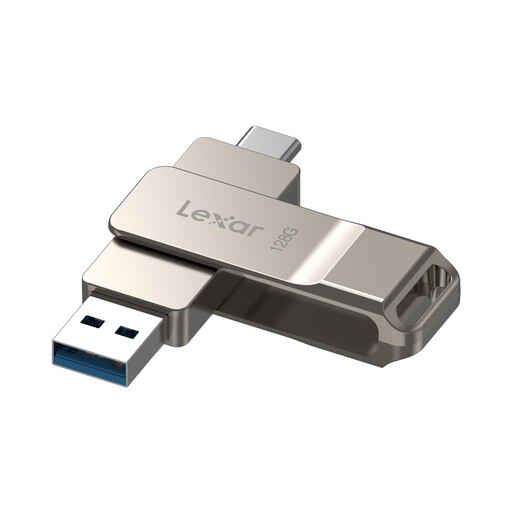 No image available
Consider it for transferring recordings between devices after checking both required ports. Its title specifies 128GB, USB 3.2 Gen 1, Type-C and a swivel design. If you intend to use the secure partition described in the listing, check the required Lexar software on each device in your workflow.
 No image available
Consider this 128GB USB 3.0 option if its connector fits every computer used for the archive. If you plan to use the encryption software described in the listing, check its setup and suitability before storing sensitive recordings.
 No image available
Consider it when recordings need to move between USB-A and Type-C connections. The title specifies 128GB, USB 3.2, a swivel design and a metal body. Confirm any encryption or access-control requirements separately before using it for sensitive files.
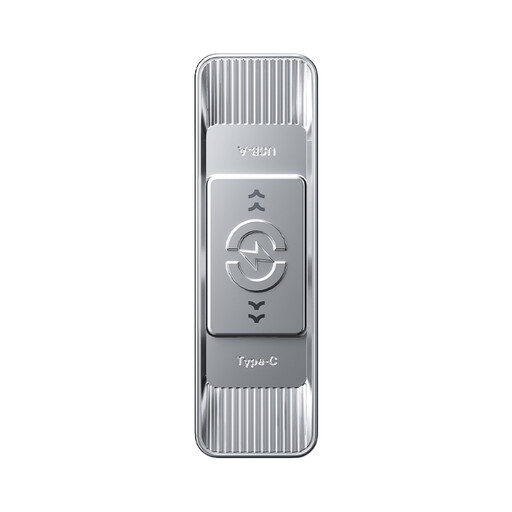 No image available
Consider this model if you use both the USB and Type-C connections described in its title. It specifies 256GB, USB 3.2 Gen 1 and a zinc-alloy housing. Check the required security controls separately if recordings contain personal information.
Choose capacity from your own files rather than a fixed minimum: measure several typical recordings, estimate how many meetings you will retain and leave headroom. The result will differ with recording duration and audio or video settings.
Do not rely on it as the sole copy of important recordings. Keep another copy in a separate location or storage system, and periodically check that the files still open; Maplin likewise advises against using a flash drive as the only backup.
Choose according to the ports on every computer that saves or retrieves the recordings. A dual-connector drive is useful when you actually use both port types; Kingston specifies USB-A and USB-C connectors for its DataTraveler Duo line.
Assess encryption when the recordings contain personal information, following your organisation’s security and retention process. The Information Commissioner's Office identifies encryption as protection for personal information stored on USB media; check how any drive’s security feature is set up before relying on it.