What should you check before buying?
Start with the ports and any restrictions on the computers you use. Then choose capacity for your transfer batches and assess speed claims against the connection available at both ends.
| Priority |
What to check |
Your needs |
| Connector and access |
Check every receiving device for USB-A or USB-C. If you use work or study equipment, confirm that removable storage is permitted before choosing a drive or adapter. |
I switch between computers with different ports, so I want a connection that works with each one. A dual-connector drive is relevant if I regularly use both USB-A and USB-C. |
| Capacity and speed |
Compare capacity with your largest transfer batch. Check claimed read and write speeds separately, along with the host port, hub and cable requirements; Kingston says these affect DataTraveler Max performance. |
For repeated large folders, I need enough space for the whole batch and want to assess whether the available connections justify a higher-speed drive or portable SSD. |
| File security |
Check the organisation’s approved-media and encryption process. The National Cyber Security Centre identifies loss, data theft and malware risks with removable media; the Information Commissioner’s Office describes encryption as protection for personal information stored on USB media. |
If I carry personal, work or study files, I need to know whether I may use the drive and how those files should be protected. |
| Daily carrying |
Consider the size, connector protection and any maker-stated resistance ratings under their specified conditions. Keep another copy of important files rather than relying on a transfer drive as an archive. |
A drive that travels between locations needs to be practical to carry, but physical protection would not replace a separate copy of my files. |
Joybuy options for file transfers
These options cover portable SSDs for larger batches, dual-interface flash drives for mixed-port use and a compact flash drive for routine files. Match the connector and capacity to your own computers before choosing.
 No image available
Samsung MU-PG2T0B 2 TB USB-C portable SSD
Consider this 2 TB option for larger transfer batches between computers with suitable USB-C connections. Its stated interface is USB 3.2 Gen 2x2; check the ports and cable you will use before relying on that interface for speed.
View on Joybuy
 No image available
Samsung MU-PE1T0S 1 TB USB-C portable SSD
The 1 TB capacity makes this an option to assess for larger file batches. The product name specifies USB Type-C and USB 3.2 Gen 2; confirm the ports on both computers and whether the cable you need is included.
View on Joybuy
 No image available
DigiEra LUS320 128GB USB-A and USB-C flash drive
The two stated connectors suit regular transfers between USB-A and USB-C computers. The name specifies a USB 3.2 interface and advertises up to 500MB/s read; check the receiving devices and file-system compatibility rather than treating that maximum as a transfer result.
View on Joybuy
 No image available
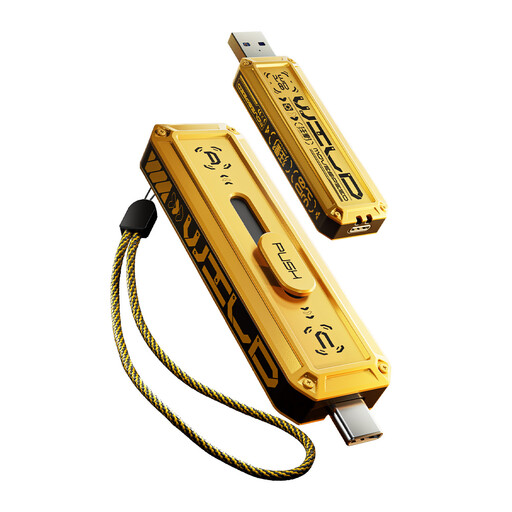
MOVESPEED YSUWD10-1TSY 1TB dual-interface flash drive
This 1TB flash drive is an option to examine for larger batches across mixed-port devices. Its name identifies a dual interface and Type-C; confirm the connector available for each computer and the speed supported through each connection before buying for time-sensitive transfers.
View on Joybuy
 No image available
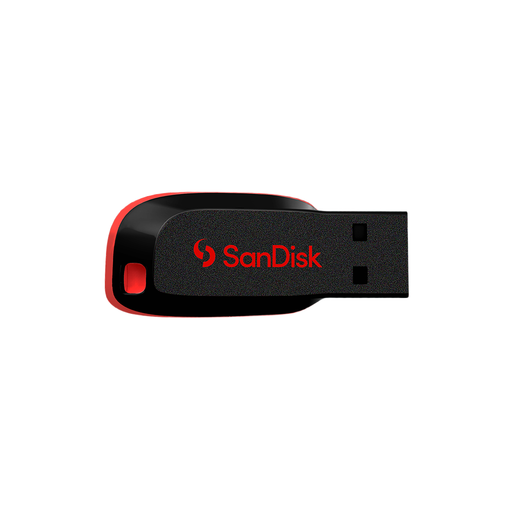
SanDisk Cruzer Blade 64GB USB flash drive
Consider the 64GB capacity for routine files if it covers your largest transfer batch. Check the connector on each computer and the drive’s transfer performance if you also move large folders frequently.
View on Joybuy
Common questions
Do I need a USB-A, USB-C or dual-connector drive?
Choose the connector that fits every device you regularly use to receive files: USB-A where those devices have Type-A ports, USB-C where they have Type-C ports, or a dual-connector drive for a mix of both. Check the port specification separately if transfer speed matters; USB-C alone does not establish a speed.
Will a faster-rated USB drive always copy files faster?
No. Kingston says the host port, hub, cable and system configuration can limit DataTraveler Max performance. Its stated optimal performance requires a USB 3.2 Gen 2 host, so check the complete connection rather than the drive’s advertised maximum alone.
When does a portable SSD make sense instead of a flash drive?
Consider a portable SSD when you repeatedly move large folders and both computers support the cable and interface you plan to use. Which? discusses smaller flash drives for regular between-computer carrying and external USB drives for moving lots of files; a higher SSD speed claim still depends on compatible hardware.
Can I use a personal USB drive for work or study files?
Check the relevant organisation’s policy before buying or connecting one. The National Cyber Security Centre says organisations may restrict or disable peripheral access; approved media or encryption requirements can also affect how you may transfer files.
Should personal information on a USB drive be encrypted?
Follow the applicable organisation’s process when carrying its data. For personal information, the Information Commissioner’s Office explains that encryption of USB storage provides protection against unauthorised or unlawful processing, particularly if the device is lost or stolen.


