One-off document handover organisers
You need to give a client a readable copy of recipes and related documents. Your starting point is the port on the device they will use, rather than a headline transfer speed.


For a recipe-only handover, choose a drive that connects to the client’s device: USB-A if its port is confirmed, or a dual USB-A/USB-C model when the devices may differ. If the pack contains personal information or confidential business material, assess the access risk and consider encryption while arranging a way for the client to open the files. The Information Commissioner’s Office identifies encryption as protection for personal information stored on USB media.
You need to give a client a readable copy of recipes and related documents. Your starting point is the port on the device they will use, rather than a headline transfer speed.
You move files between USB-C devices and USB-A computers and want the client to connect the drive without depending on an adapter. SanDisk describes this use for its Ultra Dual Drive Go.
Your recipe pack also contains personal information or confidential business details. You need to consider who can access the files if the drive is misplaced and how the intended recipient will unlock them.
Check the contents of the finished folder, the client’s available port and the way the drive will be carried. Those decisions help narrow the connector, access controls and physical design before you choose a capacity.
| Concern | What to check | Who this matters to |
|---|---|---|
| Client’s connector | Confirm whether the client needs USB-A or USB-C. If that remains uncertain, consider a drive with both connectors. | If I cannot connect the drive at the handover, the client cannot use the files when needed; around 50% of consumers put connector compatibility first. |
| Confidentiality | Check whether the folder contains personal or confidential material, then agree how any encrypted files or drive will be unlocked. | When a recipe pack includes sensitive client details, I need to limit access if the drive is lost; around 30% of consumers place that protection first. |
| Repeated transport | Look for suitable connector protection and a way to carry the drive; keep a separate master copy of the folder. | If the drive will travel between handovers, I want to protect its connector and keep track of it; for around 20% of consumers, carrying and reusing it is the primary concern. |
A USB-A-only drive cannot plug directly into a USB-C-only device. A dual-connector model can remove the need for an adapter when the two devices use different ports.
Ask which port the client will use. If you cannot establish that before buying, consider a drive with both USB-A and USB-C.
Otherwise, the handover may require an adapter or another drive.
A portable drive can be lost. The Information Commissioner’s Office identifies encryption as protection against unauthorised access to personal information stored on USB media.
Review the folder before copying it. If it contains personal or confidential material, choose an appropriate encrypted-file or encrypted-drive approach and give the client access instructions separately.
Stated maximum speeds do not tell you whether the client’s device has the right port or can open the documents. Samsung and Verbatim note that actual transfer speeds depend on the host device, files or usage conditions.
Prioritise connection and file access for a document handover. If the folder also contains many large images or videos, check the completed copy on a compatible device before passing it on.
The National Cyber Security Centre describes sanitisation as a way to reduce the likelihood of retrieving or reconstructing data from storage media; ordinary deletion should not be treated as equivalent.
If a drive previously held sensitive client files, use a new drive or an appropriate sanitisation process before reusing it for another handover.
Kingston’s DataTraveler Exodia M is a conventional USB-A option, while its IronKey Vault Privacy 50 series addresses handovers requiring controlled access.
SanDisk’s Ultra Dual Drive Go is relevant when a recipe pack must move between USB-C and USB-A devices.
Samsung’s USB-A BAR Plus is relevant to handovers where the drive will be carried repeatedly and the recipient’s USB-A port is confirmed.
Verbatim’s Store ’n’ Go V3 is a USB-A option with a sliding connector cover.
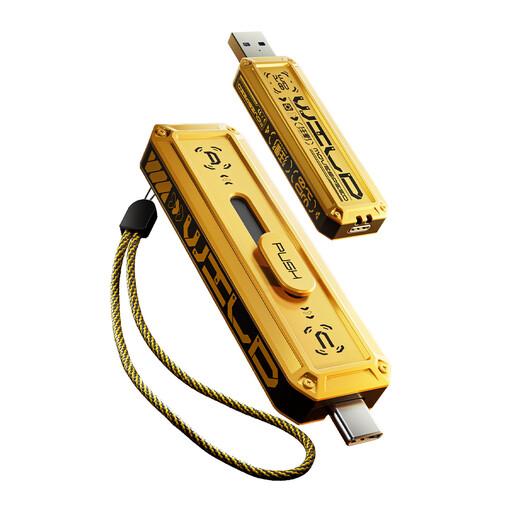
These drives cover mixed USB-A/USB-C handovers and handovers where both devices have USB-A. The MOVESPEED fingerprint model is a possible controlled-access choice only after its security features and the client’s unlocking process have been checked. For any drive, compare its capacity with the exported folder and confirm that the client can open the files.
 No image available
Consider this for a mixed-port handover if you also need to assess controlled access to sensitive files. The title specifies 256GB, a dual interface including Type-C, USB 3.2 Gen 1 and fingerprint access; confirm the security implementation and how the client will enrol, unlock and recover access before using it for confidential material.
 No image available
For a handover involving both USB-A and USB-C devices, this model lists both connectors, 128GB capacity and a 360° swivel design. Check that the client’s device can read the stated exFAT file format, and arrange separate protection if the files are sensitive.
 No image available
Consider this for carrying files between devices with different ports. Its title specifies 256GB, a dual interface including Type-C and a zinc-alloy housing. Confirm the client’s port and assess file protection separately; do not base the handover plan on the listed maximum speed without checking it for your use.
 No image available
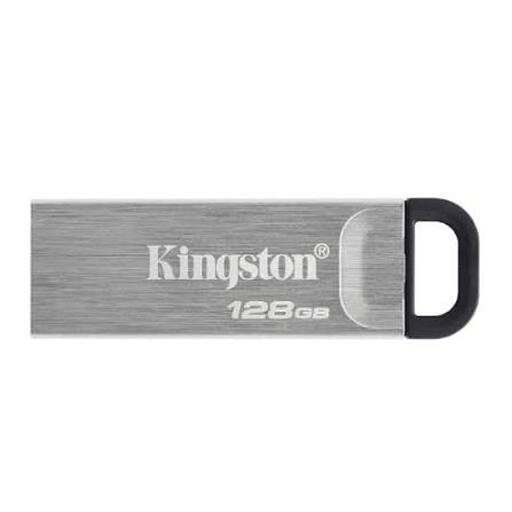
For a straightforward document handover when the client has a confirmed USB-A port. The listed capacity is 128GB; check the exported folder size and use an appropriate encryption approach if the contents require restricted access.
 No image available
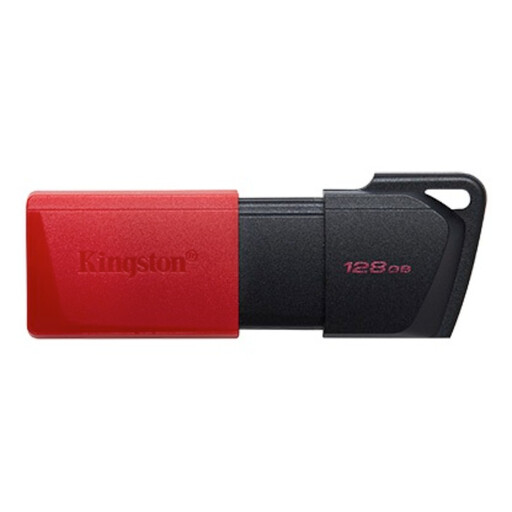
For ordinary recipe documents when both sides can use USB-A. This 128GB variant lists USB 3.2 Gen 1; Kingston identifies the Exodia M as a USB-A series. Confirm the folder fits and plan separate protection if the handover includes sensitive information.
Choose capacity after checking the size of the finished folder and allowing room for revisions. For text recipes, PDFs, spreadsheets and a modest number of images, confirming the client’s connector and checking that the files open will often matter more than choosing a larger drive.
Choose USB-A alone only when the client’s device has a confirmed USB-A port. If the sender and client may use different ports, a dual USB-A/USB-C drive avoids relying on an adapter; SanDisk’s Ultra Dual Drive Go is one example of that connector arrangement.
Copy the final folder, safely eject the drive and open a selection of files from the USB copy on another compatible device. Keep a separate master copy. If a reused drive previously held sensitive files, follow an appropriate sanitisation process rather than assuming deletion prevents recovery, as the National Cyber Security Centre’s storage-media guidance explains.
No: a product warranty is not a substitute for keeping another copy of the documents. Retain the source folder separately and confirm that the client can read the files delivered on the drive.