Small-desk desktop filers
If you scan receipts to a USB-A desktop or laptop, a drive left beside a monitor, dock or scanner should not get in the way. Samsung and Kingston describe low-profile models intended to remain connected.


Choose the connector to match every device that needs the scanned receipts: a compact USB-A drive suits a USB-A desk setup, while USB-C or a dual-connector drive makes sense when files move to other devices. A low-profile drive is useful when it stays plugged in; a protected connector is more practical when you carry it. For business receipts containing personal information, consider encryption and keep a separate backup rather than relying on one USB drive.
If you scan receipts to a USB-A desktop or laptop, a drive left beside a monitor, dock or scanner should not get in the way. Samsung and Kingston describe low-profile models intended to remain connected.
If you move files between USB-A equipment and a USB-C laptop, tablet or phone, check both ends of the journey. Samsung describes its Duo Plus as providing USB-C and USB-A connectivity.
If receipts contain customer, staff or account-holder information, storage security matters alongside the drive itself. The Information Commissioner's Office gives guidance on encryption for personal information held on removable media, while the National Cyber Security Centre advises keeping backups of important data.
For scanned receipts on a small desk, start with the ports used to save and retrieve files. Then decide whether the drive will stay connected or travel, and how you will protect and back up the records.
| Concern | What to check | Who this matters to |
|---|---|---|
| Connector compatibility | Check the ports on every device that will save or open receipts. Choose USB-A, USB-C or a drive with both connectors accordingly. | I need to open the same files on my scanner-side computer and another device without finding an adapter; around 36% of consumers put cross-device compatibility first. |
| Data protection and recovery | For business receipts containing personal information, assess encryption and keep a separate, current backup of important files. | If a drive goes missing, I need my records protected and another copy I can use. Protecting and recovering receipts is the primary concern for around 29% of consumers. |
| Desk clearance | For a drive left plugged in, check its shape and clearance around the port. If you remove it regularly, consider connector protection instead. | My drive will sit near other equipment, so I want it out of the way without risking a knock; around 21% of consumers prioritise a less obtrusive desk setup. |
| Repeat transfers | Check the exact capacity variant and USB interface. Distinguish a stated read speed from write speed and check the conditions attached to either figure. | I copy new batches of scans often and want the routine to be manageable; transfer convenience comes first for around 14% of consumers. |
A USB-C-only drive will not plug directly into USB-A equipment, and a USB-A-only drive will not plug directly into a USB-C-only device.
List the devices that must access the receipts before choosing a single- or dual-connector drive.
Samsung FIT Plus and Kingston DataTraveler Micro are designed to interfere less when left in a port. A tiny drive can be easier to misplace once removed, whereas Kingston describes a moving cap on its Exodia M to protect the connector.
Match the design to whether the drive stays at the desk or is put away between filing sessions.
Manufacturers' stated read speeds can depend on the capacity variant, host device and usage conditions. They do not establish how quickly your scanned receipts will be written to the drive.
Check which direction the speed figure measures and whether its stated conditions match your equipment.
A lost or failed drive can leave you without the records. Where business receipts contain personal information, loss of the device also raises a security concern.
Keep another current copy of important receipts. The Information Commissioner's Office advises encryption where there is a business need to store personal information on removable media; the National Cyber Security Centre advises keeping backup storage secure and disconnected when not in use.
Samsung lists USB-A, USB-C and dual-connector flash-drive models relevant to different receipt-filing setups.
Kingston's DataTraveler Micro and Exodia M offer different physical designs for USB-A filing.
SanDisk lists the Ultra Luxe USB Type-C for filing on devices with USB-C ports.
These dual-connector drives are relevant if scanned receipts need to move between USB-A and USB-C devices. Check physical clearance if a drive will remain beside other equipment; a portable dual-connector design is not necessarily a low-profile, plug-and-stay one.
 No image available
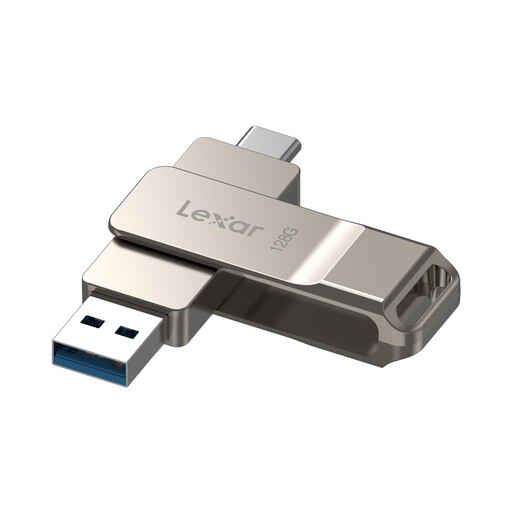
Consider this removable drive when receipts need to pass between USB-A and USB-C devices. Its name specifies USB 3.2 Gen 1, a metal housing and a swivel design. If you intend to use software encryption for personal information, check the required setup and device compatibility before relying on it; keep a separate copy of important receipts.
 No image available
This USB-A and USB-C model suits files that move between the two port types. Its name specifies USB 3.2 and a 360° swivel metal body. Check its dimensions against the space around your port, and plan an appropriate encryption method if business receipts contain personal information.
 No image available
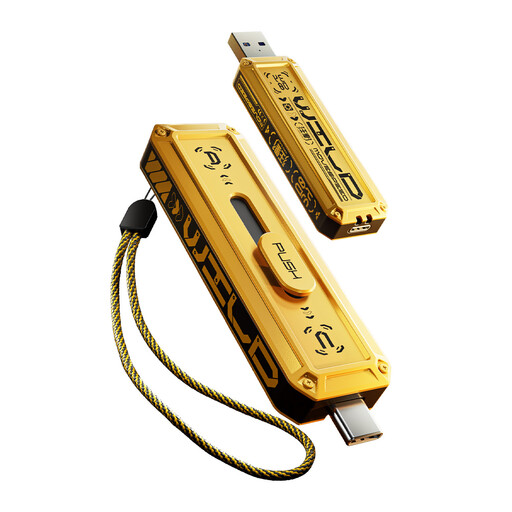
This USB-A and USB-C variant is a choice for carrying receipt files between devices. Its name specifies a zinc-alloy housing; the described sliding connector cover is relevant when putting it away between sessions. Check the applicable interface and host compatibility rather than relying on a stated maximum speed, and check desk clearance if you plan to leave it connected.
 No image available
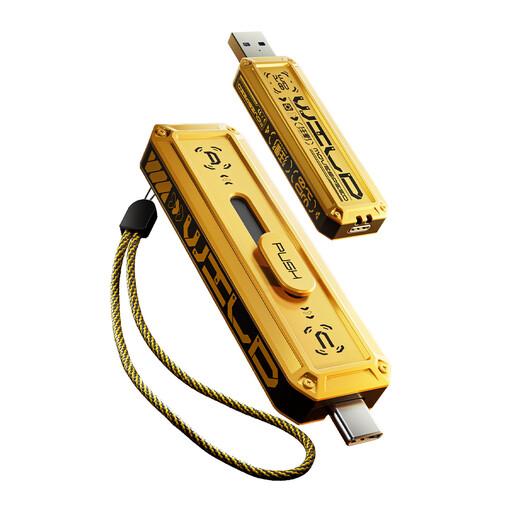
Choose between this 256GB variant and the other capacities according to the files you need to retain, rather than treating capacity as a measure of transfer speed. Its name specifies USB-A and Type-C connectivity and a zinc-alloy housing. The described sliding connector cover suits removal between filing sessions; check the applicable interface, port clearance and your security arrangements before buying.
 No image available
This 1TB USB-A and Type-C variant is relevant if your receipt archive calls for that capacity and you move the drive between devices. Its name specifies a zinc-alloy housing, and the described sliding connector cover helps protect the connector while stored. Confirm the interface that applies to your host, check the drive's physical clearance and keep a separate backup of important files.
Choose the connector that fits every device requiring direct access to the files. A dual USB-C and USB-A drive is useful when your filing setup uses both port types; otherwise, match a single-connector drive to the ports you actually use.
It can, if the port and drive placement keep it clear of nearby equipment. Samsung FIT Plus and Kingston DataTraveler Micro are described by their makers as compact designs for remaining connected; a drive you regularly carry may be easier to manage with connector protection.
Protect the records as well as choosing a compatible drive. GOV.UK states that businesses storing or using personal information must follow data-protection rules, and the Information Commissioner's Office advises implementing encryption where there is a business need to store personal information on removable media. Check the current ICO guidance when setting your storage policy.
Keep another copy if losing the receipts would disrupt your work. The National Cyber Security Centre advises organisations to back up important data and to keep backup storage secure and disconnected when it is not in use.