What matters when choosing?
Check the ports on the devices that will use the backup, measure the files and retained versions, then decide how the group will carry, protect and recover the copy.
| Concern | What to check | Who this matters to |
|---|
| Device compatibility |
List the ports on regular source and destination devices. Choose USB-A alone only if it fits them; otherwise check the connectors on a dual drive. |
I move the same lesson pack between a USB-C laptop and a shared USB-A computer, so both plugs matter. Around 31% of consumers put mixed-device compatibility first. |
| Capacity and shared-PC use |
Measure the full folder and the versions to retain, then compare that total with the space available on the drive. |
Our teaching files stay on shared PCs, and I need a backup with room for the whole archive. A further roughly 31% of consumers prioritise straightforward, adequately sized shared-PC storage. |
| Carrying and transferring files |
Check how the connectors are protected and whether speed figures apply to the chosen capacity; a read figure is not a write-speed figure. |
I carry resource packs between venues and need a drive that is practical to handle before a session. About 23% of consumers place portability and transfer practicality first. |
| Personal information |
Separate teaching materials from personal information where possible. If personal information must be stored, assess encryption, access recovery and secure storage. |
Our backup includes attendee records, so I need to plan for a lost drive as well as a failed one. For around 15% of consumers, protecting personal information is the primary concern. |
Joybuy product choices
These drives cover USB-A backups, moving files between USB-A and USB-C devices, and a keypad-encrypted option. Choose the connector and security approach that fit the group’s devices and files, then check capacity against the measured backup.
 No image available
Kingston IronKey Keypad 200 16GB
Consider this encrypted-drive route if the backup must include personal information and the group can manage PIN access and recovery.
The product name specifies 16GB and AES-256 encryption. Its FIPS 140-3 Level 3 status is described as pending, not completed; check whether 16GB accommodates the full backup.
View on Joybuy
 No image available
SanDisk Ultra 128GB USB 3.0 Flash Drive
Consider this standard-drive route if the group’s routine computers have the required port; check how any planned software-based file protection would work across those computers.
The named capacity is 128GB. Compare it with the complete teaching archive and versions to retain.
View on Joybuy
 No image available
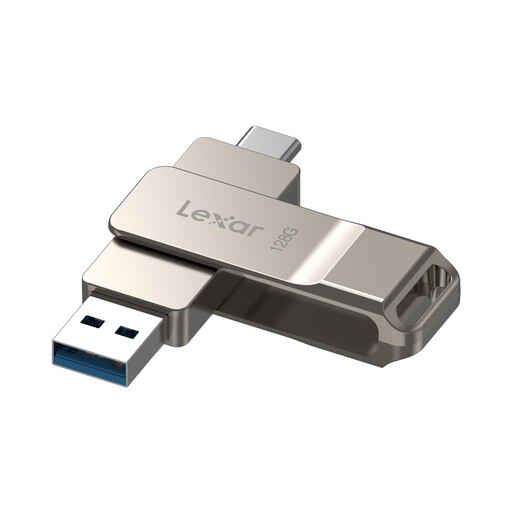
Lexar D40E 128GB Dual USB 3.2 Gen 1 Type-C (LJDD40E128G-BNSNG)
Consider this dual-drive route when lesson files move between USB-A and USB-C devices; check any required device or security-software compatibility before relying on those uses.
The product name specifies 128GB and a swivel metal housing. Measure the archive before settling on this capacity.
View on Joybuy
 No image available
DigiEra LUS320 128GB Dual USB-A/USB-C Drive
Consider this when the group moves teaching packs between USB-A and USB-C devices, provided its security approach also suits the files being carried.
The product name specifies 128GB, USB 3.2, a 360° swivel design and a metal body. Its 500MB/s figure is an advertised read-speed claim, not a measured backup write speed.
View on Joybuy
No image available
SanDisk Cruzer Blade 64GB USB Drive
Consider this straightforward backup route if its connection and transfer performance suit the computers used by the group.
The product name specifies 64GB. Check the full archive size and retained versions before choosing it, particularly if teaching packs contain media files.
View on Joybuy
Questions about teaching-resource backups
Can one USB drive be the group’s only backup?
No: keep another recoverable copy separately. The National Cyber Security Centre advises secure storage and disconnecting a USB backup when it is not in use, because connected devices can also be affected by viruses.
How much capacity do we need for lesson files?
Choose capacity after measuring the complete folder and any older versions the group will retain. Include presentations, images, audio and video, and leave room beyond the current set rather than judging by the number of documents.
Should we buy USB-A or a dual-connector drive?
Choose USB-A if every device regularly used for the backup has that port; choose a dual USB-A/USB-C drive if files routinely move between both port types. Check the physical connectors before buying, not just the USB version label.
Does every teaching-resource drive need encryption?
Not every teaching file calls for the same protection: assess what the backup contains and the consequences of losing it. For personal information stored on USB media, the Information Commissioner's Office identifies encryption as effective protection; the group should also decide how authorised users will retain or recover access.
Does a drive warranty protect our teaching archive?
No. A hardware warranty does not recreate unique files on a lost or failed drive. Keep a separate copy and check periodically that the group can open and restore an essential teaching pack.


