What matters when choosing?
Start with the ports and devices involved, then judge capacity and transfer speed against the files you actually move. Carrying conditions and data sensitivity can change the choice even when a drive fits.
| Concern |
What to check |
Who this matters to |
| Device compatibility |
Check Type-A and Type-C ports on every sending and receiving device. For an iPad, also check its external-storage requirements. |
I move files between computers with different ports and want a drive that connects without an adapter. Around 36% of consumers put that direct compatibility first. |
| Large-file transfers |
Compare capacity and model-specific read and write ratings, including the host and cable conditions attached to maximum speeds. |
Repeatedly copying large project folders makes waiting and available space my main concerns; roughly 29% of consumers prioritise those transfer needs. |
| Daily carrying |
Look at connector protection, carrying design and the exact conditions behind any durability claim. |
My drive travels between locations often, so I care most about how it carries and withstands handling. About 21% of consumers place that need first. |
| Sensitive files |
Check the required encryption, authentication and organisation policy, as well as access on the intended devices. |
If I carry confidential files, controlling access matters more to me than convenience; around 14% of consumers make protection their primary concern. |
Joybuy product choices
These choices cover dual-connector USB sticks for mixed ports, a Type-A stick for compatible computers, and a portable SSD for larger or more frequent transfers. Choose by the devices and files in your own workflow.
 No image available
MOVESPEED YSUSP05-512GSR 512GB dual-interface USB drive, silver
For moving files between USB-A and USB-C devices when the drive’s connectors match both ports.
The named variant has 512GB capacity, a USB 3.2 Gen 1 and Type-C dual interface, and a stated read speed of up to 570MB/s. Check your host connection before relying on that maximum.
View on Joybuy
 No image available
Samsung T7 Shield 1TB portable SSD, blue
Consider this route when you repeatedly carry large project folders and are willing to use a separate drive and cable.
This is the 1TB USB 3.2 Gen 2 variant. Samsung states that the T7 Shield’s maximum rated read and write speeds require a compatible host, cable and UASP mode.
View on Joybuy
 No image available
DigiEra LUS320 128GB USB-A and Type-C drive
The two connectors suit file hand-offs between compatible USB-A and USB-C devices.
The named 128GB variant has a 360° swivel design and a stated read speed of up to 500MB/s. For iPad use, check the drive’s format and partition setup as well as the connector.
View on Joybuy
 No image available
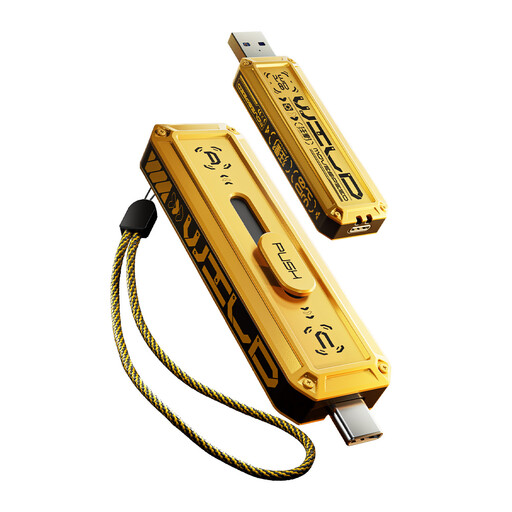
MOVESPEED YSUWD10-1TSY 1TB dual-interface USB drive, yellow
Its stated USB-A and Type-C connectors make it relevant to carrying larger files across both port types.
The named variant has 1TB capacity and a zinc-alloy housing. Confirm its exact interface and achievable read and write speeds before choosing it for time-sensitive transfers.
View on Joybuy
 No image available
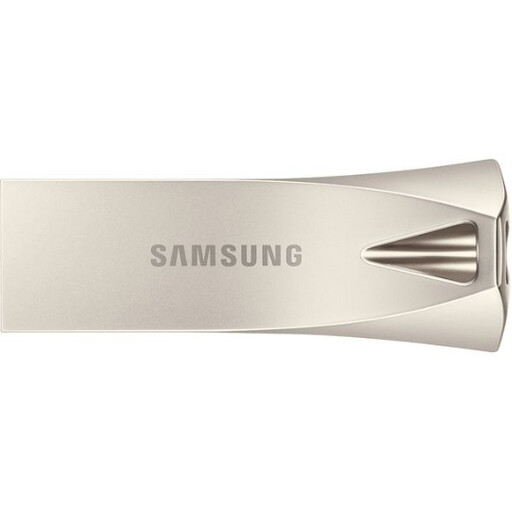
Samsung MUF-512BE3 512GB Type-A USB drive, silver
Choose a Type-A drive like this when the computers used for each transfer have accessible Type-A ports; it will not plug directly into a USB-C-only device.
The named variant specifies 512GB capacity and USB 3.2 Gen 1.
View on Joybuy
Common questions
Can one USB stick connect to both USB-C and USB-A computers?
Yes, if the exact drive has both USB-C and USB-A plugs. SanDisk and Kingston both describe dual-connector models; check the particular variant rather than assuming every drive in a product line has both plugs.
Will a USB drive work with an iPad?
A supported iPad can access compatible external storage through the Files app. Apple specifies a single data partition and a supported format, such as exFAT or FAT32; check the connector or adapter, and whether the storage needs additional power.
When is a portable SSD worth carrying instead of a USB stick?
Consider a portable SSD if you repeatedly transfer large folders or work from files on the external drive. For occasional document hand-offs, a USB stick takes up less space; for either option, check the exact capacity and the conditions behind rated read and write speeds.
When should I consider an encrypted USB drive?
Consider one when you need to carry personal or confidential information and the drive meets any applicable organisation policy. The Information Commissioner's Office describes encryption of personal information on USB media as protection against unauthorised access; confirm authentication and device compatibility before choosing a model.
What should I do before unplugging a drive?
Finish the copy and eject the drive through the device’s operating system before unplugging it. Which? advises safe ejection to help avoid file corruption after a transfer.


