Choose a capacity that accommodates your artwork collection and a connector that fits the devices you use to copy and retrieve it. Published write specifications matter if you regularly transfer large folders, while a dual-connector drive can simplify transfers between USB-A and USB-C devices. Keep the flash drive as one managed copy, not your only archive: The National Archives recommends copies in different locations and on different storage technologies.
Who needs an artwork archive copy?
Creators keeping a secondary artwork copy
If original illustrations, photographs, scans or project files would be difficult to recreate, a portable drive can hold one copy alongside storage elsewhere. The National Archives recommends keeping several copies in different locations.
Artists moving large project folders
High-resolution artwork, RAW images, video or portfolio folders make capacity, the computer’s connector and published transfer specifications particularly relevant when copies are made frequently.
People using both USB-A and USB-C devices
If you move files between older USB-A computers and USB-C devices, a drive with both connectors may be more convenient than carrying an adapter. Check that each device can access external storage.
What matters when choosing a drive?
Start with the size of the artwork you intend to copy and the devices that must open it; transfer specifications and physical design then help narrow the choice.
| Concern |
What to check |
Who this matters to |
| Archive integrity |
Allow capacity for the selected files and growth; plan for another independent copy and a way to check copied files. |
If my source files would be hard to recreate, I need a copy I can check and maintain rather than a single drive to rely on. Around 36% of consumers put archive resilience first. |
| Large-folder transfers |
Compare the exact variant’s published write specification, where available, and the computer port used for copying. |
Repeatedly copying large artwork folders makes transfer time a practical concern for me; around 29% of consumers primarily care about transfer speed. |
| Device compatibility |
Check USB-A and USB-C ports on the devices involved, plus external-storage and file-system requirements. |
My archive copy needs to move between devices with different ports without depending on an untested connection. For around 21% of consumers, compatibility is the main concern. |
| Portable handling |
Consider the housing, connector protection and attachment options for a drive carried regularly. |
When I carry a secondary copy between places, I want a design I can keep track of and handle easily; around 14% of consumers put portable handling first. |
Mistakes to avoid
-
Treating one flash drive as the whole archive
A lost, damaged or unreadable drive could leave you without access to the artwork. The National Archives recommends several copies in different physical locations and on different storage technologies; the Digital Preservation Coalition also advises moving digital material between storage systems as technologies become obsolete.
Use the flash drive as a secondary or transfer copy, keep an independent copy elsewhere and check important files over time.
-
Choosing capacity from a photo count
Artwork files differ in size, and a count based on one kind of image may not represent layered projects, source files or video.
Measure the folders you intend to copy, allow for additions and compare the capacity of the exact variant you are considering.
-
Looking only at advertised read speed
Creating an archive copy involves writing files to the drive. A published read figure alone does not establish how long your copy will take.
For frequent large transfers, look for a write specification for the exact model and check the port on the computer doing the copying. Treat published speeds as specifications, not guaranteed results for your files.
-
Reformatting before safeguarding the files
Apple states that erasing and reformatting a storage device deletes its contents.
Make and check another copy before changing the file system, then test access on the devices that need to use the artwork.
Brands to consider for these drive types
SanDisk
The Extreme PRO USB 3.2 Solid State Flash Drive is a USB-A option to consider for frequent large-folder transfers.
- For the 512GB SDCZ880-512G-G46 variant, SanDisk publishes sequential read speeds up to 420MB/s and write speeds up to 380MB/s.
- It uses USB-A; those sequential figures do not promise the same speed for every computer or set of artwork files.
Samsung
BAR Plus is a compact metal USB-A line for a portable secondary copy.
- Samsung lists capacities through 512GB, a keyring loop and, for the 512GB variant, sequential read speeds up to 400MB/s.
- Samsung’s product-specific handling protections do not replace another archive copy, and its published read figure does not establish write performance for every capacity.
Kingston
DataTraveler Kyson offers a USB-A option, while DataTraveler microDuo 3C addresses transfers between USB-A and USB-C devices.
- Kingston lists Kyson capacities through 512GB and microDuo 3C capacities through 256GB.
- The dual-connector model has a lower stated maximum capacity. Kingston’s published read figures for these lines are not a like-for-like sustained write comparison.
Joybuy product choices
These dual-interface drives are options for carrying a secondary artwork copy between USB-A and USB-C devices. Compare each stated capacity with your actual folders, and confirm that every device you plan to use can access the drive.
 No image available
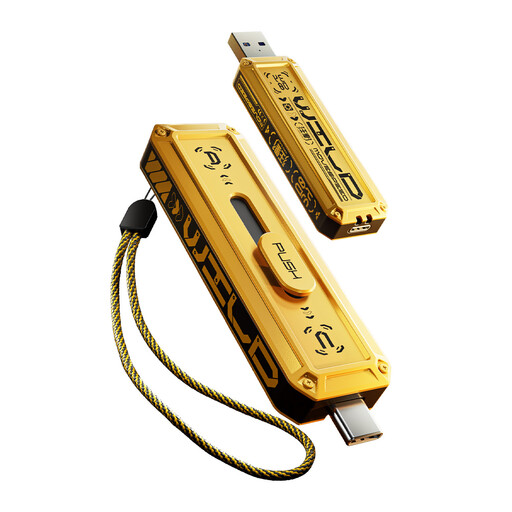
MOVESPEED YSUWD10-512GSY 512GB dual-interface flash drive
Consider this 512GB variant for a secondary artwork copy if it fits your current folders with room for additions. The product name specifies USB 3.2 Gen 2×1 and Type-C; confirm connection and external-storage support on the devices you will use.
View on Joybuy
 No image available
MOVESPEED YSUWD10-1TSY 1TB dual-interface flash drive
Consider the stated 1TB capacity if your artwork folders need more space than a smaller variant offers. The product name specifies USB 3.2 Gen 2×1 and Type-C; check your devices’ ports and storage support before relying on it for transfers.
View on Joybuy
 No image available
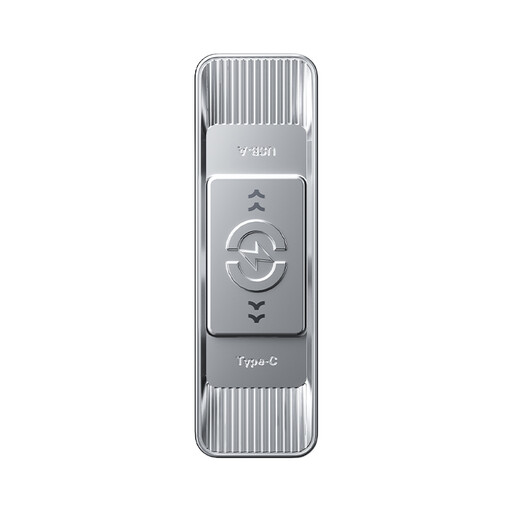
MOVESPEED YSUSP05-512GSR 512GB dual-interface flash drive
This 512GB variant is worth comparing for a portable secondary copy across your devices. Its product name states USB 3.2 Gen 1, Type-C and a 570MB/s read figure; that read figure does not establish archive-copy write time.
View on Joybuy
 No image available
DigiEra LUS320 128GB USB-A and Type-C flash drive
The two named connectors suit transfers between compatible USB-A and USB-C devices if 128GB holds the artwork you intend to carry. The product name also states USB 3.2, a 360° swivel design and a 500MB/s read figure; check capacity against your folders rather than relying on read speed alone.
View on Joybuy
 No image available
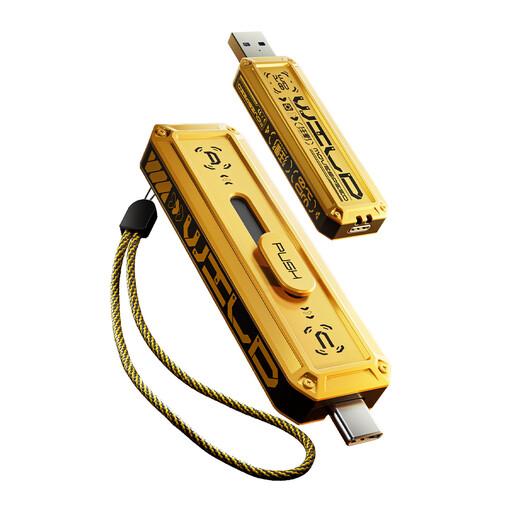
MOVESPEED YSUWD10-256GSY 256GB dual-interface flash drive
This 256GB variant may suit a selected set of artwork files rather than a larger collection; measure the files and allow for growth. Its product name specifies USB 3.2 Gen 2×1 and Type-C. Keep another independent copy of anything you need to preserve.
View on Joybuy
Frequently asked questions
Can one USB flash drive hold my entire long-term artwork archive?
It can hold the files, but it should not be your only archive copy. The National Archives recommends several copies in different physical locations and on different storage technologies; the Digital Preservation Coalition advises moving digital material between storage systems as they become obsolete.
How can I check that artwork copied to the drive correctly?
Compare the copied files and use checksum or copy-verification software for important collections. The National Archives advises regular integrity checks and keeping a record of them; repeat checks while retaining the archive, not just after the initial transfer.
Which file format should I use between Windows and Mac?
Choose a file system that works with the devices and applications that must use the drive. Apple lists ExFAT and MS-DOS (FAT) as Windows-compatible options, but other workflows may have different requirements. Make another copy before reformatting: Apple states that erasing a drive deletes its contents.
Does a metal or rugged drive remove the need for another copy?
No. A housing or product-specific handling protection may help with carrying the drive, but it does not make the artwork recoverable if that copy is lost or becomes unreadable. Keep an independent copy elsewhere and check that your retained files can still be opened.


