
24/7 Customer Support

Free returns

Same-day & Next-day Delivery

Quality Guaranteed

Unlock Your Welcome Offers: FREE Delivery | Up to 80% OFF | Free 30-day JoyPlus trial
Download the APP
USB flash drives remain a convenient way to move documents, photos, videos and project files between devices. They are small enough for a pocket or laptop bag, work without a separate power supply and can provide useful extra storage when cloud services are inconvenient.
However, specifications can be easy to misread. A low-cost USB memory stick may be suitable for occasional documents but frustrating for large video files. A high-capacity thumb drive may not connect to a newer phone. Before buying, check the points below to avoid paying for features your devices cannot use.
Transfer figures are usually maximum sequential speeds measured under particular conditions. Your actual result depends on the host device, port standard, file size, operating system and whether the drive is reading or writing.
A drive advertised as a high-speed USB 3.2 flash drive will not necessarily reach its headline speed through an older USB 2.0 port. Small files may also transfer more slowly than one large video file. Check both the read and write speeds, rather than relying on a single headline figure.
Many laptops, desktop computers and televisions still use USB-A, while newer smartphones, tablets and slim laptops increasingly use USB-C. A USB-A-only drive will not plug directly into a USB-C phone without an adaptor.
For regular transfers between older and newer devices, dual USB-A and USB-C flash drives are more practical. For a compatible USB-C iPhone, iPad or Android device, confirm that the operating system supports external storage and check whether a manufacturer app is required for automatic backups.
Flash storage is portable, but it should not be your sole copy of important photographs, coursework, business files or creative projects. Drives can be lost, damaged or corrupted if removed during a transfer.
Use a simple 3-2-1 backup approach where possible: keep three copies of important data, on two types of storage, with one copy stored separately. Encryption can help protect private files if a drive goes missing, but it does not replace a backup.
Usable space is lower than the figure printed on the packaging because some capacity is reserved for formatting and system data. As a practical guide:
Capacity alone does not indicate speed or compatibility. Check the interface and declared performance as well.
USB 2.0 is adequate for occasional documents but can feel slow when transferring large folders. USB 3.0 and USB 3.2 models generally offer quicker transfers, subject to the connected device and port.
A USB 3.x drive can usually work with a USB 2.0 port, but its performance will be limited by the slower connection. Also check the physical connector: USB-C flash drives are designed for USB-C ports, while dual-interface models offer both USB-A and USB-C connectors.
For sensitive work files, look for password protection or encryption software. Some secure USB flash drives use software-based AES encryption, while others add fingerprint access. These features may require compatible software or an initial setup, so read the instructions before relying on them.
A metal casing or a capless, retractable or swivel design can reduce the chance of losing a connector cap. Metal does not make a drive waterproof, however. Keep portable storage away from liquids, excessive heat and strong impacts, and safely eject it before removal.

Why This Fits Their Persona: A compact Type-A option for students, home users and anyone mainly moving documents, photos or music between standard USB ports.
Its USB 3.0 interface is clearly specified and remains backward compatible with USB 2.0 ports, while the retractable connector avoids a separate cap.
64GB capacity, declared read speed up to 100MB/s and included SanDisk SecureAccess software with 128-bit AES encryption.

Why This Fits Their Persona: Suitable for professionals, freelancers and shared work environments where access control and quick transfers are important.
It combines USB-A and USB-C connectors with fingerprint access and AES-256 encryption features, addressing both compatibility and privacy concerns.
Declared read and write speeds up to 550MB/s and 500MB/s, a zinc alloy body and support for up to 10 fingerprint IDs.

Why This Fits Their Persona: A high-capacity choice for photographers, video editors, gamers and content creators handling large folders across computers and USB-C devices.
The 1TB capacity and dual-interface design reduce the need to carry separate drives, while the specifications state compatibility with USB 3.1, 3.0 and 2.0.
Declared read speed up to 1090MB/s, write speed up to 1030MB/s, USB-A and Type-C connectors, and a zinc alloy sliding housing.
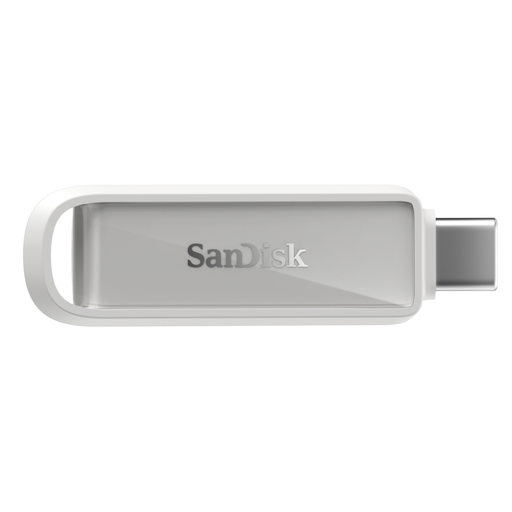
Why This Fits Their Persona: Designed for compatible USB-C iPhone, iPad and Mac users who want a straightforward iPhone storage drive for photos, videos and documents.
The USB-C connector is specified for compatible devices, and the included app supports automatic photo and video backup rather than relying only on manual copying.
128GB capacity, USB 3.2 Gen 1 interface, declared read speed up to 150MB/s and a compact metal design.
We have compiled a complete, real-time list of products that fully satisfy these strict selection criteria and UK safety regulations.
A compatible iPhone storage drive can copy photos and videos directly from a USB-C iPhone, provided the phone and drive support the required connection and file-management method. Check whether an app is needed and keep another backup of important content.
Lifespan varies with storage technology, write frequency, heat, physical handling and storage conditions. Occasional document transfers place less strain on a drive than frequent video recording and deletion. Replace a drive if it shows errors, disconnects unexpectedly or becomes unusually slow, and do not wait for failure before copying important files elsewhere.
They do not normally have a separate power supply. Power draw depends mainly on the interface, controller and connected device rather than capacity alone. High-speed transfers can use more power than light document access, which may matter when using a phone or tablet.