
24/7 Customer Support

Free returns

Same-day & Next-day Delivery

Quality Guaranteed

Unlock Your Welcome Offers: FREE Delivery | Up to 80% OFF | Free 30-day JoyPlus trial
Download the APP
A USB flash drive seems like a simple purchase, but the market is filled with options that can easily lead to disappointment. Whether you need to back up important coursework, transfer large video files or simply move documents between your laptop and phone, choosing the wrong memory stick can mean wasted money and frustratingly slow performance. As a Joybuy Product Recommendation Officer, my role is to help you see past the marketing jargon and focus on what truly matters for your needs.
Before you add any thumb drive to your basket, be aware of these common pitfalls:
To ensure you get a reliable and practical USB flash drive, focus on these core specifications.
This is the most critical factor for usability. Your devices' ports will determine what you need.
Don't just look at the number on the box. Understand what it means for your daily use.
Choosing the right capacity prevents you from overspending or running out of space.
Based on these practical criteria, here are some recommendations tailored to different user needs.
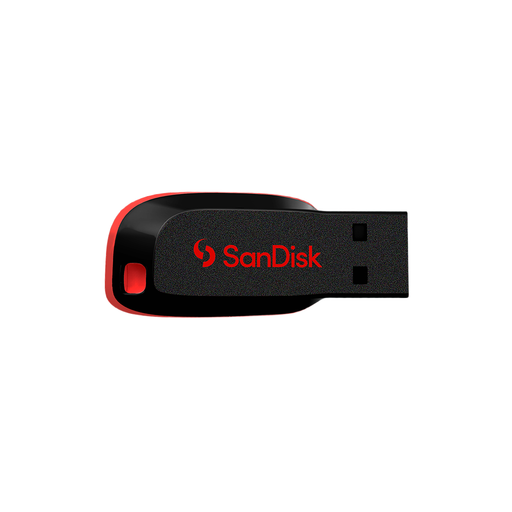
Why This Fits Their Persona: Ideal for students or home users in the UK who need a reliable, no-frills thumb drive for documents, music and photo backups. It's a simple, portable solution for everyday tasks without paying for features they won't use.
This drive avoids the trap of overspending. As a USB 2.0 device, its value is in its capacity and simplicity, not speed. It's an honest tool for basic storage, preventing you from paying a premium for high-speed performance you don't need for Word documents or MP3s.
Generous Capacity for the Price: Offers a substantial 128GB of storage at an accessible price point.
Ultra-Compact Design: Its tiny form factor fits easily onto any keyring or into a wallet.

Why This Fits Their Persona: Perfect for the UK professional or student who moves files between a new USB-C laptop, an older office desktop and their Android phone. This is the ultimate tool for bridging the gap between old and new tech.
It directly solves the "Connector Mismatch" pitfall with its built-in USB-A and USB-C plugs. The 360° swivel metal casing also addresses the "Fragile Build" issue by protecting the connectors without a cap to lose.
Dual-Interface Versatility: Works natively with both legacy and modern devices.
High-Speed Performance: With USB 3.2 speeds up to 500MB/s read and 400MB/s write, it handles large files efficiently.
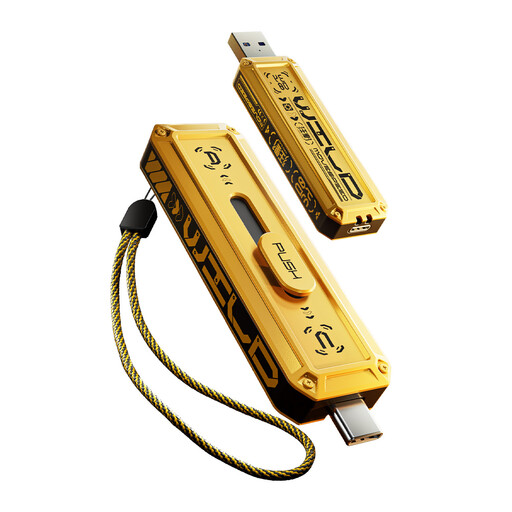
Why This Fits Their Persona: For the video editor, gamer or creative professional who needs performance rivalling an external SSD in a pocket-sized form. Time is money and waiting for files to transfer is not an option.
This drive completely bypasses the "Misleading Speed Claim" by delivering phenomenal read (up to 1090MB/s) and write (up to 1030MB/s) speeds. Its robust zinc alloy body also ensures it withstands the rigours of professional use, avoiding the fragile build pitfall.
Exceptional Speed: Transfers a 1GB file in approximately one second, making it ideal for 4K video and other large assets.
Durable Metal Construction: The zinc alloy housing provides superior protection and heat dissipation.
We have compiled a complete, real-time list of products that fully satisfy these strict selection criteria and UK safety regulations.
The lifespan of a memory stick isn't measured in years, but in "write cycles"—the number of times data can be written and erased. For most users, this translates to many years of reliable service. However, physical damage is a more common cause of failure. Choosing a drive with a sturdy metal casing and a protective cap or swivel design can significantly extend its usable life.
Yes, provided you have the right connector. Most modern Android phones and recent iPhone models (like the iPhone 15 and 16 series) use a USB-C port. To connect a drive directly, you will need a flash drive for phone that has a USB-C connector. A dual USB flash drive with both USB-A and USB-C is an excellent choice, as it allows you to easily move files between your phone and a computer.
The "up to" speed advertised is a theoretical maximum achieved under ideal conditions. Real-world speed can be affected by several factors: the USB port on your computer (a USB 3.2 drive will run at slower USB 2.0 speeds if plugged into an older port), the size and number of files being transferred (transferring one large file is often faster than thousands of small ones) and the drive's own write speed, which can be much lower than its read speed.