Choose the connector arrangement before paying attention to headline speed: a dual USB-C and USB-A drive helps when the client’s port is uncertain, while a faster single-connector drive makes more sense when both devices are compatible and the handover includes large supporting files. If the portable copy contains personal or confidential material, agree an encryption and access method with the client. Keep another independent manuscript copy, and check that the files open from the handover drive.
Who needs which kind of drive?
Writers handing files to mixed-device clients
If the client’s computer port is uncertain, a drive with both USB-C and USB-A connectors can avoid relying on an adapter. SanDisk describes its Ultra Dual Drive Luxe as working with both connector types; still confirm that the recipient can open the handover files.
Freelancers handling confidential manuscripts
When a portable copy contains personal data or sensitive client material, agree how it will be protected and unlocked before handover. The National Cyber Security Centre identifies encryption at rest as an appropriate measure for removable media holding personal data outside strong physical controls.
Creators handing over large file packages
Artwork, media, source files or multiple drafts can make transfer time more relevant than it is for a document alone. Check the capacity against the complete folder and the computer’s USB connection before choosing a drive for its stated speed.
What matters when choosing?
Check the ports at both ends of the handover, then decide whether the files call for controlled access and how the USB copy will fit into a separate backup routine.
| Concern |
What to check |
Who this matters to |
| Connector compatibility |
Check the ports on both devices and whether the client can use an adapter. |
If the client’s port is uncertain, I need a drive they can connect without an adapter; around 45% of consumers would put connector access first. |
| Confidentiality |
Agree whether the files need encryption and how the client will unlock them. |
For a portable copy of sensitive client material, I want protection that the recipient can actually use; roughly 33% of consumers would make confidential access their primary concern. |
| Complete, separate copy |
Check that the whole folder fits, open copied files, and store another copy separately. For large folders, check the host USB connection before relying on a speed rating. |
When I hand over artwork or multiple drafts with the manuscript, I need a complete copy I can check and retain independently; about 22% of consumers would prioritise this need. |
Handover mistakes to avoid
-
Treating the handover drive as the only backup
A single removable copy can be lost or damaged. The National Cyber Security Centre advises keeping backup media separate from the computer and notes that physically disconnected media is harder for an attacker to access.
Retain another independent manuscript copy. After copying the final folder, disconnect and reconnect the handover drive, then open representative files before putting it away.
-
Choosing by transfer speed alone
A drive’s stated speed may depend on a compatible computer port or hub. Kingston says its DataTraveler Max needs a USB 3.2 Gen 2 host connection for optimal performance.
Check the connectors and USB connections on both devices first. If the recipient’s port is unknown, accessible connectors may matter more than a higher speed rating.
-
Sending protected files without an agreed unlock process
Encryption can protect stored files, but a client who cannot unlock the drive cannot use the handover. This matters particularly when personal data travels outside strong physical controls, as described in National Cyber Security Centre guidance.
Agree the client’s security requirements and access method in advance. Test the protected files and share any PIN or password separately from the drive.
Relevant brands to consider
SanDisk
SanDisk has both dual-connector and USB-A performance-drive lines relevant to a manuscript handover.
- The Ultra Dual Drive Luxe has USB-C and USB-A connectors, according to SanDisk, for handovers between devices with those ports.
- Do not treat the dual-connector design as a speed guarantee. SanDisk lists different performance figures for different Extreme PRO models, so check the exact variant and the host connection.
Kingston
Kingston’s relevant lines include DataTraveler Max for compatible faster connections and IronKey Keypad 200 for PIN-accessed encrypted storage.
- Kingston specifies a USB 3.2 Gen 2 host connection for optimal DataTraveler Max performance and describes IronKey Keypad 200 as hardware-encrypted with keypad PIN access.
- The encrypted route requires an agreed way for the client to unlock the files; it is not necessary simply because a file is a manuscript.
Verbatim
Verbatim’s Store 'n' Go Secure Pro line is an option to examine when the handover calls for encrypted portable storage.
- Verbatim describes the line as using AES 256 hardware encryption and USB 3.0 connectivity.
- Confirm the chosen variant’s capacity, connector and compatibility with the client’s access process.
Transcend
Transcend’s JetFlash 750 is a conventional flash-drive line to compare when its stated memory type matters to the choice.
- Transcend states that the JetFlash 750 uses MLC NAND flash and a USB 3.1 or USB 3.2 Gen 1 interface.
- Its memory type alone does not settle connector access, confidentiality requirements or whether the complete handover folder will fit.
Joybuy products for a manuscript handover
These drives cover dual-interface handovers, PIN- or fingerprint-accessed files, and conventional storage for a known device setup. Match the complete folder size, both devices’ connections and the client’s access requirements before choosing.
 No image available
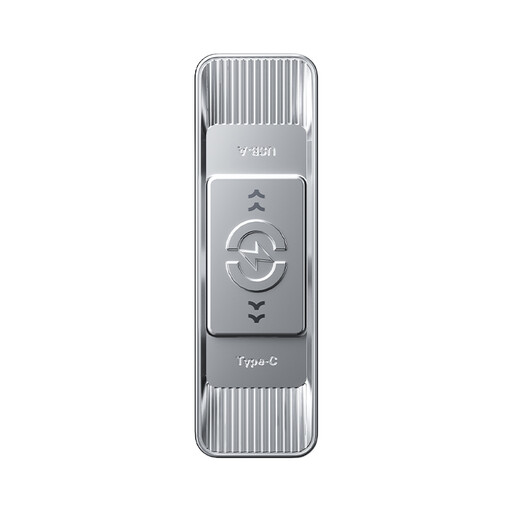
MOVESPEED YSUYC-256GSN 256GB (Silver)
Consider this dual-interface drive if the client has agreed to a fingerprint-access handover; test that the recipient can unlock the files.
The product title lists 256GB, USB 3.2 Gen 1 and Type-C, with stated read and write speeds of 550MB/s and 500MB/s. Check that the full folder fits and that the connectors suit both devices.
View on Joybuy
 No image available
MOVESPEED YSUSP05-512GSR 512GB (Silver)
This dual-interface option is worth checking when the sender and client may use different ports and the handover includes a larger folder.
The product title states 512GB, USB 3.2 Gen 1 and Type-C, and a 570MB/s read-speed claim. Confirm the connectors on both devices and any confidentiality requirements before handover.
View on Joybuy
 No image available
DigiEra LUS320 128GB
For a handover between USB-A and USB-C devices, this variant offers both connectors; check that 128GB holds the complete folder.
The product title lists USB 3.2, a 500MB/s read-speed claim and a 360° swivel design. Agree a protected delivery method separately if the client’s files require one.
View on Joybuy
 No image available
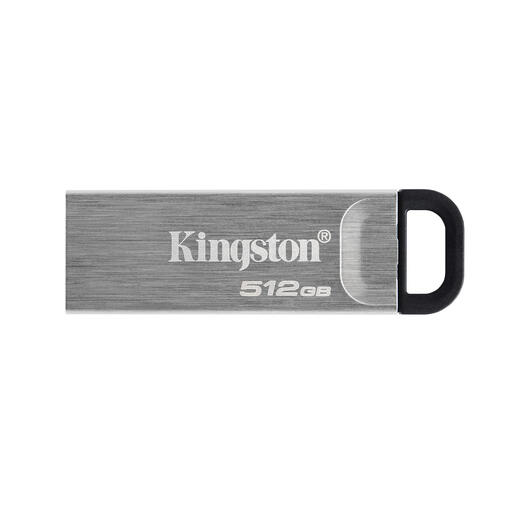
Kingston DataTraveler Kyson 512GB
For a larger handover folder on a known device setup, compare this drive’s stated 512GB capacity with the size of all files being delivered.
Confirm that its connector suits both computers and whether the client requires encrypted delivery. Keep another independent manuscript copy.
View on Joybuy
 No image available
Kingston IronKey Keypad 200 16GB
Consider this PIN-accessed encrypted route when the client requires controlled access to a portable manuscript copy; agree and test the unlocking process together.
The product title states 16GB and AES-256 encryption. Check that the folder fits and that the connector suits the client’s device. FIPS 140-3 Level 3 status is marked pending, so do not treat validation as confirmed.
View on Joybuy
Frequently asked questions
Can the handover flash drive be my only manuscript backup?
No: retain another independent copy rather than relying on the drive you give the client. The National Cyber Security Centre advises keeping backup media separate from the computer; after copying, reconnect the handover drive and check that the files open.
Does every client manuscript need an encrypted USB drive?
Not necessarily; the decision depends on the material and the client’s requirements. For personal data on removable media outside strong physical controls, the National Cyber Security Centre identifies encryption at rest as an appropriate security measure. Agree how the recipient will unlock protected files before choosing the drive.
Why might a fast flash drive copy the manuscript folder slowly?
The computer’s USB connection, including any hub, can limit transfer speed. Kingston specifies a USB 3.2 Gen 2 host connection for optimal DataTraveler Max performance, so check the connection used for copying rather than assuming the drive’s stated speed will apply.


