Students using USB-A computers
If both computers have USB-A ports, focus on a drive you can keep track of while packing. Kingston describes a cap and keyring loop on its DataTraveler Exodia; Samsung describes a keyring loop on its BAR Plus.


For notes copied between USB-A computers, a USB-A drive with a cap or attachment point is a straightforward choice, but check the folder size before choosing a capacity. If the devices have different ports, consider a dual USB-A/USB-C drive; repeated large transfers make stated write speed more relevant, while organisational personal information calls for an approved way to encrypt the files. Keep the originals and another backup until you have opened files from the copied drive.
If both computers have USB-A ports, focus on a drive you can keep track of while packing. Kingston describes a cap and keyring loop on its DataTraveler Exodia; Samsung describes a keyring loop on its BAR Plus.
If one device has USB-A and another has only USB-C, check for both connectors on the exact drive. The MOVESPEED dual-interface listing is an example of this arrangement.
If placement or course files contain personal information handled for an organisation, check its rules for removable storage and encryption. The Information Commissioner’s Office advises encrypting personal information stored on removable media; a tougher casing does not control access to the files.
Check the ports on the devices and the size of the notes folder first. Then decide whether copying time, keeping track of the drive or protecting sensitive files changes the choice.
| Concern | What to check | Who this matters to |
|---|---|---|
| Completing the copy | For repeated or large transfers, compare stated write speeds as well as read speeds. Check the computer’s port: the USB Implementers Forum identifies USB 3.2 Gen 1 as a 5Gbps signalling class, not a drive’s guaranteed copying speed. | If my folder contains scans or recordings, I want enough time to copy it and check that files open before packing the computer. Around 31% of consumers put completing the transfer efficiently first. |
| Keeping track of the drive | Look for a cap, keyring loop or attachment point on the exact model. Keep a separate copy of the notes even if the drive has physical-resistance claims. | Among boxes and bags, I need to know where the small drive is without making it the only copy of my work. Roughly 31% of consumers make keeping the drive findable and protected their primary concern. |
| Connector fit | List the ports on every device that must read the notes. Choose a drive with both USB-A and USB-C connectors if you need to plug directly into both types. | If my old computer and new device have different ports, I do not want to discover a mismatch on moving day. Around 23% of consumers prioritise connector fit. |
| Protecting sensitive files | Establish whether the files contain organisational personal information. If they do, follow the organisation’s storage policy and check which encryption method it permits. | When I carry placement or similar records, I need to limit access if the drive goes missing. Roughly 15% of consumers put protection against unauthorised access first. |
A drive may be lost or damaged during a move, and a completed transfer does not by itself show that the files will open. The National Cyber Security Centre recommends keeping multiple backups of important files in different locations.
Retain the originals and another backup. Open representative files from the flash drive before packing away the source device.
The USB Implementers Forum distinguishes several USB 3.2 signalling classes. The label alone does not tell you a drive’s write speed or its connector shape.
Check model-specific read and write claims separately, along with the connector and the port on the computer you will use.
A USB-A drive cannot plug directly into a USB-C-only port. Check the ports on both the device holding the notes and the one that will receive them.
If direct use with both port types matters, choose a drive whose exact model has both connectors.
Otherwise, you will need a compatible adapter or another way to transfer the files.
A casing or resistance claim does not prevent someone from opening files on a lost drive. The Information Commissioner’s Office advises encrypting personal information stored on removable media.
For information handled for an organisation, confirm its approved storage and encryption method before copying the files.
The DataTraveler Exodia is a USB-A option for carrying everyday files between compatible computers.
The BAR Plus is a USB-A metal-body option for carrying a drive among moving-day essentials.
The JetFlash 920 is a USB-A option to examine when copying larger folders repeatedly makes stated write performance important.
The Ultra Luxe is a USB-A model with a metal casing for everyday portable storage.
The Aegis Secure Key 3z is a specialist USB-A option to assess when organisational files require controlled access.
These drives cover different ways to carry notes between devices, including dual-connector models and a USB-A keypad model. Match a drive to your devices, folder size and any organisational storage rules before choosing.
 No image available
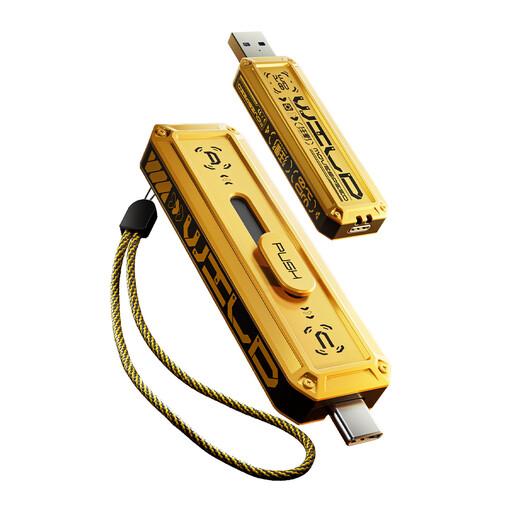
Consider this model if the notes must move between USB-A and USB-C devices. Its title specifies both connectors, USB 3.2 and a 360° swivel design; check that 128GB accommodates the folder and that each device can use the drive’s file system.
 No image available
This model is worth checking if you need to transfer notes between USB-A and USB-C devices. Before relying on its advertised transfer speeds, confirm the exact interface and the capabilities of the devices you will use; check the folder size against its 256GB capacity.
 No image available
The USB-A and USB-C connectors may suit transfers between devices with different ports. For organisational personal information, do not rely on the fingerprint or encryption wording in the product title alone: confirm how access protection works, whether the organisation approves it and how access can be recovered.
 No image available
Consider a keypad-controlled drive only if it fits the rules for the information you need to carry. Check its encryption details, PIN recovery process and organisational approval; the product description marks FIPS 140-3 Level 3 certification as pending, not completed. Its USB-A connector and 16GB capacity also need to fit your devices and folder.
 No image available
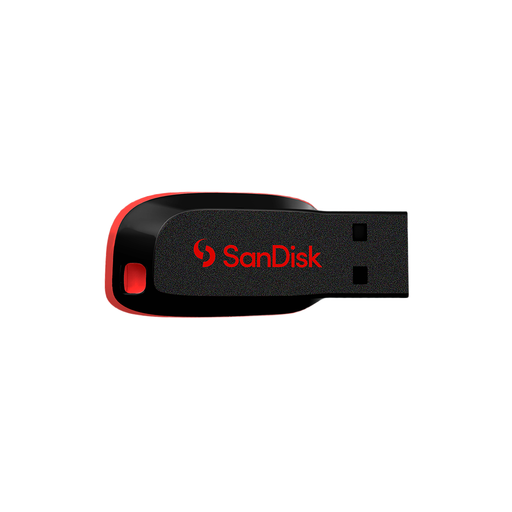
This is a straightforward option to assess for a compatible device and a folder that fits within 64GB. Check the connector against each device and plan where you will keep the drive during the move; its listed USB 2.0 specification does not establish a particular copying time.
Choose capacity after checking the size of the folder you intend to copy, leaving room for the files you still need to add. A folder containing scans, recordings or video may need substantially more space than text notes alone.
It may work at the connection’s lower common speed, provided the physical connectors fit. The USB Implementers Forum describes USB 3.2 backwards compatibility, but a USB-A plug still needs a USB-A port or a suitable adapter.
Keep the originals, open representative files from the flash drive and retain another backup before packing away the source device. The National Cyber Security Centre recommends multiple backups in different locations, while Microsoft advises safely removing a USB drive before disconnecting it.
If the files contain personal information handled for an organisation, follow its policy and use an encryption method it permits. The Information Commissioner’s Office advises encrypting personal information stored on removable media; check approval and recovery arrangements before copying placement or similar records.