Choose a USB flash drive that connects to every device needed to create, present or restore the teaching resources: USB-A may suffice for compatible classroom PCs, while a dual USB-A/USB-C drive suits a mixed-port workflow. Check the project folder and largest individual file before choosing capacity or a file system. If the backup contains personal data, follow the school’s approved procedure, and keep the drive as one copy rather than the only backup.
Who needs which approach?
Mixed-device classroom users
If teaching resources move between a USB-C laptop or tablet and USB-A classroom PCs, check both ends of the workflow before choosing a connector. Kingston Technology and SanDisk each describe dual-connector drive lines for this use.
Media-heavy project organisers
Presentations, images, audio and video make the project folder and its largest file more important than a capacity chosen from documents alone. Measure both, including space for planned revisions.
Staff handling personal-data files
If the backup includes identifiable pupil, parent or staff information, check the school’s removable-media procedure before choosing a drive. The Information Commissioner’s Office identifies encryption as protection for personal information on USB and backup media, but a particular device still needs to fit the school’s rules.
What matters when choosing a drive?
Start with the devices that must open the backup, then measure the files. Decide how the drive will be protected and stored before putting any school information on it.
| Concern |
What to check |
Who this matters to |
| Connector compatibility |
List the ports on every device that must read or update the backup. Check for USB-A, USB-C or both on the exact drive. |
If I move lessons between a newer laptop and older classroom PCs, I need a drive I can connect without relying on an adapter. Around 31% of consumers put this mixed-port need first. |
| Capacity and transfers |
Measure the folder and allow for planned media and revisions. Compare speed claims only for the exact model and capacity. |
When my project includes video or audio alongside slides, I need room for the files and time to copy them. Capacity and transfer practicality come first for around 25% of consumers. |
| Personal-data protection |
Identify any personal data, then check the school’s permitted storage and encryption procedure before using removable media. |
If my files identify pupils or staff, I need to know whether the school permits this backup method and how to protect it. Roughly 19% of consumers prioritise that decision. |
| Recovery and large files |
Keep another copy, disconnect the drive after updating it, and check its file system against the largest individual file. |
I need to recover the project if a drive is lost, and I cannot risk a large video failing to copy. Around 25% of consumers put backup resilience and file handling first. |
Mistakes to avoid
-
Treating one USB drive as the whole backup plan
A portable copy can be lost or damaged; leaving it connected can also expose it to an incident affecting the computer. The National Cyber Security Centre advises disconnecting removable backup media when it is not in use.
Keep another copy in a separate location or approved service, unplug the drive after updating it, and occasionally open backed-up files to check that they can be read.
-
Choosing capacity before checking the ports
A drive cannot be used directly on a required device unless its connector fits. A USB-A-only drive will not plug directly into a USB-C-only port.
Write down the ports on the devices used to edit, present and restore the project, then choose a matching single- or dual-connector drive.
A connector mismatch may mean carrying an adapter or changing drives before the files can be used.
-
Putting personal data on a drive without checking school procedure
The Department for Education says school staff have responsibilities for protecting personal data. Encryption may help protect information on a lost USB drive, but it does not itself authorise removable-media use.
For identifiable information, follow the school’s procedure and ask the data protection officer or line manager which storage method is approved.
-
Checking a large video only at the point of copying
Microsoft Learn specifies a 4GB maximum size for an individual file on FAT32, regardless of the drive’s total capacity.
Check the largest file and the drive’s file system in advance. Copy existing contents elsewhere before reformatting a drive.
Relevant brands for reference
These product lines illustrate different connector and protection choices; check the exact model rather than applying a line-wide feature to every drive from a brand.
Kingston
Kingston Technology lists USB-A DataTraveler drives, dual USB-A/USB-C microDuo drives and separate encrypted IronKey lines.
- DataTraveler microDuo 3C provides both USB-A and USB-C connectors for a mixed-port workflow.
- Do not assume a USB-A DataTraveler has a USB-C connector or that an ordinary drive has IronKey encryption features.
SanDisk
SanDisk offers USB-A Ultra Luxe drives and dual USB-C/USB-A Ultra Dual Drive Go models.
- The dual-connector line offers a way to move files between devices with those two port types.
- Capacity and stated read speed vary by configuration, so check the variant being considered.
iStorage
iStorage describes PIN-authenticated, hardware-encrypted drives intended for controlled storage workflows.
- The manufacturer describes the datAshur PRO+C as a USB-C model with PIN access, hardware encryption and a Type-C-to-Type-A adapter.
- Its security features do not replace the school’s approval, access procedures or another backup copy.
Joybuy flash drive options
These drives cover mixed-port, USB-A and USB-C project workflows. Choose among them by checking the devices, measured folder size and school rules; their presence here does not mean that any one drive meets every backup need.
 No image available
DigiEra LUS320 128GB USB-A/USB-C flash drive
Consider this model when the project moves between USB-A and USB-C devices. It has a stated 128GB capacity and USB 3.2 dual interface; compare that capacity with the folder and planned revisions.
Check the file system against any large individual files, and keep another backup copy.
View on Joybuy
 No image available
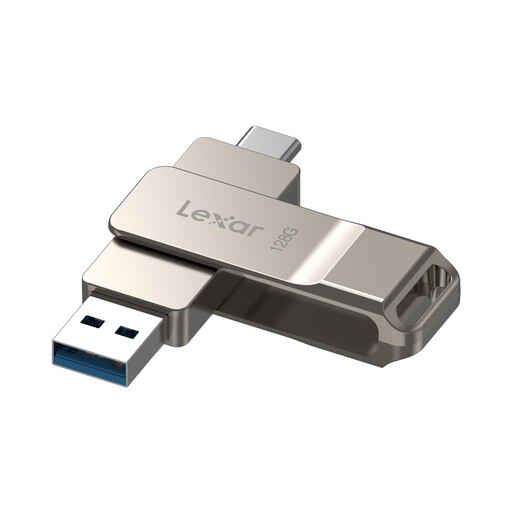
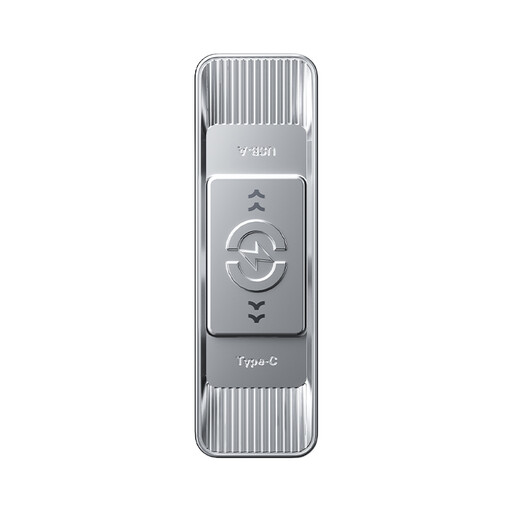
Lexar D40E 128GB dual USB drive (LJDD40E128G-BNSNG)
This 128GB USB 3.2 Gen 1 Type-C model is a candidate for moving a project between devices with different ports; confirm its connectors against the devices you will use.
Check the file system before copying a file larger than 4GB. If the folder contains personal data, follow the school’s approved storage procedure rather than assuming an optional security feature is sufficient.
View on Joybuy
 No image available
MOVESPEED YSUSP05-512GSR 512GB dual-interface drive
The stated 512GB capacity is worth considering for a project with substantial media or revisions, but measure the folder to decide whether it is needed and sufficient. The title specifies a USB 3.2 Gen 1 and Type-C dual interface; check the exact ports required by your devices.
Confirm the file system for large individual files and the school’s storage procedure if personal data is involved.
View on Joybuy
 No image available
Kingston Technology IronKey Keypad 200 16GB
Consider this USB-A, PIN-protected AES-256 encrypted model only if it fits the school’s approved process for the files concerned. Measure the project folder against its 16GB capacity and check that every required device has a compatible port.
The product title describes FIPS 140-3 Level 3 as pending, not completed validation; confirm any exact security requirement before choosing it.
View on Joybuy
 No image available
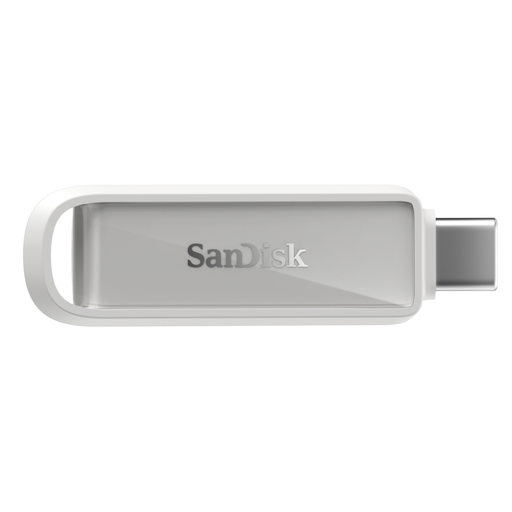
SanDisk Phone Drive with USB-C, Arctic White, 128GB
This USB-C drive is an option when the devices needed for the project have compatible USB-C ports. It does not plug directly into a USB-A-only classroom PC; check how the teaching-resource folders will be copied rather than assuming a photo-backup app handles them.
Compare its 128GB capacity with the measured folder and check the file system before copying a large individual file.
View on Joybuy
Frequently asked questions
Can a USB flash drive be my only school-project backup?
No: keep another copy of important teaching resources. The National Cyber Security Centre advises disconnecting removable backup media when it is not in use; periodically check that files on your separate copies can be opened.
Should I choose USB-A, USB-C or a drive with both?
Choose according to the ports on every device that must use the backup. A USB-A drive suits a USB-A workflow; a dual USB-A/USB-C drive allows direct connection across both port types when the particular devices support them.
What if the backup contains pupil or staff personal data?
Follow the school’s data-protection and removable-media procedures before putting those files on a drive. The Information Commissioner’s Office identifies encryption as protection for personal information on USB media, but the school must determine which devices and workflow it permits.
Why might a large teaching video fail to copy?
A drive formatted as FAT32 cannot hold an individual file larger than 4GB, according to Microsoft Learn. Check the video’s size and the drive’s file system; copy existing contents elsewhere before considering reformatting.


