Choose a wired USB headset around the audio problem you face: microphone noise reduction for a busy room, a comfortable wearing style for long sessions, or meeting controls that suit your software. A headset cannot brighten your camera image, so assess lighting separately if remote participants also need to see you clearly.
Who needs which features?
Meeting facilitators in busy rooms
If nearby conversations or typing make it difficult to follow a discussion, consider both what reaches remote participants through your microphone and what you hear through the earcups. Logitech describes separate microphone noise reduction and listening ANC on its Zone Wired 2; HP describes microphone noise reduction and passive isolation in the Poly Blackwire 5200 line.
Teams-first planning leads
If you regularly manage calls in Microsoft Teams, check the precise headset variant for the controls you use. Microsoft says Teams-certified devices offer plug-and-play operation and call control; Jabra distinguishes its Teams-focused MS variants from its UC variants.
People running longer sessions across devices
If workshops run for hours or you change computers, weigh wearing style and fit alongside the ports on each device. HP lists USB-C, a USB-A adapter and 3.5 mm connectivity for a particular Poly Blackwire 5220 bundle; check what comes with the version you select.
What should you check before buying?
For consumers choosing a USB headset to lead a planning meeting in a dim room, the audio decision comes down to a primary need: being heard over surrounding noise, connecting and controlling calls smoothly, or staying comfortable through a longer session. Camera lighting is a separate decision.
| Concern | What to check | Who this matters to |
|---|
| Clear speech in a busy room |
Check microphone noise reduction separately from active noise cancellation (ANC) or passive isolation for listening. |
If nearby activity could drown out decisions or follow-up actions, I need remote participants to hear my voice clearly. Around 46% of consumers put speech clarity and noise management first. |
| Connection and call controls |
Match USB-C or USB-A to your computer and check the included adapter; verify the exact variant if you need Teams-specific controls. |
When I move between computers or manage meetings in Teams, I want the headset to connect and its controls to work as expected. Roughly 36% of consumers make connection and meeting-app workflow their primary concern. |
| Long-session comfort and listening |
Consider fit and mono versus stereo wearing style; check whether you need to hear people in the room. |
For an extended workshop, I need a headset I can keep wearing while hearing the discussion the way I prefer. Around 18% of consumers prioritise comfort and listening style above the other concerns. |
Common buying mistakes
-
Expecting a headset to fix dim video
A headset handles audio, not the light reaching your face or your webcam. Better call controls will not make a poorly lit image clearer.
Choose the headset for your audio needs, then assess the room lighting or camera setup separately if appearing clearly on video matters.
-
Assuming ANC cleans up your outgoing voice
Listening ANC addresses sound reaching your ears; microphone noise reduction addresses sound sent to other participants. Having one does not establish that the headset has the other.
If both concentration and speech clarity matter in a busy room, check for each function on the exact model.
-
Choosing by product family rather than variant
Connectors, bundled adapters and Teams-focused controls can differ between versions of a headset. A familiar range name alone does not settle compatibility.
Before ordering, match the precise variant to your computer port and meeting application, and check which adapter is included.
-
Putting an unwanted headset in general waste
Headsets contain electrical components. Oxfordshire County Council advises that electrical items should not go in general waste; collection arrangements depend on the local area.
Check your local authority’s instructions for electrical recycling or an applicable retailer take-back route.
Brands to consider for wired meeting headsets
Logitech
Logitech’s Zone Wired 2 is relevant when you want a wired headset with separate features for listening isolation and microphone noise reduction.
- Logitech describes adaptive hybrid ANC and noise-cancelling microphones on the Zone Wired 2.
- Check its connector, meeting-platform compatibility and fit for your setup; the stated noise features are manufacturer claims, not a measure of performance in your room.
Poly
The Poly Blackwire 5200 line includes different wearing styles and connection options for corded calls.
- HP lists USB-C, a tethered USB-A adapter and 3.5 mm connectivity for its Blackwire 5220 stereo USB-C bundle.
- Confirm the model, wearing style and included connections rather than assuming every Blackwire headset has that bundle.
Jabra
Jabra’s MS and UC variants are relevant when meeting-platform controls affect your choice.
- Jabra describes Teams-oriented plug-and-play functions on its MS variants and broader UC-platform use for its UC variants.
- Check the exact variant if you need Teams-specific controls; a UC variant is not the same control choice as an MS variant.
Joybuy headset choices
These wired headsets offer different starting points for a planning-meeting setup: a model labelled with listening ANC, a stereo USB-C model with an adapter, and a USB headset labelled with a noise-cancelling microphone. Check the exact connection and call features you need; none addresses dim camera lighting.
 No image available
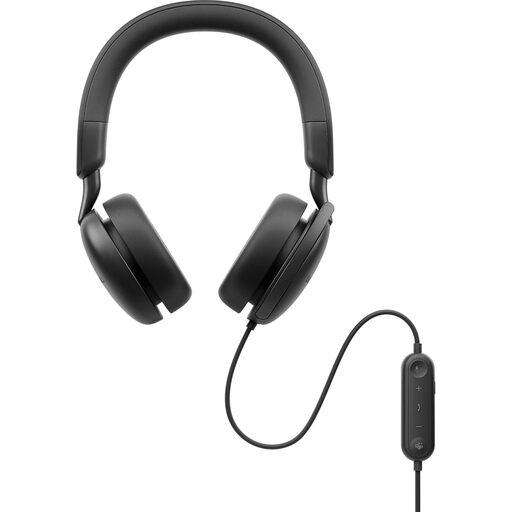
DELL Pro Plus Wired ANC Headset WH5024
Consider this wired model if reducing sound you hear in a busy room is a priority. ANC appears in the product name; check the microphone features, connector and meeting-platform controls on the exact variant if you also need clear outgoing speech or Teams controls.
View on Joybuy
 No image available
Poly Blackwire 3220 Stereo USB-C Headset with USB-C/A Adapter
Consider this wired stereo headset if your planning meetings may use computers with different USB ports. Its product name specifies USB-C and a USB-C/A adapter; check microphone and listening-isolation features separately if surrounding noise is your main concern.
View on Joybuy
 No image available
Logitech 960 Wired USB Headset with Inline Remote and Noise-Cancelling Microphone, Black
Consider this wired USB headset if an inline remote and microphone noise reduction are priorities when leading calls. Check its connector against your computer, and assess listening isolation separately if you also need help concentrating amid room noise.
View on Joybuy
Frequently asked questions
Will a USB headset make me look brighter on camera?
No. A headset does not light your face or adjust webcam exposure. If remote participants struggle to see you in a dim room, assess lighting or your camera setup separately from the headset.
Should I choose a Teams variant or a UC variant?
Choose a Teams-focused MS variant when Teams is your main meeting application and you need its dedicated controls; consider a UC variant when another calling platform is central. Microsoft describes plug-and-play call control for Teams-certified devices, while Jabra distinguishes the Teams experience of its MS variants from its UC variants. Check the functions of the precise headset you intend to buy.
How can I check that a headset will connect to my computer?
Identify your computer’s USB port, then check the headset’s exact connector and included adapter. HP lists a USB-A adapter with a particular Poly Blackwire 5220 USB-C bundle, but that does not establish what comes with every Blackwire model.
What should I do with an unwanted headset?
Check your local authority’s electrical-recycling instructions rather than putting the headset in general waste. Oxfordshire County Council advises against disposing of items with electrical components in general waste; available collection and take-back routes depend on your area.


