Choose a wired USB headset with a microphone-focused noise-reduction feature if household sounds could interrupt your interview; a simpler wired model may suit a quieter kitchen. Check the connector or included adapter, then test your speech in the interview app from the kitchen table. A feature that reduces noise for you does not, by itself, show how clearly the interviewer will hear you.
Who needs to consider what?
Candidates in a shared or active kitchen
If conversation or other household sounds may occur during the call, look for a feature specifically described as reducing noise picked up by the microphone. Test your voice from the planned seat as well: Barnet Council advises finding a quiet location for a video interview.
Candidates unsure of their computer's USB port
Check whether the interview computer has USB-A or USB-C before choosing a variant. If you need an adapter, confirm that it is included with the exact configuration; HP lists connector options for a particular Poly Blackwire 5220 configuration, not every headset in the range.
Candidates preparing for one important call
Focus on a working microphone and speakers, a comfortable fit and controls you can find during the interview. Zoom Support provides a pre-join audio test, which is more useful preparation than relying on a headset's feature list alone.
What matters when choosing?
Start with the sound the interviewer will receive, then confirm the physical connection and rehearse the call setup. Consider fit and controls in light of how long you expect to wear the headset.
| Concern |
What to check |
Who this matters to |
| Outgoing speech |
Look for a microphone-specific noise-reduction or multi-microphone call feature. Test it with typical sounds at the kitchen table. |
If people may talk nearby, I need my answers to remain understandable without assuming the headset will silence the room. Around 50% of consumers put outgoing speech first. |
| Connection and setup |
Match the headset's USB connector to the computer, confirm any included adapter and select the headset as both microphone and speaker in the interview app. |
I cannot risk discovering at the start of the call that the plug does not fit or the app is using another microphone. For around 30% of consumers, connection and setup are the primary concern. |
| Fit and controls |
Consider the wearing style and locate mute and volume controls before the call; check the exact model for the controls you need. |
If I will be concentrating on interview questions, I want a fit I can tolerate and a mute control I can find without searching the screen. Fit and controls come first for around 20% of consumers. |
What should you avoid?
-
Confusing listening isolation with microphone noise reduction
A headset can reduce the noise you hear without establishing how it handles nearby sounds picked up during your answers.
Check the exact model for a microphone or call-noise feature, then test speech with realistic background sound.
-
Choosing a USB variant before checking the computer
USB-A and USB-C plugs need the corresponding port or a suitable adapter; adapter contents can differ between configurations.
Inspect the computer and confirm the connector and included accessories on the exact product listing.
A mismatch may mean obtaining a suitable adapter or changing headsets before the interview.
-
Waiting until the interview to try the headset
A connected headset may not be the microphone or speaker selected in the meeting app.
Test both devices in the app beforehand. Zoom Support describes a pre-join speaker-and-microphone test, while Microsoft Support describes making a test call in Teams.
-
Expecting the headset to replace a quiet setting
Noise-suppression features do not guarantee that every conversation or interruption will disappear from a live call.
Arrange the quietest available time and position. Barnet Council's video interview advice also recommends finding a quiet location.
Brands to consider
Jabra
The Evolve2 40 line is worth checking if call-microphone features and a choice of USB connector matter to you.
- Jabra specifies three-microphone call technology, a noise-isolating design and USB-A or USB-C variants for Evolve2 40.
- Choose the connector for your computer and test the microphone in the kitchen; those specifications do not establish its performance in your room.
Logitech
Logitech has distinct wired options for buyers considering a call-focused model or a straightforward USB-A connection.
- Logitech describes dual-microphone noise suppression on Zone Wired and positions H340 as a USB-A headset with a noise-cancelling microphone.
- These are model-specific manufacturer descriptions. Check the exact headset rather than assuming the same microphone features across the brand.
Poly
A specified Blackwire 5220 configuration is relevant if you need to check more than one connection option.
- HP lists USB-C, a USB-C/A adapter and 3.5 mm connectivity for the cited Blackwire 5220 configuration, alongside a noise-cancelling microphone.
- Confirm the exact variant, adapter contents and computer compatibility; those details should not be assumed for other Blackwire models.
Joybuy headset options
These wired USB headsets offer different starting points for a kitchen-table interview: a listed USB-C configuration with an adapter, straightforward call headsets and a gaming-oriented alternative. Check the connector and microphone setup for the exact product you choose.
 No image available
Poly Blackwire 3220 Stereo USB-C Headset with USB-C/A Adapter
Consider this configuration if you need to check both USB-C and USB-A connection options before the interview. Its title specifies a stereo USB-C headset and USB-C/A adapter; confirm the computer port and test the microphone in the planned room.
View on Joybuy
 No image available
Logitech 960 Wired USB Headset with Inline Remote
For a computer interview where accessible call controls matter, this model's title specifies an inline remote and a noise-cancelling microphone. Confirm its connector against your computer and test how your speech sounds with typical kitchen noise.
View on Joybuy
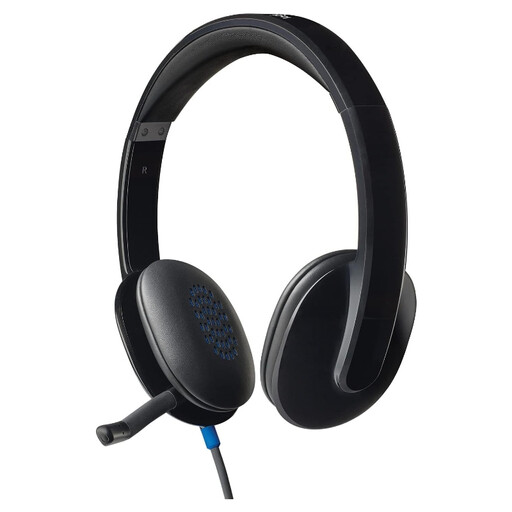 No image available
Logitech H540 Wired Headset
This wired model is an option to assess for a computer interview. Confirm the exact USB connector and available controls on the product listing, then select and test its microphone and speakers in the interview app.
View on Joybuy
 No image available
Edifier G2II Black Wired USB Gaming Headset
Consider this gaming-oriented headset only if its connection and microphone setup work for your interview computer. The title specifies a noise-cancelling microphone, 50 mm drivers and 7.1 surround sound; those audio features do not establish how your voice will sound to an interviewer, so make a test call.
View on Joybuy
Frequently asked questions
How should I test a headset before the interview?
Use the computer and kitchen-table position planned for the call, and check both the microphone and speakers in the interview app. Zoom Support describes a pre-join audio test, while Microsoft Support describes a Teams test call. Try realistic nearby sounds so you can hear whether your answers remain understandable.
Will software noise suppression make any USB headset suitable for a noisy kitchen?
No; treat it as an additional setting, not a substitute for checking the microphone and finding a quieter position. Microsoft Support describes noise-suppression options in Teams, but a test call in your planned setting is still important.
Should I choose USB-A or USB-C?
Choose the connector that fits the interview computer, or check that the exact configuration includes the adapter you need. HP specifies a USB-C/A adapter for a cited Poly Blackwire 5220 USB-C configuration; a similarly named variant should not be assumed to include it.
What if I need an adjustment for a remote interview?
Tell the recruiter what you need so the interview arrangements can be discussed in advance. The Government Digital and Data Hub gives changing an interview's time, location or format as examples of adjustments offered to candidates; what is appropriate depends on your needs and the recruitment process.


