Meeting leads in busy open offices
If you explain plans and assign actions while colleagues talk or type nearby, prioritise how clearly remote participants can hear your voice.


For a planning meeting in a noisy office, start with a boom microphone that specifies noise reduction: it addresses what remote participants hear. Add active noise cancellation (ANC) if you also need less distraction while listening, then check the exact USB connector, cable reach and meeting-platform variant before buying.
If you explain plans and assign actions while colleagues talk or type nearby, prioritise how clearly remote participants can hear your voice.
If your organisation uses Microsoft Teams, check the exact headset variant when on-headset call controls or a Teams button matter to your meetings.
If planning sessions run for extended periods, consider fit, cable reach and accessible mute controls alongside microphone features.
Choose for outgoing speech first, then decide whether you need ANC for listening. Check the connection and fit against the desk and meeting software you actually use.
| Concern | What to check | Who this matters to |
|---|---|---|
| Outgoing speech | Look for a boom microphone with stated noise reduction; if you use Teams, check any open-office microphone designation against the exact variant. | When nearby conversations or typing could obscure decisions and assigned actions, I need my voice to remain understandable to remote attendees. Around 36% of consumers put outgoing speech clarity first. |
| Listening focus | Check whether the exact headset offers ANC and adjustable settings; assess its microphone separately. | To follow questions while the office is busy, I need less distraction in what I hear. Personal listening focus is the main concern for around 29% of consumers. |
| Connection and controls | Match USB-A or USB-C to your computer, confirm any included adapter and choose the appropriate Teams or UC variant. | If a meeting depends on headset mute or call controls, I want the connector and platform version settled before it starts. Around 21% of consumers prioritise connection and platform certainty. |
| Extended use | Check fit, mute operation and stated cable length against your seated working position. | During a long planning session, I need a headset I can keep wearing and a cable that reaches without pulling. Fit and day-to-day practicality come first for around 14% of consumers. |
ANC addresses noise heard by the wearer; remote participants depend on the microphone. A headset can offer one feature without establishing the other.
Prioritise stated microphone noise reduction for outgoing speech, and add ANC if you also need help concentrating while listening.
Connectors, controls and platform support can differ between versions. Jabra describes Evolve2 50 Teams compatibility as variant-dependent, while Logitech says Zone Wired 2 certification varies by version.
Match the full variant on the listing to your computer port and meeting platform.
A wired connection limits movement to the cable and needs a connector that fits the work computer.
Check the exact SKU’s cable length, connector and included adapter against the distance from computer to seat.
A headset selected for meetings does not, by itself, address workplace noise exposure.
If noise raises a hearing-risk concern, raise it through your employer’s health-and-safety process rather than relying on the headset as a substitute for assessment and controls.
The Evolve2 50 office-headset range includes USB-A, USB-C and USB-C/USB-A configurations.
Zone Wired 2 is a wired USB business headset offered in Teams and UC versions.
Blackwire is a corded headset line; HP describes the Blackwire 8225 with microphone noise reduction and hybrid ANC.
The ADAPT 100 line includes wired on-ear boom headsets in single- and double-sided variants.
These wired USB headsets have microphone features relevant to leading calls from a noisy desk. Compare their exact connections and listening features rather than treating them as interchangeable.
 No image available
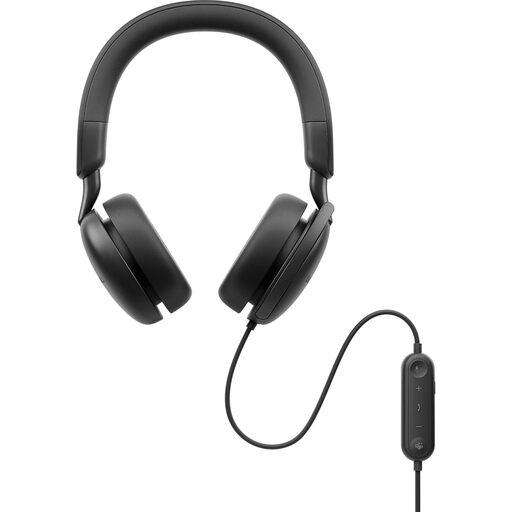
Consider this model if you need microphone noise reduction for calls and ANC while listening in an open office.
The description specifies a beamforming boom microphone, USB-C with a USB-A adapter, and inline mute and call controls. Check cable reach for your desk and the exact supplied variant’s Teams or Zoom compatibility.
 No image available
This is an option for desk-based calls when an adjustable noise-cancelling boom microphone and accessible mute control are priorities.
The description specifies USB-A, inline volume and mute controls, and a 2.4 m cable. If you need ANC or certified Teams controls, check the exact version before ordering.
 No image available
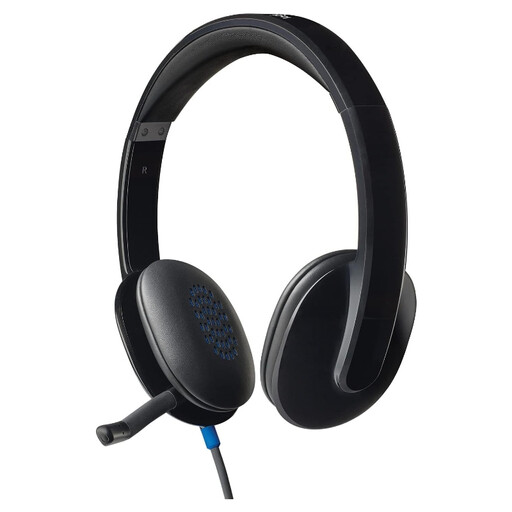
Consider the H540 for USB-A office calls where a noise-cancelling boom microphone and quick mute access matter.
The description specifies inline volume and mute controls, an adjustable padded headband and a 1.8 m cable. Check your meeting software requirements separately if certified controls or ANC are important.
 No image available
This corded stereo model suits meeting calls where a noise-cancelling microphone and a choice of USB-C or USB-A connection are useful.
The description specifies a USB-C connection, a USB-A adapter and mute and call controls. Confirm cable reach and exact-platform certification if either affects your setup; do not apply Blackwire 8225 ANC specifications to this model.
Prioritise a noise-cancelling microphone for what remote attendees hear; add ANC if office noise also distracts you while listening. Check both features on the exact headset, because one does not establish the other.
Choose a Teams-certified variant if your meetings use Microsoft Teams and its headset call controls matter to you; otherwise, check which UC variant fits your organisation’s software. Microsoft says certified Teams peripherals support plug-and-play use and call control, but certification must apply to the exact version you buy.
Check your computer’s port and the contents of the exact headset package. Connector arrangements differ: Logitech lists USB-A or USB-C versions of Zone Wired 2, while HP describes Blackwire 8225 with USB-C and a tethered USB-A adapter; neither arrangement should be assumed for another model.
No. A headset chosen for calls does not replace an employer’s assessment and control of workplace noise risk. The Health and Safety Executive sets out separate duties concerning noise exposure; raise a hearing-risk concern through your employer’s health-and-safety process.