For one person joining a design-brief call from a small meeting room, choose a wired USB headset with a boom microphone and stated call-noise suppression, then check its connector and meeting-platform variant against the computer you will use. Ear-cup isolation may help the wearer concentrate, but it does not replace microphone noise control. If one device needs to pick up several people in the room, assess a shared speakerphone or room system instead.
Who is this for?
Participants concerned about voice clarity
If colleagues are talking nearby while you join the call individually, a close boom microphone with stated background-noise suppression is more relevant to what remote listeners hear than ear-cup isolation alone.
Teams users and people switching computers
Moving between meeting-room laptops makes the available USB port important. If you also rely on Microsoft Teams headset controls, check the certification of the exact variant rather than the product family.
People on longer calls
For extended discussions, consider fit and how much surrounding conversation you still need to hear. Greater ear-cup isolation may aid concentration while reducing awareness of colleagues in the room.
What matters when choosing?
Start with what the remote participants need to hear, then confirm the computer connection and calling platform. Choose the wearing style around your need for concentration and awareness of people in the room.
| Concern |
What to check |
Who this matters to |
| Outgoing voice clarity |
Look for a boom microphone and stated microphone noise suppression. Do not mistake listening-side isolation for an outgoing-call feature. |
If colleagues talk nearby, I need remote participants to follow my contribution without the room conversation taking over; around 46% of consumers put outgoing voice clarity first. |
| Connection and call controls |
Match the exact SKU’s USB connection and any included adapter to the computer. Check platform certification if headset controls in Teams matter. |
When I change meeting computers, I need the headset to connect and its expected controls to work; around 27% of consumers chiefly prioritise connection and platform certainty. |
| Comfort and concentration |
Compare mono and stereo wearing styles, cushioning and isolation against the need to hear colleagues in the room. |
For a long design review, I want to stay focused without losing track of people beside me; around 27% of consumers place comfort and concentration first. |
Mistakes to avoid
-
Choosing ear-cup noise control to fix the outgoing call
Active noise cancellation and isolating ear cups concern what the wearer hears; neither alone establishes what nearby voices will sound like to remote listeners.
Check the exact headset’s boom microphone and stated call-noise suppression separately from its listening features.
-
Assuming every variant has the same connection or certification
Logitech says certification varies by Zone Wired 2 for Business version. HP describes a tethered USB-A adapter for its Blackwire 5200 series, but that arrangement should not be assumed for another headset.
Before ordering, match the exact variant, connector, included adapter and platform designation to the meeting computer.
If your connection depends on an adapter, you will also need to keep it with the headset when moving between computers.
-
Expecting one personal headset to cover the room
A headset places its microphone near one wearer. Microsoft distinguishes personal peripherals from shared meeting devices assessed for room and usage conditions.
When several people must be heard through one connection, assess a shared speakerphone or room system for the room size and microphone distance.
-
Putting an old headset in general waste
Recycle Your Electricals identifies headphones as electrical items that can be recycled. The available route depends on where you live.
Check local council guidance or a nearby electrical-recycling or retailer take-back option.
Brands to consider for wired call headsets
Logitech
The Zone Wired 2 for Business is a wired USB option to consider when microphone noise management and a particular collaboration-platform variant matter.
- Logitech specifies dual noise-cancelling microphones, USB-C or USB-A versions, and compatibility with Windows, macOS and ChromeOS.
- Certification varies by version. Check the exact variant if Teams-certified controls are required; manufacturer noise-control descriptions are not a promise of the same result in every room.
Jabra
The Evolve2 40 SE is a wired office-headset option for buyers considering microphone positioning, passive ear-cup isolation and a UC-oriented or Teams-certified variant.
- Jabra describes three-microphone call technology, a flexible boom and foam ear cushions.
- Its background-conversation claims are manufacturer descriptions, not a fixed result for every meeting room. Confirm which variant carries the Teams designation.
HP Poly
The Blackwire 5200 series is relevant when a USB-C cable with a tethered USB-A adapter or a choice of mono and stereo wearing styles suits the setup.
- HP describes a noise-cancelling microphone, passive ear-cup isolation and inline call controls for the series.
- Do not assume every configuration has Teams-certified controls; check the designation of the exact SKU.
Joybuy product choices for individual calls
These wired USB headsets are choices for one person joining the design-brief call. Check the exact connection and meeting-platform requirements before selecting a model; a personal headset is not a substitute for capturing everyone around the table.
 No image available
Poly Blackwire 3220 Stereo USB-C with USB-C/A adapter
Consider this wired option if the meeting computer may require either the stated USB-C connection or the bundled USB-C/A adapter. Check the exact variant’s Teams designation if certified call controls are important.
Stereo headset; USB-C connection and USB-C/A adapter are identified in the product name.
View on Joybuy
 No image available
Logitech 960 Wired USB Headset, black
A wired option for one participant concerned about nearby conversation. Confirm that its connector fits the meeting computer and check the exact model’s platform designation if Teams-certified controls matter.
The product name identifies an inline remote and a noise-cancelling microphone; that description does not establish call performance in a particular room.
View on Joybuy
 No image available
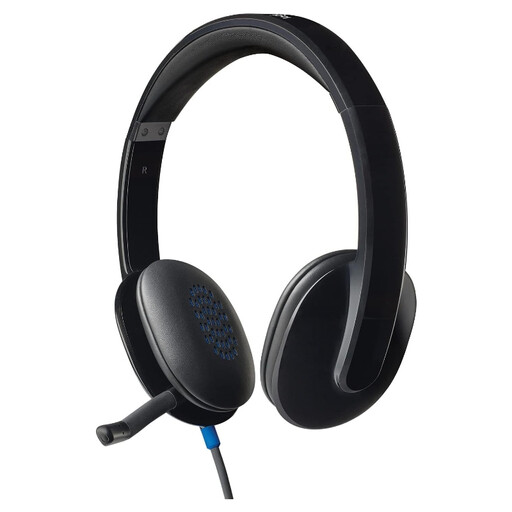
Logitech H540 Wired Headset
Consider it for an individual design-brief call where a wired headset suits the setup. Check the precise USB connection and any meeting-platform controls required before ordering.
View on Joybuy
 No image available
Edifier G2II Wired USB Gaming Headset, black
This gaming-oriented wired headset may be considered for an individual call, but check compatibility with the intended meeting application and the call controls you need.
The product name specifies a noise-cancelling microphone, 50 mm driver and 7.1 surround sound; none of those specifications establishes microphone performance around nearby talkers.
View on Joybuy
Common questions
Can one USB headset pick up everyone in a small meeting room?
A personal USB headset is not the appropriate sole device when several people need to be heard. Its microphone sits close to one wearer; assess a shared speakerphone or room system against the room size and speaking distance instead. Microsoft distinguishes personal peripherals from shared meeting devices.
Do I need a Teams-certified headset?
Choose a Teams-certified variant if you use Microsoft Teams and need its tested plug-and-play behaviour and headset call controls. Microsoft describes those capabilities for certified personal peripherals; the designation does not establish better performance in every other meeting app. Check the exact variant, not just the model family.
Should I choose USB-A or USB-C?
Choose the connection that fits the meeting computer, or an exact headset variant documented as supplying the adapter you need. HP describes a tethered USB-A adapter on the Blackwire 5200 series, while Logitech lists USB-A and USB-C versions of Zone Wired 2 for Business. Check the particular product before assuming either arrangement applies.
What should I do with an old wired headset?
Use an available electrical-recycling route rather than putting the headset in general waste. Recycle Your Electricals lists options that can include retailers, council services, recycling centres and recycling banks; check which are available locally.


