Members who want to plug in and join
A wired headset may suit you if you join discussions regularly and want a microphone and controls close at hand. Check the connector against your laptop before choosing a model.


Choose a headset whose USB connector fits your laptop, then check that your study-group app can use it for both sound and speech. A boom microphone, a comfortable fit and accessible controls matter for regular calls; consider a Teams-certified variant or active noise cancellation only if those features address how you actually meet and study.
A wired headset may suit you if you join discussions regularly and want a microphone and controls close at hand. Check the connector against your laptop before choosing a model.
If nearby activity gets into your calls, consider a positionable boom microphone with stated background-noise reduction. Test how your voice sounds in your usual room rather than relying on a feature name alone.
If Teams is your regular meeting platform, an explicitly Teams-certified version may be worth considering. Microsoft awards certification to devices that pass its programme requirements; check the designation on the exact variant.
Start with the connection and your meeting app, then decide whether speech clarity, long-session fit or a specialist feature is most important to you.
| Concern | What to check | Who this matters to |
|---|---|---|
| Connection and call setup | Match the exact USB connector to your laptop or a suitable adapter or dock. Select and test the headset as both speaker and microphone in your meeting app. | If I need to join promptly, I want the plug to fit and the call to use the right audio devices. Around 36% of consumers would put connection and setup first. |
| Speech clarity | Look for a positionable boom microphone and a model-specific noise-reduction description; test a short recording in your usual surroundings. | When I speak from a busy room, I want my group to hear my contribution without repeated questions. Clear outgoing speech would come first for around 29% of consumers. |
| Fit and call controls | Check the mono or stereo design, ear pads, adjustment and cable reach, plus whether mute and volume controls are included. | For longer revision sessions, I need a fit I can tolerate and a quick way to manage interruptions. Around 21% of consumers would prioritise fit and controls. |
| Listening and Teams features | Check for active noise cancellation if surrounding sound distracts you; for Teams, confirm certification on the exact variant. Neither feature replaces a microphone check. | If background sound disrupts my listening or my group meets regularly in Teams, a feature addressing that specific need matters more to me. Around 14% of consumers would make one of these features their primary concern. |
Logitech specifies USB-A for the H390, while Jabra offers Evolve 20 connector variants. The family name alone will not tell you which plug or mono/stereo configuration you are buying.
Check your laptop ports and the exact connector and variant designation before ordering.
A mismatched plug may leave you needing a suitable adapter or another way to join the call.
Active noise cancellation addresses sound heard by the wearer; microphone noise reduction addresses sound sent to the group. One does not establish the performance of the other.
If classmates struggle to hear you, focus on microphone placement and test your voice. Consider ANC separately if surrounding sound distracts you while listening.
Logitech distinguishes H570e Teams and UC versions, and Microsoft certification applies to devices that meet its programme requirements.
If Teams integration matters to you, confirm that the exact variant is identified as Teams-certified.
Your meeting app may need you to select the headset separately for playback and microphone input. Zoom Support provides speaker and microphone tests for this purpose.
Connect the headset ahead of time, select both audio devices and check your voice and mute control before the group starts.
Troubleshooting during the session can take time away from the discussion.
Logitech offers wired USB call headsets including the USB-A H390 and H570e UC and Teams variants.
The Evolve 20 range offers wired call headsets with connector and mono/stereo choices.
EPOS ADAPT 100-series variants are relevant if you are comparing USB call headsets with UC, Teams-oriented or listening-noise features.
These wired USB choices cover an over-head call headset, a gaming-style headset and in-ear earbuds with a microphone. Match the connector and form factor to your laptop and the way you take study-group calls.
 No image available
Consider this wired call headset if you switch between USB-C and USB-A computers. Its named configuration includes a USB-C/A adapter; check that the headset is selected for both microphone and playback in your study-call app.
 No image available
This over-ear gaming-style headset is an option if you also want a wired headset with a microphone for computer calls. The product name lists a 50 mm driver and 7.1 surround sound; check your study-call app and whether the controls you need are present.
 No image available
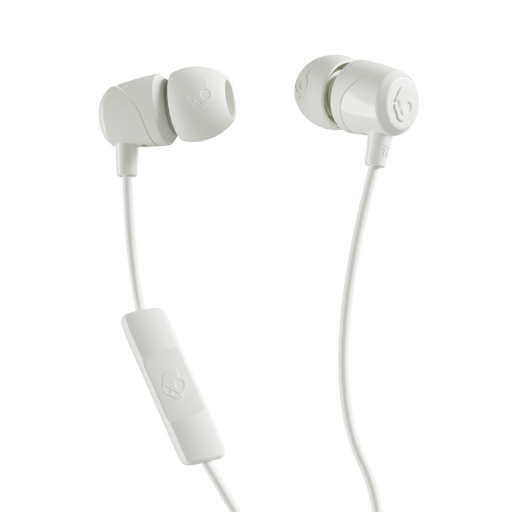
These wired in-ear earbuds are an alternative if you prefer that form factor for study calls. They have a microphone and USB-C connection rather than an over-head boom; check that your computer supports USB-C audio and that your meeting app uses the microphone.
A USB headset can handle the call if its connector fits and your computer and meeting app detect its speaker and microphone. Zoom Support recommends testing both audio devices; check the settings in whichever app your group uses.
Choose the connector that matches an available laptop port, unless you have a suitable adapter or dock. Logitech specifies USB-A for the H390, while Jabra lists USB-A, USB-C/A and USB-C Evolve 20 variants, so confirm the exact version before buying.
Teams certification is worth considering if your study group uses Teams regularly and you want a version assessed under Microsoft’s device programme. It is not a requirement for general computer audio; check certification on the exact headset variant.
No. Active noise cancellation targets surrounding sound heard by the wearer, while microphone noise reduction targets sound transmitted with your voice. Decide which side of the conversation needs attention before choosing between those features.