Single-seat meeting host
You lead from your own laptop and want a wired microphone positioned close to your mouth, a suitable USB connection and controls you can reach during the discussion.


Choose a wired USB headset when one person leads the planning meeting from a computer and needs personal audio and a microphone close to their mouth. If several people around one table must be heard through that computer, choose a speakerphone or room conferencing system designed for the group instead. For a headset, check the computer connector, outgoing microphone features and the exact meeting-platform version; listening-side noise cancellation serves a different purpose.
You lead from your own laptop and want a wired microphone positioned close to your mouth, a suitable USB connection and controls you can reach during the discussion.
You speak from an open office or busy home. Prioritise features affecting the sound sent to remote participants; active noise cancellation (ANC) for your own listening is a separate consideration.
Several people share one meeting room and need to contribute through one computer. Assess a speakerphone or room conferencing system rather than relying on the host’s personal headset to pick up the whole table.
Decide whether the computer needs to carry one person’s voice or the whole room’s conversation before comparing headset features. For a personal headset, work from the meeting environment and platform to the connector and wearing style.
| Concern | What to check | Who this matters to |
|---|---|---|
| Room coverage | Establish how many people share the room and check the stated group or room size for shared-audio equipment. | If everyone around my table needs to speak through one computer, I need room audio rather than the host’s headset. Around 36% of consumers put shared-room coverage first. |
| Outgoing voice clarity | Check for a stated noise-cancelling boom microphone; do not treat listening-side ANC as the same feature. | When I lead from a noisy desk, remote participants need to hear my voice without nearby activity dominating it. Voice clarity is the primary concern for around 29% of consumers. |
| Meeting controls | For Microsoft Teams, check certification and mute or call controls on the exact headset version. | I need to manage a Teams discussion without hunting for on-screen controls. Around 21% of consumers place that workflow first. |
| Connection and fit | Match the connector and any included adapter to the computer; consider wearing style and cable layout for longer meetings. | If I move between computers or wear the headset through long sessions, connection and fit shape my choice. They come first for around 14% of consumers. |
A personal headset places its microphone near one wearer. Logitech describes its BCC950 and GROUP conferencing products for groups and meeting rooms, respectively—a different task from capturing the host’s voice.
Count the people who will speak from the room. If they all need to be heard, assess shared-room equipment before choosing a headset for anyone’s private listening.
ANC addresses noise heard by the wearer; microphone noise reduction concerns sound sent to other participants. A product can describe both, but one does not establish the other.
For a noisy meeting location, check the microphone features separately from listening-side noise cancellation.
USB-A, USB-C, included adapters and Teams or UC versions differ across the cited headset lines. A product-family name alone does not identify the configuration being ordered.
Match the exact model and connector to the meeting computer, and check its platform version if integrated Teams controls matter.
Jabra marks its referenced Evolve2 40 support page as discontinued. Documentation for that model can help explain its design without establishing what is currently offered.
If considering an Evolve2 40 SE headset, confirm the exact current model, connector and seller terms before ordering.
These product lines illustrate different personal-headset configurations; the brand names do not indicate that every model or variant has the same features.
Logitech’s wired business range includes the H570e Teams USB-A headset and Zone Wired 2 for Business in platform-specific versions.
The wired Blackwire 5200 line includes configurations for people who need more than one connection type.
The corded Evolve2 40 family offers office-oriented USB-A and USB-C variants.
EPOS ADAPT 160T USB II is a double-sided wired headset with a Teams-oriented configuration.
These wired personal headsets are choices for one facilitator or remote participant using a meeting computer. If several people in the same room must be heard, choose shared-room audio equipment for that task instead.
 No image available
Consider this personal headset when the facilitator needs a wired connection and may use computers with different USB ports.
The named configuration is stereo and includes a USB-C/A adapter. Check the exact headset’s Teams certification if integrated Teams controls are required.
 No image available
Consider this personal headset for a facilitator who wants a microphone described as noise-cancelling and an inline remote.
Check that its USB connection fits the meeting computer and whether the exact model has the platform controls your meetings require.
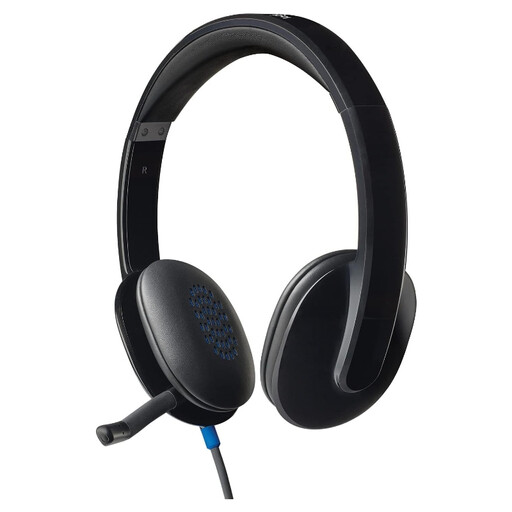 No image available
Consider this wired personal headset when one person, rather than a group around a table, will speak through the meeting computer.
Check the computer connection and the exact model’s meeting-platform controls before choosing it for a Teams-led workflow.
Not as the main way to capture everyone around a table: a personal headset serves its wearer. For shared audio, look at equipment designed for the group; Logitech describes BCC950 for teams of 1–4 people and GROUP for rooms seating 14–20.
It matters when you want headset controls integrated with Microsoft Teams rather than relying only on the meeting software’s on-screen controls. Microsoft says certified USB peripherals offer plug-and-play operation and Teams call control; check the exact device version for the functions you need.
No. ANC addresses distractions heard by the headset wearer, while microphone noise reduction concerns sound sent to remote attendees. Logitech lists both features for Zone Wired 2, which is why they should be checked separately on any model you consider.
Match the exact headset and any included adapter to the ports on your meeting computer. Logitech offers USB-C and USB-A Zone Wired 2 configurations, while HP describes a Blackwire 5220 USB-C configuration with a USB-A adapter; do not assume every variant has the same contents.
Check fit for the expected meeting length and whether replaceable wear parts are available for the exact model. Logitech says Zone Wired 2 earpads and its headset strap can be replaced; confirm compatibility and availability before relying on replacements.