Hosts in noisy shared spaces
If nearby conversations, typing or venue noise could reach remote attendees, make the microphone your priority. Check its noise-reduction features rather than relying on ANC, which addresses what you hear.


Choose a wired USB headset that fits your computer and meeting platform, then check whether its microphone, controls and fit suit the way you chair. In a noisy venue, examine microphone noise-reduction features for the benefit of remote participants; active noise cancellation (ANC) addresses noise reaching your ears, so check the two features separately.
If nearby conversations, typing or venue noise could reach remote attendees, make the microphone your priority. Check its noise-reduction features rather than relying on ANC, which addresses what you hear.
If you move between meeting computers or need to start promptly, confirm the USB connector, any supplied adapter and the exact meeting-platform variant before the session.
If you chair extended discussions, consider the wearing style, padding and adjustment alongside the placement of mute and volume controls. Fit remains individual.
Check the computer connection and the noise around your microphone first. Then consider fit and whether you also need to reduce noise reaching your ears.
| Concern | What to check | Who this matters to |
|---|---|---|
| Speech heard remotely | Look for a boom microphone and check its stated noise-reduction features separately from ANC. | If I chair in a shared room, I need remote members to follow my voice without nearby chatter taking over. Around 36% of consumers put outgoing speech clarity first. |
| Connection and platform | Match the exact USB connector and any included adapter to your computer; check the UC or Teams variant where relevant. | When I have to start the meeting on time, I cannot risk choosing the wrong connector or expecting call controls that my setup does not provide. For around 29% of consumers, compatibility is the primary concern. |
| Fit and call controls | Consider mono or stereo wear, adjustment and padding, and check how mute and volume are controlled. | Through a longer discussion, I need a fit I can tolerate and controls I can reach without losing track of the meeting. Long-session comfort and control come first for around 21% of consumers. |
| Noise reaching the host | If you need quieter listening as well as outgoing speech control, confirm ANC and microphone noise reduction separately. | In a persistently busy venue, I need to follow remote speakers despite the sound around me. Reducing noise reaching the host is the leading need for around 14% of consumers. |
ANC concerns noise heard by the wearer. Remote participants depend on the headset's microphone system, so a model's ANC feature alone does not answer their listening needs.
For a noisy venue, read the microphone description separately and check for a boom microphone with stated noise-reduction features.
Connectors, adapters and meeting-platform variants can differ within a range. A familiar model family does not establish what comes with the exact version you order.
Match the model and variant to your computer's USB port, and confirm any adapter and UC or Teams designation before buying.
A headset that seems suitable for a brief call may feel different through introductions, discussion and troubleshooting. Padding and adjustment matter, but comfort depends on the wearer.
Check the wearing style, adjustment and ear-cushion description, along with the retailer's applicable return terms.
Voluntary return terms and statutory remedies serve different purposes. GOV.UK explains that customers must be offered a remedy when goods are faulty or not as described.
Keep your order confirmation and check the retailer's change-of-mind process separately from information about faulty goods.
The features below relate to particular headset lines and variants, not every product bearing the brand name.
Its wired USB range includes computer headsets and the Zone Wired 2 business model.
The Blackwire 5200 and 8225 lines illustrate different wired connectivity and noise-management features.
The Evolve2 30 SE is a wired meeting-headset option with UC and Teams-oriented variants.
These wired computer-headset choices may suit club-meeting hosts who want to check connection and microphone needs against a particular product. Confirm the exact connector, controls and meeting-platform fit before ordering.
 Image unavailable
For hosting from a computer, this wired option is worth checking if you need the USB-C connection and USB-C/A adapter named in the product listing.
Confirm how its connector and adapter fit your computer, and whether its controls work as you expect with your meeting platform.
 Image unavailable
For chairing a computer-based meeting, consider this model if an inline remote is important to your setup.
Its product name describes the microphone as noise-cancelling; check the connector and how the controls behave with your meeting platform rather than assuming a particular result in your venue.
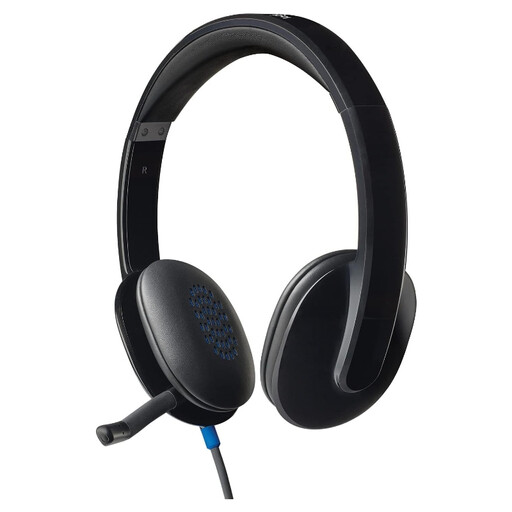 Image unavailable
For a club meeting, assess this wired headset against the computer you will use and the length of time you will wear it.
Confirm its connector, mute controls and fit on the exact product listing before choosing it for your hosting setup.
 Image unavailable
If you are considering a gaming-oriented headset for a computer-based club meeting, check its meeting controls and conferencing-platform fit before choosing it.
The product name identifies a wired USB design and describes its microphone as noise-cancelling; that description does not establish how it will perform in your venue.
No, not for every club meeting. If your club uses Teams and headset call controls matter to you, Microsoft says its certified personal peripherals offer plug-and-play setup and Teams call control; check that the exact variant is certified.
Prioritise microphone noise reduction when your main concern is what remote members hear. Consider ANC as well if you need to reduce noise reaching your own ears, and check that the particular headset specifies both features.
Match your computer's available port to the connector on the exact headset variant. Check whether an adapter is included rather than assuming that an accessory supplied with another model comes with yours.
In the UK, a fault and a change of mind are different return situations. GOV.UK explains that customers have remedies when goods are faulty or not as described; for an unsuitable online purchase, check the applicable cancellation conditions and the retailer's process separately.