For a wired USB-A mouse on a small desk, choose a hub whose computer-side plug fits an available port and whose downstream sockets include USB-A. Measure the cable path as well as the space for the hub: a basic bus-powered model suits a mouse and other simple peripherals, while a hub with documented extra power is worth considering if demanding storage or charging devices will share it.
Who this setup suits
Small-desk laptop users
If your wired mouse has a USB-A plug, you need a reachable USB-A socket without leaving the hub and its cable in your working area. Check the laptop’s available port separately: it determines whether the hub needs a USB-A or USB-C host plug.
Users with a computer farther away
A desktop under the desk or a laptop on a stand may need a longer attached lead to put the hub where you can reach it. UGREEN and StarTech.com describe USB-A hub models with attached leads of 60 cm and 61 cm respectively.
Mouse users adding other devices
If storage or charging devices will join your mouse, consider how the hub supplies power to everything connected. StarTech.com also lists a powered model with an adapter for a more demanding setup, though that adds a cable and uses a socket.
What to check before buying
Match the plugs first, then measure where the hub needs to sit; choose additional ports and power features for devices you actually plan to connect.
| Concern |
What to check |
Who this matters to |
| Connector match |
Match the hub’s host plug to the computer’s free port and its downstream socket to the mouse plug. |
If my mouse has a USB-A plug, I need somewhere to connect it that also fits my computer. Around 42% of consumers put connector matching first. |
| Cable reach and placement |
Measure the cable path to the intended hub position; compare it with the attached lead length. |
With my computer under the desk or on a stand, I need the hub within reach without stretching the mouse cable. For around 33% of consumers, placement is the primary concern. |
| Simple expansion |
Count the sockets needed for the mouse and other peripherals you regularly use. |
If I only want to add a keyboard or flash drive beside my mouse, I would rather keep the setup straightforward. Basic expansion comes first for around 17% of consumers. |
| Power for other devices |
For storage or charging devices, check whether extra power is supported and how much is shared. |
If I may add an external drive or charge a device through the hub, I need to account for its power requirements. Around 8% of consumers prioritise that future load. |
Common buying mistakes
-
Checking the mouse plug but not the computer port
A USB-A mouse needs a USB-A downstream socket, but the hub’s host plug must also fit the computer. A USB-A-host hub and a USB-C-host hub are not interchangeable without considering that connection.
Check the computer’s available port and the mouse plug before choosing the hub’s connector arrangement.
-
Choosing a small body without measuring cable reach
A short attached lead can leave the hub awkwardly placed when the computer is on a stand or below the desk. UGREEN and StarTech.com list examples with 60–61 cm leads for setups needing more reach.
Measure the route from the computer port to a usable position for the hub. A shorter lead may be tidier when both are already close together.
-
Expecting a basic hub to handle every power load
A mouse-only setup does not call for the same power arrangement as one that also connects demanding storage or charging devices. StarTech.com describes a powered hub with 15 W of shared power, while Anker advises keeping the combined connected-device load within the limit stated for its four-port data hub.
Check the planned devices against the particular hub’s power information before adding them to the same connection.
-
Assuming USB-C includes charging and display output
A USB-C connector alone does not establish those functions. Belkin states that its F4U090 mini hub supports neither pass-through charging nor video output from its USB-C ports.
If either function matters to your desk setup, check the hub’s stated capabilities and the computer’s compatible features rather than relying on connector shape.
Relevant brands to consider
UGREEN
UGREEN UK lists compact hubs, including a four-port USB-A model with an attached 60 cm lead.
- That model’s stated 10.4 × 3.0 × 1.0 cm body and longer lead are relevant when the hub needs a small place on the desk away from the computer.
- Check current availability before planning around this particular model.
Belkin
Belkin’s F4U090 is a USB-C-host mini hub with two USB-A and two USB-C downstream ports.
- Its port mix is relevant if a USB-C computer needs a USB-A socket for the mouse alongside USB-C peripherals.
- Belkin states that this model does not support pass-through charging or monitor video output from its USB-C ports; check current availability as well.
StarTech.com
StarTech.com lists both extended-cable USB-A hubs and a separately powered compact option.
- Its H5A4A-USB-HUB-2 has four USB-A ports and a 61 cm attached lead; the separately powered ST4300MINI has a stated 15 W of shared power.
- The powered model needs its adapter and a socket, which adds hardware to a desk used only for a mouse.
Anker
Anker lists a compact four-port USB-A data hub for basic peripheral connections.
- Its four data ports offer a way to connect a mouse alongside other basic peripherals.
- Anker states that this hub does not support charging and advises against a combined connected-device load above 900 mA.
Joybuy product choices
These hubs offer different ways to connect a wired mouse: simpler multi-port options for basic peripherals and USB-C docks with additional connections. Check the host plug and cable path against your own desk before choosing.
 No image available
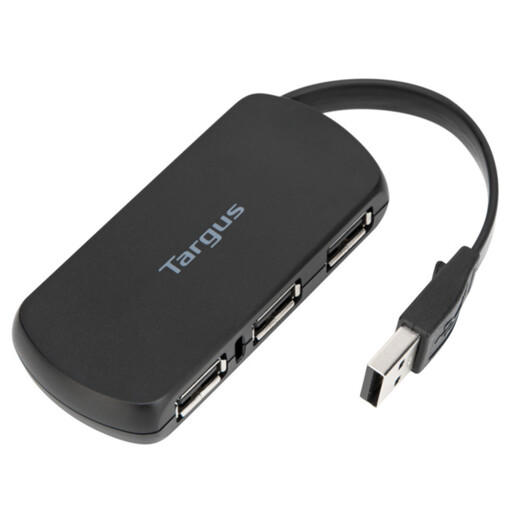
Targus 4-Port USB Hub
Consider this four-port hub if you want to connect a mouse alongside other basic peripherals. Check the host connector and the space available for the hub at your intended desk position.
View on Joybuy
 No image available
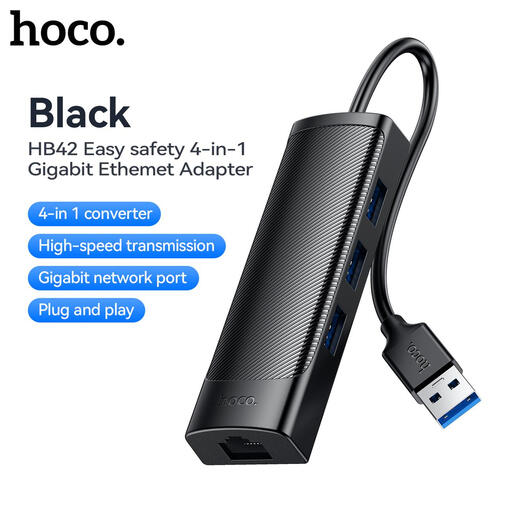
HOCO HB42 4-in-1 USB Gigabit Ethernet Adapter, Black
Consider this adapter if your mouse will share a nearby USB-A computer connection with other peripherals and you also want an Ethernet socket. It has three USB 3.0 ports, RJ45 LAN and a stated 0.2 m cable; measure the route before choosing it for a computer farther away.
View on Joybuy
 No image available
MOVESPEED DK5A1 10-in-1 USB-C Docking Station
This USB-C dock is a choice to examine when a wired mouse is one of several devices in the desk setup. Its title lists USB-A connections, 4K 60Hz HDMI, SD/TF and 3.5 mm audio; check the computer’s support for any additional functions you intend to use, and confirm the dock’s dimensions and cable reach.
View on Joybuy
 No image available
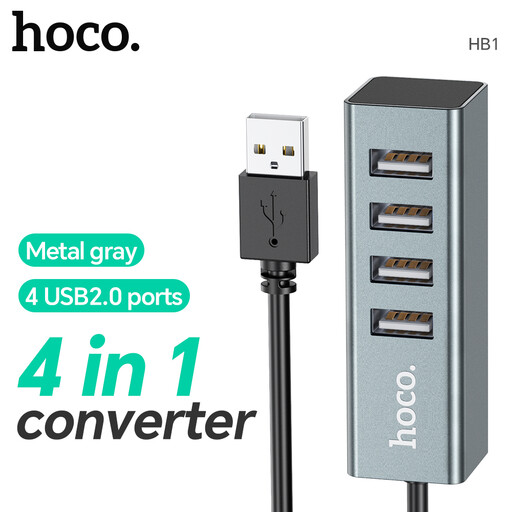
HOCO HB1 USB Hub, four USB 2.0 ports, Metal Grey
Consider this hub for a wired mouse and other basic USB peripherals when four sockets would be useful. The named ports are USB 2.0; confirm the computer-side connector and cable length before deciding where it can sit.
View on Joybuy
 No image available
Baseus Metal Gleam Series II 10-in-1 USB-C Hub, Cosmic Black
This USB-C hub is worth examining if the mouse connection is part of a setup that also calls for display, network or card-reader ports. Its title lists USB-A sockets, two HDMI connections, RJ45 and SD/TF; check the computer’s capabilities for the functions you need, along with the hub’s dimensions and cable reach.
View on Joybuy
Frequently asked questions
Will a USB-C hub work with my wired USB-A mouse?
Yes, if the hub connects to an available USB-C port on your computer and provides a USB-A downstream socket for the mouse. Check other required functions separately: Belkin states that its F4U090 mini hub does not provide pass-through charging or monitor video output from its USB-C ports.
Do I need a powered hub just for a wired mouse?
A basic bus-powered hub is a suitable route for a mouse and similar peripherals. If you also intend to connect demanding storage or charging devices, check the particular hub’s power provision; StarTech.com lists a separately powered model with 15 W of shared power for more demanding connected devices.
Will a 5Gbps hub improve how my wired mouse works?
Do not choose a 5Gbps hub on the assumption that the rating will make the mouse more responsive. The data-rate label is more relevant when you also connect compatible storage; the USB Implementers Forum explains that the connection operates at the lowest common speed capability of its components.
What should I do with an old USB hub in the UK?
Ask the seller about its arrangements for disposing of old household electrical equipment rather than treating the hub as ordinary rubbish. GOV.UK says retailers and distributors must provide customers with a way to dispose of old household electrical and electronic equipment.


