For one computer, choose a hub whose host connector fits the computer and whose downstream data port fits the USB headset; check documented audio support if the headset uses USB-C. Consider extra power when other connected devices call for it. If the headset must alternate between two computers, choose a USB sharing switch rather than an ordinary hub.
Who needs which setup?
One-computer users who need an accessible port
If a laptop or desktop USB port is awkward to reach, a hub can put the headset connection in a more convenient position. Match both connectors and check that the host cable reaches the intended spot. StarTech.com’s cited hubs illustrate why port layout and cable length matter.
Users with USB-A and USB-C peripherals
If the headset shares a desk with devices using both plug types, check the hub’s downstream port mix. Belkin’s F4U090 has two USB-A and two USB-C downstream ports, but its USB-C connection does not provide pass-through charging or video output.
People alternating between two computers
If the same headset needs to move between two computers, look for deliberate host switching rather than extra ports on a one-computer hub. UGREEN describes its four-port USB switch as sharing connected devices between two computers.
What matters when choosing?
Establish whether the headset connects to one computer or alternates between two. Then check connector fit, cable reach and the power needs of everything that will share the connection.
| Concern |
What to check |
Who this matters to |
| Connector fit |
Match the hub’s host plug to the computer and a downstream data port to the headset. For a USB-C headset, check documented USB-C audio support. |
I need the headset to plug into the hub without relying on an adaptor whose compatibility I have not checked. Around 36% of consumers put connector fit first. |
| Desk access |
Measure from the computer’s port to the intended hub position, allowing slack in the attached cable. |
When the computer sits away from the desk edge, I want to reach the headset connection without pulling on its cable. Cable reach is the main concern for around 29% of consumers. |
| Device power |
List the devices sharing the hub and check whether its stated arrangement is bus power, an auxiliary input or a mains adaptor. |
If other peripherals stay connected alongside my headset, I need their combined power demands to suit the hub. Around 21% of consumers prioritise the power arrangement. |
| Computer switching |
If the headset alternates between computers, check for a USB switch with suitable host and downstream connections. |
At a desk used with two computers, I want to select which one receives the headset rather than move its plug each time. That is the primary need for around 14% of consumers. |
Mistakes to avoid
-
Assuming a USB-C host plug means USB-C headset ports
The host connection and downstream ports can differ. StarTech.com’s H5C4A-USB-HUB connects to a computer through USB-C but provides four USB-A downstream ports.
Check the computer port and headset plug separately. For USB-C headphones, look for a downstream port documented for USB-C audio, as on Belkin’s AVC018.
Using a separate adaptor adds another compatibility check for data and audio.
-
Buying a one-computer hub to switch between computers
An ordinary hub expands one computer’s connections; it does not provide the host selector described for UGREEN’s two-computer USB switch.
If the headset must alternate between computers, check a switch’s host connections, downstream ports and selection controls.
Without switching hardware, moving the headset may still involve unplugging it.
-
Expecting extra power to fix every audio problem
Extra power addresses the connected devices’ power demands. Microsoft also identifies the selected output, mute settings, audio enhancements and drivers as possible causes of no sound in Windows.
Consider a powered hub when the connected devices call for it. For a Windows sound problem, test the headset directly and check the selected audio output before changing hubs.
An unneeded mains adaptor adds a cable and plug to the desk without addressing an output-selection problem.
-
Overlooking the attached cable
A hub with suitable ports may still be awkward to place. StarTech.com specifies a 13 cm attached host cable for its H5C4A-USB-HUB and a 30 cm cable for its 5G3AGBB-USB-A-HUB.
Measure the route from the computer port to a stable, reachable hub position, leaving enough slack to avoid pulling the connector.
Relevant brands to consider
StarTech.com
Its cited models cover compact USB-C-to-USB-A expansion and a USB-A hub with an auxiliary-power option.
- The H5C4A-USB-HUB specifies four USB-A downstream ports and a 13 cm attached host cable.
- That model has no downstream USB-C port for a USB-C headset. The separate 5G3AGBB-USB-A-HUB shares 4.5 W of bus power across three downstream ports.
Belkin
Its cited models offer different port mixes and power arrangements, so the model matters more than the brand name alone.
- The F4U090 lists two USB-C and two USB-A downstream ports. Belkin explicitly lists USB-C headphones among the supported uses for the separate AVC018.
- The F4U090 does not provide pass-through charging or USB-C video output; those capabilities should not be inferred from its USB-C ports.
UGREEN
Its cited USB switch addresses a different task from a one-computer hub: alternating connected devices between two computers.
- UGREEN describes its four-port USB 3.0 switch as providing a selection button and indicators for the active computer.
- The headset must fit the switch’s downstream connection, and the active computer must be selected before use.
Joybuy products for one-computer desks
These USB-C hubs and docks offer additional connections for a desk using one computer. Check the actual headset plug, the computer’s host port and the intended hub position; the products shown here are not two-computer sharing switches.
 No image available
Baseus Metal Gleam Series II 10-in-1 hub, Cosmic Black
Consider this for a one-computer desk needing USB-A and USB-C peripheral connections alongside a headset.
The listed connections include one USB-A port at 10 Gbps, two USB-A ports at 480 Mbps and one USB-C port at 10 Gbps; the title also lists HDMI, RJ45, SD/TF and a USB-C PD connection. Check which downstream port supports your headset, plus the host-cable reach and power arrangement for the desk.
View on Joybuy
 No image available
MOVESPEED DK5A1 10-in-1 USB-C docking station
Consider this for one computer when the headset shares a dock with other USB peripherals.
The listed connections include three USB-A data ports, one USB-C data port and a separate 3.5 mm audio socket. The 3.5 mm socket is not a USB headset port: match the headset to a USB data port and check its audio compatibility. Also check cable reach and power needs.
View on Joybuy
 No image available
Mokin 2USBC to TB+ docking hub, 2xUSB A 3.0 and 1USB C3.0
Consider this for a one-computer desk if its actual host and downstream connections match the computer and headset.
The title lists two USB-A 3.0 connections, one USB-C 3.0 connection, SD/TF and HDMI 4K60Hz. Confirm which connections are downstream data ports on the offered variant, whether the headset is supported, and whether the cable and power arrangement suit the desk.
View on Joybuy
 No image available
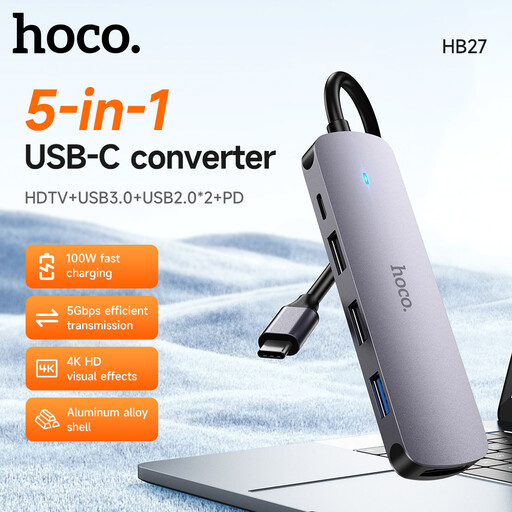
HOCO HB27 USB-C hub, Metal Gray
Consider this for a one-computer desk needing additional USB connections, once the offered port layout has been checked against the headset.
The product is identified as a USB-C hub with USB 3.0 ports. Confirm the downstream connector types and headset compatibility, then check cable reach and the power arrangement for the devices you plan to connect.
View on Joybuy
Common questions
Do I need a 5 Gbps or 10 Gbps hub just for a USB headset?
Choose by compatible connections and documented headset support before comparing transfer-rate labels. The USB Implementers Forum identifies several USB 3.2 transfer rates, but a rate printed on a hub does not establish that a particular headset and computer will work together. For a USB-C headset, check whether the hub explicitly supports USB-C audio.
Will a headset become the audio output as soon as I plug it into a hub?
Not necessarily on Windows: check that the headset is selected as the output device after connecting it. Microsoft also identifies mute settings, audio enhancements and drivers as possible causes when sound does not play.
Do I need a powered hub for one USB headset?
Not necessarily; a bus-powered hub may suit a desk where the headset is the main connected peripheral. If other devices share the hub, assess their power demands against that particular hub’s stated arrangement before choosing an auxiliary-power or mains-powered option.
Can a normal USB hub share one headset between two computers?
Choose a USB sharing switch if the headset must alternate between two computers; a normal one-host hub adds ports rather than selecting a computer. UGREEN describes its four-port switch as sharing USB devices between two computers. Check the headset connection and select the active computer before using it.


