Keyboard-only desk users
You need a connection for one wired keyboard, perhaps alongside a mouse, without adding docking features you will not use.


Choose a hub whose computer-side connector fits your computer and whose downstream port fits your wired keyboard. A compact bus-powered hub is a straightforward choice for a keyboard and a few low-power peripherals; consider a self-powered hub when several devices need more power. A USB-C multiport hub makes sense when the same desk setup also needs features such as a display connection, Ethernet or charging pass-through.
You need a connection for one wired keyboard, perhaps alongside a mouse, without adding docking features you will not use.
Your computer has a USB-C port, while your keyboard and other existing accessories have USB-A plugs. Check both sides of the hub before considering its extra features.
Your keyboard shares the desk with devices such as storage, a headset or a monitor. The number of connections, their power needs and the hub’s position on the desk all matter.
Match the computer and keyboard connectors first, then check where the hub will sit and what else will remain connected.
| Concern | What to check | Who this matters to |
|---|---|---|
| Connector match | Identify the computer-side USB-A or USB-C connection and confirm that a downstream port fits the keyboard plug. | If my keyboard has a USB-A plug but my laptop only has USB-C, I need a hub that joins the two before extra ports matter. Around 39% of consumers put connector matching first. |
| Desk reach | Check the host-cable length against the route to the intended hub position, and consider where the ports face. | With my computer away from the keyboard, I need the hub within reach rather than hanging from its cable. Roughly 23% of consumers prioritise desk placement. |
| Shared power | List the devices that will stay connected and compare the hub’s total and per-port power information; consider a supplied power adapter for greater demands. | If storage or charging devices will share my keyboard’s hub, I need to know how their power demands are accommodated. Around 23% of consumers make power headroom their primary concern. |
| Wider desk connections | Confirm the exact display, Ethernet or charging connections needed and the laptop’s compatibility with them. | When my keyboard is one part of a laptop desk setup, I want the same hub to handle other connections I actually use. About 15% of consumers put wider workstation connectivity first. |
A hub with a USB-A computer-side plug will not connect directly to a USB-C-only computer. A USB-C hub also needs a downstream port that fits the keyboard.
Check the plug at each end of the connection before choosing the number of ports.
Power may be shared across the hub. StarTech.com specifies 4.5 W shared across four downstream ports on its cited bus-powered model, so additional devices change what you need to assess.
For several devices with greater power demands, compare the exact model’s total and per-port figures with a self-powered alternative.
HDMI, Ethernet and charging pass-through serve different needs from connecting a keyboard. Their presence does not improve a keyboard-only connection.
Choose those features only if your computer supports them and you plan to use them at this desk.
A self-powered hub adds a mains adapter to the setup, so the adapter and its condition matter as well as the hub’s ports.
Use the compatible supplied adapter, inspect plugs and cables for damage, and consult official product-safety alerts if you suspect a particular product is unsafe.
Kensington’s CH1200 represents a compact way to connect USB-A accessories to a USB-C computer.
The cited StarTech.com models cover both a bus-powered USB-A hub and a self-powered desktop hub.
The cited TP-Link models illustrate the difference between powered USB-A expansion and a USB-C hub with display and charging connections.
UGREEN’s cited seven-in-one USB-C hub is aimed at a desk that needs more than a keyboard connection.
Anker lists a range of USB-C hubs with different port combinations for laptop desks.
These options range from a basic keyboard hub to USB-C desk adapters with additional connections. Check the computer-side plug and keyboard-side port on the exact product before buying, especially where the connector configuration needs confirming.
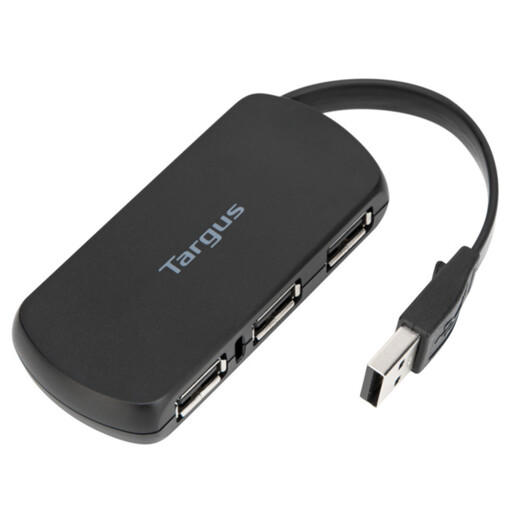 No image available
A straightforward option when a wired keyboard needs a hub rather than display or network connections.
Four ports are stated in the product name. Confirm that the computer-side connector and a downstream port fit your devices, and that the cable reaches the intended position.
 No image available
Consider this adapter when a keyboard connection is part of a USB-C laptop desk setup that also needs display or wired-network connections.
The product name specifies 4K HDMI, VGA, Gigabit Ethernet, 100 W power delivery and dual USB 3.0 ports. Check the keyboard-port configuration and the computer’s USB-C display compatibility before relying on those functions.
 No image available
This is a wider desk-connectivity option if you need to connect a keyboard alongside display, network or card-reader equipment.
The product name lists USB-A and USB-C data connections, two HDMI outputs, RJ45, SD/TF and a USB-C power-delivery input. Verify the exact USB-A port arrangement and USB-C DisplayPort Alt Mode support before choosing it for a particular setup.
No image available
Consider this dock if your keyboard will share a compatible laptop connection with other desk peripherals.
The product name also lists a USB-C 3.0 connection, SD/TF and HDMI 4K60Hz. Confirm that your computer supports the dock’s required USB-C or Thunderbolt functions before relying on its additional connections.
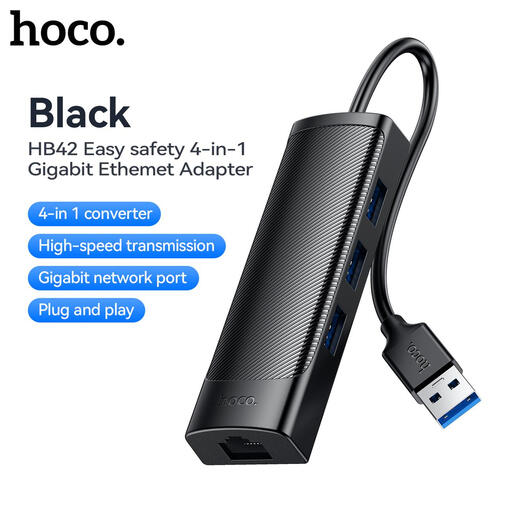 No image available
This adapter may suit a desk that needs a keyboard connection and wired networking, provided its connectors fit the computer and keyboard.
The product name specifies three USB 3.0 ports, RJ45 and a 0.2 m cable. Confirm the host plug and downstream connector types before buying; the short cable also makes hub placement worth checking.
A higher data-transfer rating is not a reason to expect faster typing from a wired keyboard. Prioritise matching the connectors; transfer speed becomes more relevant if the same hub will also serve storage devices.
A powered hub is not the default requirement for one keyboard and a mouse. If you will also attach storage or charging devices, check the exact hub’s shared-power limits: StarTech.com specifies 4.5 W shared across four ports on its cited bus-powered model, while its cited self-powered model includes a dedicated supply.
It can if the hub provides a port that fits the keyboard, supports the required power-delivery arrangement and works with the laptop’s USB-C charging connection. TP-Link lists one USB-A data port and up to 100 W power delivery for the UH3020C; check the laptop and power-source requirements before relying on charging pass-through.