What to check when buying
Establish the tablet’s approved connection first. Then count the peripherals that need ports at the same time and check any display or power requirements against the computer.
| Concern |
What to check when buying |
Who this matters to |
| Tablet connection |
Check the exact tablet model’s hub guidance and test its direct computer connection before changing the setup. |
I need pen input to remain connected while other desk accessories are in use; around 36% of consumers would put tablet connection stability first. |
| Usable peripheral ports |
Count the USB-A and USB-C data connections needed simultaneously, then check the hub’s host connector. |
When I take over the shared desk, I do not want to unplug the keyboard or storage just to connect another accessory. Roughly 29% of consumers would prioritise usable peripheral ports. |
| Pen-display video and power |
Confirm the tablet’s specified video, data and power route against the host port and cable; a USB-C connector alone does not establish those capabilities. |
My pen display needs a working picture as well as input, so the complete connection path matters to me; about 21% of consumers would make that their primary concern. |
| Power and cable arrangement |
Check whether connected devices need a self-powered hub and where its mains adapter would go. |
I need several power-drawing accessories to stay connected without crowding the shared workspace. Around 14% of consumers would put the power and cable arrangement first. |
Relevant brands for reference
These product lines illustrate different port arrangements; their listed features do not establish compatibility with a particular graphics tablet.
Belkin
Belkin UK lists the Connect 7-Port USB-C Hub (AVC023) as a multiport option for a laptop desk.
- Its listed connections include USB-A, USB-C data, HDMI, SD and microSD, with up to 100W Power Delivery to the host.
- Its 20cm attached host cable affects placement, and the port list does not establish tablet compatibility or add video capability to the computer.
UGREEN
UGREEN UK’s Revodok Pro 6-in-1 is a USB-C option for desks that need data ports alongside a display connection.
- UGREEN UK lists two 10Gbps USB-C data ports, two 10Gbps USB-A data ports, DisplayPort output and Power Delivery input.
- The stated 100W input and up to 85W pass-through do not establish that a pen display will operate through the hub.
Anker
Anker UK lists model A83D2 as a compact 7-in-1 USB-C hub with display, peripheral and card connections.
- Its listed features include 4K@60Hz HDMI, 5Gbps USB ports, SD/TF slots and 85W charging.
- Those specifications do not confirm graphics-tablet compatibility or the computer’s support for video and charging through its USB-C port.
StarTech.com
StarTech.com describes USB hub ranges covering conventional USB expansion and USB-C desk connections.
- Its range includes self-powered and bus-powered options, as well as different data-rate and Power Delivery arrangements.
- A range description cannot identify which individual model, if any, is approved for a particular graphics tablet.
Joybuy options for shared-desk peripherals
These docks and hubs are options for connecting other shared-desk accessories while keeping the graphics tablet on its manufacturer-approved connection. Check the computer’s host port before relying on any display or charging feature.
 No image available
Targus USB-C Universal Dual HDMI 4K Docking Station, 100W Power Delivery Pass-Thru (Retail Packaging)
Consider this dock when the shared desk needs display connections as well as a separate, approved connection for the graphics tablet.
The product name specifies dual HDMI 4K and 100W Power Delivery pass-through. Check the computer’s display capabilities and the required power-adapter arrangement.
View on Joybuy
 No image available
V7 V7UC-U3CRJ45HDVG-BLK USB-C Adapter
This adapter is relevant when the desk needs peripheral and display connections while the graphics tablet uses its approved route.
Its product name specifies dual USB 3.0 ports, 4K HDMI, VGA, Gigabit Ethernet and 100W Power Delivery. Confirm the computer’s video support and how the USB-C port handles data and charging if both matter to your setup.
View on Joybuy
 No image available
Mokin 2USBC to TB+ Dock, 2 × USB-A 3.0, USB-C 3.0, SD/TF and HDMI 4K60Hz
This dock offers named peripheral, card and display connections for a shared desk where the tablet remains on its approved connection.
The product name lists two USB-A 3.0 connections, USB-C 3.0, SD/TF and HDMI 4K60Hz. Confirm the exact host connector and computer compatibility before choosing it for display use.
View on Joybuy
 No image available
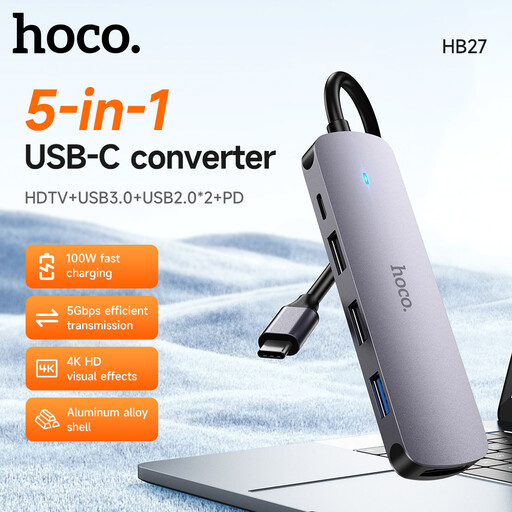
HOCO HB27 USB-C Hub – Metal Gray
Consider this USB-C hub for other shared-desk accessories, keeping the graphics tablet’s connection subject to its maker’s instructions.
Confirm the port counts and HDMI display capability you need before buying, as well as the computer port’s support for the intended functions.
View on Joybuy
 No image available
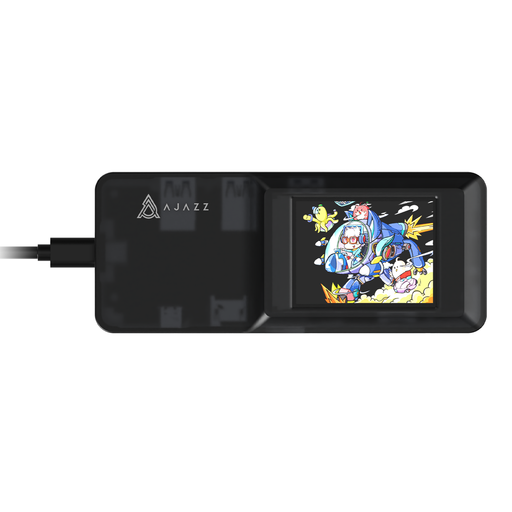
AJAZZ AKP01E Visualization Hub 8-in-1
This expansion dock may be considered for shared-desk accessories while the graphics tablet follows its approved connection route.
The product name identifies an 8-in-1 hub with TF/SD card slots. Confirm the exact port arrangement, host connection and display functions against the hardware you intend to use.
View on Joybuy
Frequently asked questions
Will any USB hub work with my graphics tablet?
No: suitability depends on the exact tablet and its connection mode. Wacom Support advises a direct computer connection when troubleshooting intermittent detection, and Huion Support lists a faulty adapter among possible causes of disconnection. Check the tablet maker’s instructions and establish a working direct connection before trying a hub.
What should I check before using a USB-C hub with a pen display?
Check the pen display’s required video, data and power connections against the computer port and cable. Wacom Support says that one-cable use with certain Wacom One 13 Touch configurations requires DisplayPort Alt Mode and 15W Power Delivery; Huion Support specifies USB 3.1 Gen 1 data and DP 1.2 Alt Mode for the display connections covered by its compatibility guidance.
When should I consider a self-powered USB hub?
Consider one when several connected accessories draw power and the computer port alone is not the intended supply for the setup. UGREEN UK explains that self-powered hubs use an external source, while bus-powered hubs draw from the host port. You will also need space and a socket for the adapter; tablet compatibility remains a separate check.
Does USB-IF certification tell me whether my tablet will work through a hub?
No: it does not replace the tablet maker’s connection guidance. The USB Implementers Forum says its public product search covers products certified to bear the USB-IF logo and to have passed its compliance programme. If certification matters to you, check the exact product identity, then confirm the tablet’s approved connection separately.


