One-computer desk users
You keep the printer connected to one laptop or desktop but need more USB ports for nearby peripherals. A hub addresses port expansion; it does not change which computer controls the printer.


Choose a USB data hub when one computer needs extra ports for a printer and other desk devices. If two computers need to take turns using one directly connected USB printer, choose a peripheral-sharing switch instead: it assigns the printer to one computer at a time. In either case, check the host connector, printer cable and cable reach before buying.
You keep the printer connected to one laptop or desktop but need more USB ports for nearby peripherals. A hub addresses port expansion; it does not change which computer controls the printer.
Two work computers need to use the same directly connected USB printer. A peripheral-sharing switch lets them take turns, subject to the switching method and printer compatibility of the particular model.
Your computer sits under the desk, on a stand or away from the printer. The route taken by the host lead and printer cable matters alongside the number of ports.
Start with the number of computers that need a direct USB connection to the printer. Then check the connections and physical layout of the desk.
| Concern | What to check | Who this matters to |
|---|---|---|
| Two-computer access | Check for two host connections, printer compatibility and a suitable manual or supported automatic switching method. | If two computers need to take turns with one directly connected printer, I need to know which computer controls it. Around 46% of consumers put switching between computers first. |
| Ports for one computer | Match the hub’s host connector to the computer and count the downstream connections needed for the printer and other devices. | If my computer has too few ports, I want the printer and everyday peripherals to stay connected. Roughly 36% of consumers prioritise extra ports for one computer. |
| Cable reach and power | Measure the cable route to the hub or switch; check how any other USB-powered devices will receive power. | With the computer away from the printer, I need cables that reach without strain and a workable connection for my other devices. About 18% of consumers make desk layout and power their primary concern. |
A standard hub adds ports to one host. It does not hand a directly connected printer from one computer to another.
If two computers need access, look for a printer or peripheral-sharing switch with the required host connections. Check whether its manual switching suits the desk, or whether any automatic function has software conditions.
The port count is little help if the hub cannot connect to the computer or sit where the printer cable reaches comfortably.
Check the computer-side connector and printer cable, then measure the route to the intended hub position, allowing room for cable bends.
StarTech.com explains that devices on an unpowered hub share the power available from its host connection. Accessories that draw more USB power may need a different arrangement.
List the devices that will draw power through the hub. If that includes portable storage or other higher-draw accessories, compare powered-hub specifications and check the adapter supplied with the model.
A powered hub also needs space for its mains connection and another cable at the desk.
A hub’s stated maximum data rate describes link capability, not how quickly a printer will produce pages. TP-Link notes that actual transmission speed depends on the computer and connected devices.
Choose the connections the printer needs first. A higher data-rate rating is more relevant if suitable storage or other peripherals will share the hub.
Its UH400 is a reference point for adding USB-A ports to one computer.
Its four-port USB-A hub with an attached 60cm lead illustrates an option for placing ports farther from one host computer.
Its US221A addresses the different task of sharing one USB peripheral between two computers.
Its GUB231 is a printer-focused switch for two PCs and/or Macs using one printer or multifunction printer.
These hubs are options for adding peripheral connections to one compatible computer at a shared desk. If the printer must move between two computers, look for a peripheral-sharing switch instead.
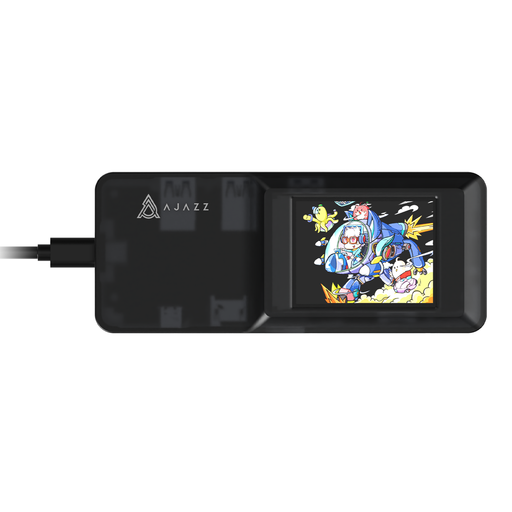 Image unavailable
Consider this for a one-computer desk that needs additional peripheral connections. The named variant lists USB-C connectivity, TF/SD card slots and 4K HD projection; confirm that a downstream port fits your printer cable and that the lead reaches the intended position. If other devices need USB power, check the downstream power specifications and included equipment.
 Image unavailable
Consider this when one compatible computer needs several kinds of peripheral connection. The product name specifies two USB-A 3.0 ports, one USB-C 3.0 port, SD/TF slots and HDMI 4K60Hz. Confirm the computer’s docking support and connector arrangement, then check the printer cable, cable reach and power needs before choosing it for the desk.
No: an ordinary hub expands one computer’s ports. For a printer that two computers must use in turn through a direct USB connection, look for a peripheral-sharing switch; ATEN and IOGEAR describe models that assign the device to one computer at a time.
Not necessarily. Check the printer cable and required ports first. A hub’s higher data-rate rating may matter more when compatible storage is connected alongside the printer; TP-Link notes that actual transmission speed depends on the computer and devices.
Check that the printer is powered on and the USB cable is secure, then try connecting it directly to the computer to help isolate the connection problem. Microsoft Support says a wired printer normally installs after connection; if it does not, try adding it in Printers & scanners and check Windows Update for drivers.
Consider one when other devices drawing USB power, particularly portable drives, will share the hub. StarTech.com explains that an unpowered hub shares the host port’s available power. Check the particular hub’s downstream power specifications and adapter before relying on it for those devices.