Choose a suitable powered USB data hub if the shared desk mainly needs a webcam and a few peripherals. Consider a USB-C multiport hub or dock when the desk also needs laptop charging, displays or wired networking, but check the camera plug, available data ports and laptop compatibility before buying. If the camera has connection problems through a hub, Logitech advises trying a direct laptop connection.
Who is the desk for?
Hot-desk webcam users
If your main task is plugging in a webcam and a few everyday peripherals, start with a data port that fits the camera. Keep a laptop port available for a direct-connection test if the camera has problems through the hub, as Logitech advises for its webcams.
One-cable laptop users
If you want the same desk connection to handle the webcam, charging and perhaps a monitor, check what each laptop supports over USB-C. A hub's charging and display connections are useful only when the host, charger and cable support the functions you intend to use.
Fixed shared-workstation teams
If the webcam stays beside displays, wired networking and several USB accessories, a dock can keep those desk connections together. Check its display and charging requirements against every laptop expected to use the workstation.
What matters when choosing a hub?
Start with the webcam connection, then decide whether the desk also needs charging, displays or permanently connected accessories. Those extra functions can change which hub or dock is appropriate.
| Concern |
What to check |
Who this matters to |
| Webcam connection |
Find a data port that fits the camera plug. If the webcam maker recommends a powered hub, check the power arrangement and keep a direct laptop port available for troubleshooting. |
When calls depend on the camera being recognised each time I sit down, interruptions matter more than extra desk connections; around 36% of consumers would put a reliable webcam connection first. |
| Connector and laptop compatibility |
Check the webcam plug and each laptop's ports. If you plan to connect a display, confirm the required USB-C display support on the host. |
Sharing a desk between different laptops and camera plugs means I need connections that actually fit; roughly 29% of consumers would prioritise connector and laptop compatibility. |
| Charging and desk expansion |
Compare the hub's stated laptop charging output with the laptop's requirements, and check the charger and cable. Add display or network ports only if the desk needs them. |
I want one connection to handle the camera and keep my laptop charged instead of reconnecting desk accessories; about 21% of consumers would make one-cable charging and expansion their main concern. |
| Permanent workstation connections |
Reserve a USB port for the webcam, count the other connections needed and check display compatibility and box contents. |
When several peripherals and displays stay at the desk between users, I want to change laptops without rewiring them; around 14% of consumers would chiefly value a permanent workstation setup. |
Shared-desk setup mistakes to avoid
-
Assuming the webcam must work through a hub
An intermediate connection may cause video or connectivity problems with some camera setups. Logitech recommends a high-quality powered hub for its C925e webcam, while its Brio 105 guidance recommends a direct computer connection.
Leave a suitable laptop port accessible. If the camera has problems through a hub, dock or KVM switch, test it directly before changing the rest of the desk setup.
-
Treating every USB-C connection alike
A connector that fits does not establish that a laptop supports the charging or display mode you intend to use. Kensington specifies host requirements for display and Power Delivery functions on its docks.
Identify the webcam plug, then check the laptop's documented charging and display capabilities against the particular hub or dock.
-
Planning charging around the charger rating alone
Power used by a hub may reduce what reaches the laptop. Anker states that its 555 USB-C Hub supports up to 100W pass-through charging but uses 15W for hub operation; the laptop must also support the power it receives.
Compare the stated laptop-side output with the laptop's requirements, and read the box contents before relying on a single charging connection.
Depending on the model, a compatible charger, cable or power supply may need to be obtained separately. Kensington states that its SD4842P dock does not include the cable, power supply or power cords.
-
Choosing a large dock for a webcam-only desk
Ethernet, several display outputs and a permanent power arrangement add setup requirements without necessarily helping a desk that only needs a webcam and basic input devices.
Choose the required connections before choosing the form factor: a powered data hub suits a simpler port-expansion task, while a multiport hub or dock is relevant when its additional functions will be used.
Relevant brands for reference
Anker
Anker's USB-C hub range includes compact multiport models for desks that need USB expansion alongside other connections.
- Anker lists charging, HDMI and USB connections on its 7-in-1 and 8-in-1 hub pages.
- For the Anker 555, up to 100W pass-through charging is reduced by 15W used for hub operation, and a wall charger is not included.
Belkin
Belkin offers portable USB-C adapters and larger multiport hubs for different combinations of desk connections.
- Belkin's UK range includes models with combinations of USB-A, HDMI, Ethernet, card-reader and pass-through charging connections.
- Check the particular hub and laptop together before relying on its display or charging functions.
UGREEN
UGREEN's hub range covers simpler USB expansion and multiport arrangements for a desk with more attached equipment.
- The range lists hubs with different combinations of USB ports, HDMI, Ethernet and Power Delivery.
- Port layouts vary by model, so choose against the webcam plug and the other connections the desk actually uses.
Kensington
Kensington's docking options are relevant to fixed desks with a webcam and several other peripherals.
- Kensington specifies USB ports, Ethernet, charging and display connections for its SD4842P dock.
- Its display functions have host requirements, and the SD4842P package excludes the cable, power supply and power cords.
Joybuy multiport hub choices
These multiport choices are relevant when the shared desk needs a webcam connection alongside other desk connections. Before choosing either, match a data port to the webcam plug and check the laptop functions you plan to use.
 No image available
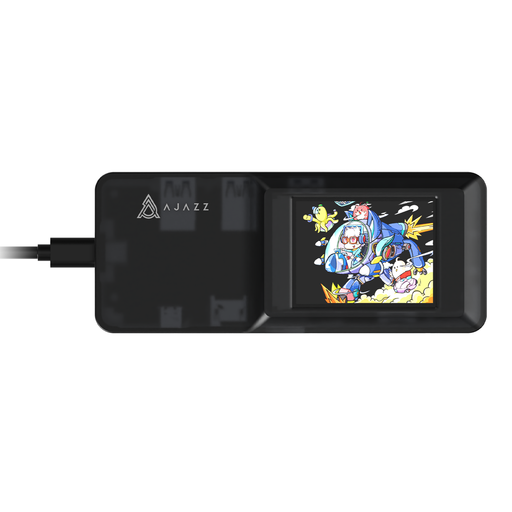
AJAZZ AKP01E Visualization Hub 8-in-1
Consider this USB-C hub if the desk needs a webcam connection alongside card or display connections. Its product name lists TF/SD slots and 4K projection; check that an available data port fits the webcam and that the laptop supports the display connection you intend to use.
Confirm the laptop charging arrangement separately before relying on the hub to supply power.
Joybuy
 No image available
USB-C Adapter with 2HDMI, DP, 2USB3.0, 2USB2.0, RJ45, PD, SD/TF and Audio
Consider this adapter when a shared workstation needs a webcam connection alongside displays and wired networking. Its product name lists 2HDMI, DP, 2USB3.0, 2USB2.0, RJ45, PD, SD/TF and audio connections.
Check that a data port fits the webcam plug, and confirm the laptop's display and charging compatibility before relying on those functions.
Joybuy
Common questions
Will a USB hub work with my webcam?
A webcam can work through a hub, but the result depends on the camera and connection. Logitech recommends a high-quality powered hub for its C925e webcam; if video or connectivity problems occur, try connecting the camera directly to the laptop.
Should the shared desk have USB-A or USB-C camera ports?
Choose a data port that matches the webcam's plug and works with the laptops using the desk. Check the particular camera cable rather than assuming that a USB-C laptop requires a USB-C webcam connection.
Can one USB-C hub connect the webcam and charge my laptop?
Yes, if the hub provides a suitable camera data connection and the hub, charger, cable and laptop support the required USB Power Delivery arrangement. Anker states that its 555 hub reserves 15W of its up-to-100W pass-through charging capacity for hub operation, so compare the laptop-side output with your laptop's requirements.
Do I need a dock if the shared desk has monitors?
Not necessarily: a multiport hub may cover a webcam and a single display, while a dock is more relevant when several displays, wired networking and other peripherals stay connected. Check the laptop and dock requirements for the intended display arrangement before choosing either.


