Keyboard-only student setup
You need a compatible port for a wired keyboard at a compact desk, without display or laptop-charging functions you do not plan to use.


For one wired keyboard, match the hub’s computer-facing plug to an available port, then check that it has a data port for the keyboard: a compact USB-A hub suits a computer with USB-A, while a USB-C-only laptop needs a compatible USB-C hub with a USB-A port if the keyboard uses USB-A. A hub drawing power from the computer is generally sufficient for a keyboard-led setup; consider an externally powered hub if several additional or higher-power devices will share it, allowing for its adapter and desk space.
You need a compatible port for a wired keyboard at a compact desk, without display or laptop-charging functions you do not plan to use.
Your laptop has an available USB-C connection but your wired keyboard uses USB-A. A USB-C hub with a USB-A data port bridges that connection and can provide ports for other devices.
Your keyboard will share a hub with several accessories or devices with greater power needs. Check both the number of usable ports and how the hub is powered.
Start with the two ends of the connection: the available port on the computer and the keyboard’s plug. Once those match, decide where the hub will sit and which other devices, if any, will use it.
| Concern | What to check | Who this matters to |
|---|---|---|
| Connector compatibility | Match the hub’s computer-facing USB-A or USB-C plug to an available computer port; check for a USB-A data port if the keyboard uses USB-A. | If my laptop has only USB-C but my keyboard uses USB-A, the right port combination comes before any extra features. Around 50% of consumers put connector compatibility first. |
| Desk placement and cable reach | Measure the route from the computer port to where the hub will sit, then check the host-cable length. | With a computer under the desk or on a stand, I need the hub to reach a usable spot without pulling on its cable. Cable reach and compact placement come first for around 30% of consumers. |
| Power for other devices | List devices that will connect together; if they have greater power needs, check whether the hub uses an external supply and what adapter it requires. | If I plan to add several peripherals alongside the keyboard, I need to account for their power requirements rather than the keyboard alone. Around 20% of consumers prioritise that expansion need. |
A USB-A-input hub cannot plug directly into a USB-C-only computer. A hub’s additional functions do not resolve that connector mismatch.
Identify an available computer port first, then check that the hub also has a data port matching the wired keyboard’s plug.
HDMI, card-reader and charging connections can be useful for a wider desk setup, but they do not improve basic keyboard input.
Choose the required connector and data ports before deciding whether you will use the dock’s other connections.
According to UGREEN’s guidance, hubs powered by the computer suit low-power devices such as keyboards, while an externally powered hub is worth considering for multiple devices or accessories with greater power needs.
If you plan to add such devices, check the hub’s power arrangement and whether a separate adapter is required.
A short cable may leave the hub in an awkward position when the computer is under a desk or raised above it.
Measure the intended cable route before choosing between a short integrated cable and a longer-cable hub.
The UH400 illustrates a compact USB-A four-port hub for a keyboard-led setup when the computer has USB-A.
Its four-port USB-A hub with a stated 60cm cable is relevant when the computer is set back from the keyboard position.
The Anker 341 is a USB-C hub to consider when a USB-A keyboard connection is part of a wider laptop desk setup.
These options cover compact hubs for a computer with USB-A and wider dock setups for a compatible USB-C computer. Choose by the connection your computer and keyboard need; the extra network, display and media connections matter only if you plan to use them.
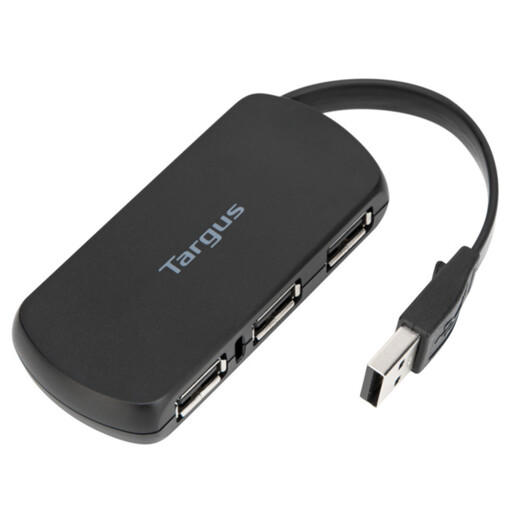 No image available
Consider this for a keyboard-led setup with an available USB-A computer port. Check that its computer-facing connection and downstream ports match your computer and keyboard; its four-port format provides space for other peripherals.
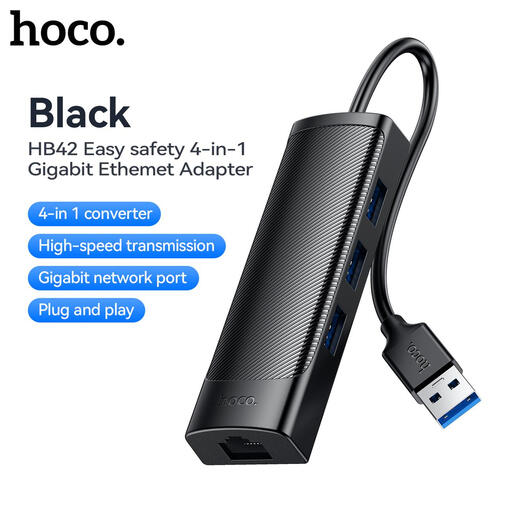 No image available
Consider this when a USB-A computer needs keyboard ports and you would also use wired Ethernet. Its listed connections include three USB 3.0 ports and RJ45; check whether the stated 0.2m cable reaches your intended hub position.
 No image available
Consider this for a compatible USB-C computer if you need to connect a USB-A keyboard and will use further desk connections. The named configuration includes USB-A, HDMI, SD/TF and 3.5mm audio connections; check host compatibility, cable reach and the power arrangement for your intended setup.
 No image available
Consider this for a compatible USB-C computer when a USB-A keyboard will share the hub with other devices. The named configuration has three USB-A ports, two HDMI connections, RJ45, SD/TF and a USB-C Power Delivery connection; display use also requires DisplayPort Alt Mode support from the computer. Check cable reach and the charging arrangement if those functions matter to you.
No: a 5Gbps transfer rating is not needed for keyboard input alone. It becomes a more relevant specification if you also plan to use the hub for data transfers with storage devices.
Consider one when the keyboard will share the hub with several devices or accessories with greater power needs. UGREEN’s manufacturer guidance places low-power keyboards among suitable uses for a hub powered by the computer; check the power and adapter requirements of any expanded setup.
It can if that particular hub supports compatible Power Delivery pass-through and has the charger it requires. For the Anker 341, Anker states that a separate charger is needed and that 15W is reserved for hub operation.
Check the product marking and seller documentation for the market where you are buying, but assess keyboard compatibility separately from the marking. GOV.UK distinguishes arrangements for Great Britain and Northern Ireland, so check the applicable documentation if you are buying in Northern Ireland.