Choose a hub whose plug fits your laptop and whose ports accept your wired mouse. A compact USB-A hub suits a USB-A laptop and a mouse with a USB-A plug; if the laptop has only USB-C, look for a USB-C-host hub with a USB-A port. Extra ports or external power matter when you plan to connect more devices, while a USB-C connection alone does not establish charging or display support.
Who needs which setup?
Students with a USB-A laptop and a wired mouse
If the mouse has a USB-A plug, a small USB-A-host hub gives it a port and leaves room for occasional extras such as a keyboard. TP-Link and Belkin both describe four-port hubs for this kind of connection.
Students with a USB-C laptop and a USB-A mouse
Look for a hub that connects to the laptop through USB-C and provides a USB-A port for the mouse. Belkin’s F4U090 illustrates that connector arrangement; check charging or display functions separately if you need them.
Students connecting several desk peripherals
Count the devices you want connected at once, then consider port count, cable reach and whether a powered hub is needed. UGREEN lists a four-port hub with a 60 cm lead, while TP-Link’s UH700 has seven ports and a supplied power adapter.
What should you check before buying?
Start with the laptop and mouse connectors; then decide whether the hub also needs to accommodate other devices or reach a less accessible laptop port.
| Concern | What to check | Who this matters to |
|---|
| Connector compatibility |
Match the hub’s host plug to the laptop port, and check for a USB-A port if the mouse has a USB-A plug. |
If my mouse cannot connect to the laptop, extra hub features will not help. Roughly 50% of consumers put connector compatibility first. |
| A manageable desk setup |
Count the ports needed for the mouse and occasional extras; check the host lead’s length if the laptop port is hard to reach. |
I want the mouse within reach without filling a small desk with connections I will not use. For around 30% of consumers, a simple, low-clutter setup is the primary concern. |
| Room for more devices |
Count simultaneous peripherals; if you will use storage or devices needing power, check the hub’s stated data capability and power arrangement. |
If I also connect storage or several peripherals, a mouse-only arrangement may leave me swapping plugs. Broader expansion comes first for roughly 20% of consumers. |
Common buying mistakes
-
Choosing ports for the mouse but the wrong plug for the laptop
A hub can have USB-A ports for a mouse yet connect to the computer through either USB-A or USB-C.
Check the laptop port first, then confirm both the hub’s host plug and the port for the mouse.
-
Assuming a USB-C hub also handles charging and video
Those functions vary by model. Belkin states that its F4U090 does not support pass-through charging or USB-C video output.
If you need charging or a monitor connection, check the exact hub functions and the laptop port’s capabilities.
-
Buying a powered seven-port hub for one mouse
TP-Link’s UH700 supplies seven data ports and uses an included 12V/2A power adapter, whereas connecting a mouse alone does not call for that many ports.
Choose port count around the devices you expect to connect at the same time, and check whether they need a powered hub.
A powered model also needs space for its adapter and a suitable socket.
-
Assuming a product listing means it is ready to order
Specifications can help you compare hubs, but availability can change before you buy.
Check the current listing, seller and delivery terms at checkout.
Brands to consider
TP-Link
TP-Link offers both the four-port UH400 USB-A-host hub and the seven-port UH700 for a larger desk setup.
- TP-Link lists four USB 3.0 ports and up to 5Gbps capability for the UH400; actual transfer speed depends on the computer and connected devices.
- The UH700’s seven ports and supplied power adapter are more than a mouse-only setup generally calls for.
UGREEN
UGREEN’s four-port USB-A hub is a reference point when cable reach matters at a desk.
- UGREEN lists four USB-A ports, a 60 cm lead and up to 5Gbps capability for this model.
- Check the current listing before relying on this particular model being available to order.
Belkin
Belkin has a basic four-port travel hub as well as the USB-C-host F4U090, which retains USB-A ports for a wired mouse.
- Belkin lists two USB-A ports and two USB-C ports on the F4U090; its travel hub offers four ports for devices including a mouse.
- The F4U090 has no pass-through charging or USB-C video output, while the travel hub uses USB 2.0.
Anker
Anker’s hub range includes models with USB-A and USB-C ports, alongside configurations with other connections for broader desk use.
- Anker lists HDMI, Ethernet and card-reader options across its hub range for setups needing more than a mouse port.
- Those connections vary by model: check the particular hub’s ports and host requirements rather than assuming every model includes them.
Joybuy products for different setups
These choices range from straightforward four-port mouse connections to USB-C multiport setups. Match each product’s host connection to your laptop before considering its extra ports.
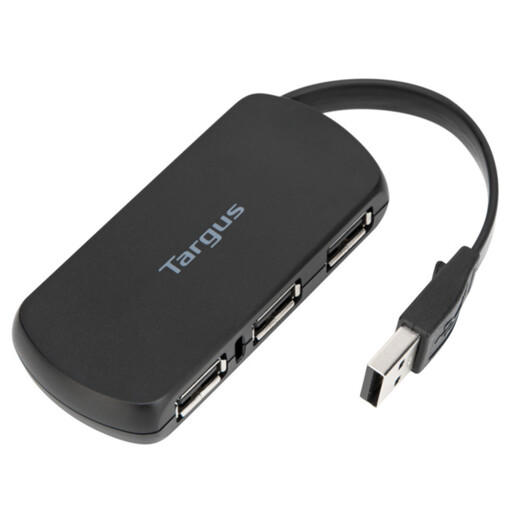 Image unavailable
Targus 4-Port USB Hub
A four-port option if you want to connect a wired mouse and leave ports for other peripherals. Confirm that its host plug fits your laptop and that a port accepts your mouse plug.
View on Joybuy
 Image unavailable
Baseus Metal Gleam Series II 10-in-1 USB-C Hub, Cosmic Black
Consider this for a USB-C laptop if you need USB-A mouse connectivity alongside other connections. Its named configuration includes one USB-A port rated at 10Gbps, two USB-A ports rated at 480Mbps, two HDMI connections and a USB-C PD connection. Check which functions your laptop supports before choosing it for more than a mouse.
View on Joybuy
 Image unavailable
Mokin 2USBC to TB+ Multiport Hub
This configuration provides USB-A ports for a wired mouse if its host connection is compatible with your computer. The product name specifies two USB-A 3.0 ports, a USB-C 3.0 port, SD/TF connections and HDMI 4K60Hz; confirm the host and display requirements before relying on its docking functions.
View on Joybuy
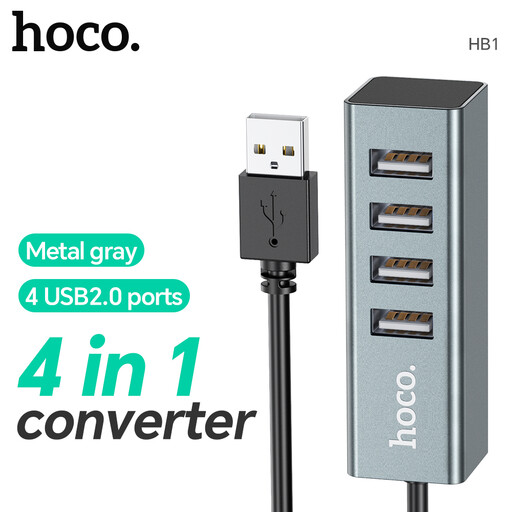 Image unavailable
HOCO HB1 USB Hub, Metal Grey
A four-port option to consider for a wired mouse and occasional peripherals. Its named configuration has four USB 2.0 ports; check that the hub’s host plug fits your laptop before buying.
View on Joybuy
Frequently asked questions
Do I need USB 3.0 for a wired mouse?
No, USB 3.0 is not required just to connect a wired mouse: Belkin describes its USB 2.0 travel hub for mouse use. If you will also transfer files to external storage, compare the hubs’ stated data capabilities.
Can a USB-A mouse connect to a USB-C laptop through a hub?
Yes, if the hub connects to the laptop through USB-C and has a USB-A port for the mouse. Belkin’s F4U090 is one example with that connector arrangement.
Will every USB-C hub charge my laptop or connect a monitor?
No. Belkin states that its F4U090 has neither pass-through charging nor USB-C video output. Check the exact hub functions and your laptop’s port capabilities for either use.
Why might a new hub not work straight away with an Apple-silicon Mac laptop?
The Mac may need approval for a new or unknown USB accessory. Apple Support advises unlocking the Mac and allowing the accessory to connect; declining that request prevents recognition for data access.
Is CE marking accepted for electrical products in Great Britain?
GOV.UK guidance dated 21 August 2026 says Great Britain continues to recognise CE marking alongside or in place of UKCA marking where the relevant product-regulation requirements are met. Check the applicable requirements for the particular product; Northern Ireland has a different process.


