Card-reader users short of USB ports
If your reader connects by USB, count the data ports left for a mouse, keyboard or storage device after plugging it in. That matters more than the hub’s total number of connectors.


Choose a hub by matching your card reader’s plug to a data port and checking that the computer’s host port supports the connection. A compact data hub can serve a reader and a few accessories; consider Power Delivery pass-through if that same USB-C port must also charge the laptop, or a larger adapter only if you need its display or network connections.
If your reader connects by USB, count the data ports left for a mouse, keyboard or storage device after plugging it in. That matters more than the hub’s total number of connectors.
When the USB-C port needed for the hub normally charges your laptop, look for Power Delivery pass-through and check the power available to the laptop after the hub takes its share.
A multiport adapter becomes relevant when the reader must share the desk connection with a monitor, wired network or several peripherals. Those additional functions still depend on the laptop’s host-port capabilities.
Establish whether you need built-in SD or microSD slots or a data port for a separate reader. Then check charging and any other desk connections you intend to use.
| Concern | Buying checks | Who this matters to |
|---|---|---|
| Usable data ports | Match the reader’s USB plug and the computer’s host connector; count the data ports remaining for essential accessories. | I need my USB reader connected alongside everyday peripherals without swapping cables. Around 36% of consumers put correctly matched data ports first. |
| Laptop charging | Check host charging support, the laptop’s power requirement and how much of the hub’s Power Delivery input reaches the laptop; check whether a charger is included. | If the hub occupies the port I use to charge my laptop, I need both connections working together. Around 29% of consumers make charging continuity their primary concern. |
| Card access and transfer speed | Check the reader’s interface and the relevant hub data port, or the stated card formats and standard for built-in slots. | For frequent card transfers, I care whether the connection suits my reader or SD media rather than gaining display ports. Around 21% of consumers prioritise card access and transfer capability. |
| Compact setup | Check the hub’s dimensions, host-cable length and plug spacing, as well as whether it needs a separate power connection. | When I move between desks, I want the reader and essential accessories connected without a cumbersome adapter. Around 14% of consumers put a compact setup first. |
A USB-C connector used for Power Delivery is not necessarily an available peripheral data port. The reader may therefore have nowhere suitable to connect.
Match every device plug to a port explicitly described as supporting data, and confirm that the computer’s USB-C host port supports USB data.
Power Delivery pass-through uses power from a charger, and the hub may reserve some of that power for itself. A headline input rating is not necessarily the power reaching the laptop.
Compare the laptop’s charging requirement with the hub’s stated output to the laptop, and check what comes in the box.
You may need to provide a separate compatible USB-C charger.
HDMI, Ethernet and other dock connections add functions but do not resolve a mismatch between the card reader’s plug and the hub’s data ports.
Start with the reader and essential peripherals; consider a multiport desk adapter when you also need its display or wired-network connections.
Built-in SD and microSD slots serve the stated media formats. They do not establish compatibility with a specialist USB reader or payment-card device.
Identify the reader’s plug, power and software requirements before deciding whether built-in slots or a separate USB data port meet your needs.
Anker’s 341 is a portable USB-C multiport hub combining USB data connections with SD and microSD slots, HDMI and charging pass-through.
Belkin describes its AVC009 as a slim USB-C multiport adapter for moving between workstations or reducing desk clutter.
StarTech.com offers both a data-focused USB-C hub with card slots and a multiport adapter for a desk with additional connections.
These USB-C adapters offer different combinations of USB data connections, card slots and desk connections. For a separate card reader, match its plug to a data port; built-in SD or microSD slots are relevant only if you use those card formats.
 No image available
Consider this model if a USB reader needs to share a USB-C connection with other peripherals, or if you use SD or TF cards directly.
The product name lists a 10Gbps USB-A port, a 10Gbps USB-C port, two 480Mbps USB-A ports, SD/TF, RJ45 and two HDMI connections. Check that the computer supports the functions you plan to use and how much charging power reaches the laptop through the PD connection.
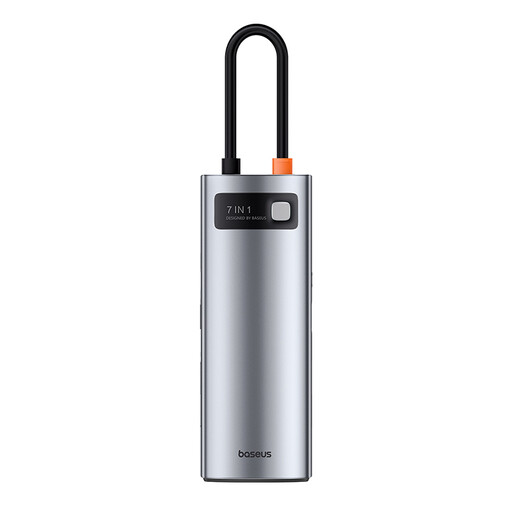 No image available
This is an option for connecting a reader and other accessories through a USB-C laptop port; confirm that its data-port layout fits every device you intend to attach.
If you need pass-through charging, a separate compatible PD charger is required. Check the power available to your laptop before relying on the hub for charging.
 No image available
Consider it if you need card slots and a display connection alongside USB accessories, provided its host connection fits your computer.
The product name lists two USB-A 3.0 connections, USB-C 3.0, SD/TF and HDMI 4K60Hz. Confirm the exact host connector and usable data-port layout before choosing it for an external reader; also check laptop video support if you need HDMI.
 No image available
This adapter is worth checking for a separate USB reader at a desk that also needs display or wired-network connections. Match the reader to a suitable data port.
Its product name specifies dual USB 3.0 ports, HDMI, VGA, Gigabit Ethernet and 100W Power Delivery. Check the power delivered to the laptop and whether you need to supply a charger; confirm host video support for the display ports.
 No image available
This configuration is more relevant to a desk needing card access, USB peripherals and display connections than to a reader-only setup.
The product name lists two USB 3.0 ports, two USB 2.0 ports, RJ45, PD, SD/TF and audio alongside dual HDMI and DisplayPort. Confirm the exact data-port layout, charging requirements and host display capabilities before purchase.
No: the reader needs a matching hub data port, and the computer’s USB-C host port must support USB data. If you also need charging or video, check those host functions separately rather than relying on the connector shape.
Not necessarily; a bus-powered data hub can suit a reader and low-power accessories when their connection and power requirements match. StarTech.com describes its HB31C3ASDMB as bus-powered. Consider Power Delivery pass-through if you also need to charge the laptop through the occupied USB-C port.
Not automatically: 100W may describe the hub’s maximum Power Delivery input rather than its output to the laptop. Anker UK and StarTech.com each specify models that reserve 15W for hub or dock operation, leaving up to 85W for the laptop with a compatible charger. Check the figures for the exact model you choose.
No. Department for Business and Trade guidance on products placed on the Great Britain market says those markings indicate that the manufacturer believes the product meets relevant requirements; they do not establish compatibility with a particular reader or computer. Check the reader’s connector and the host and hub functions separately.