Students adding one existing card reader
If you already have a USB card reader, start with its plug and your laptop’s available port. You may only need a hub with the right data port and room for one or two other devices.


A basic USB-A hub suits a laptop and existing card reader with matching USB-A connections. Choose a USB-C multiport hub if your laptop uses USB-C and you need a suitable data port for the reader, with charging or display connections only if you will use them. Check the laptop, hub, reader and card before paying for a higher data-rate specification; charging and video support need separate compatibility checks.
If you already have a USB card reader, start with its plug and your laptop’s available port. You may only need a hub with the right data port and room for one or two other devices.
A USB-C hub can connect an existing reader and, on selected models, add a display output, charging pass-through or SD/microSD slots. Check each function against the laptop before treating it as part of your desk setup.
If you regularly move large files, consider the data capabilities of the laptop, hub, reader and card together. USB Implementers Forum guidance says a USB connection operates at its lowest common speed capability.
Match the laptop and card-reader connections first, then count the ports you will use at once. Treat faster data rates, charging and display outputs as separate reasons to choose a more complex hub.
| Concern | What to check | Who this matters to |
|---|---|---|
| Matching connections | Check the laptop’s USB-A or USB-C port and the reader’s plug. Confirm that a matching port on the hub carries data, rather than serving only as a power input. | I already own a reader and need it to connect without changing my whole desk setup; roughly 50% of consumers would put connection compatibility first. |
| Data rate and port count | Count devices used simultaneously and compare stated data rates with the laptop, reader and card. USB Implementers Forum identifies distinct 5Gbps and 10Gbps USB 3.2 rates, but the connection runs at its lowest common capability. | When I transfer files and use other peripherals at the same time, I want enough ports without paying for speed my equipment cannot use. Around 30% of consumers would prioritise everyday transfer and expansion needs. |
| Desk power and extras | If you need charging or a monitor, check the exact laptop, hub, charger and cable requirements. Use an undamaged extension lead within its rating if your room setup needs one. | I want card access alongside charging or a display, while keeping the room’s power connections safe; about 20% of consumers would place desk power and expansion first. |
A USB-C connector does not establish that a laptop supports a hub’s optional charging, video or stated data rate. The reader also needs a compatible downstream data port.
Check the laptop port and reader plug first, then confirm charging and display functions separately against the hub’s requirements.
USB Implementers Forum distinguishes 5Gbps and 10Gbps interface rates, but devices operate at the lowest common speed capability. A higher hub rating alone does not establish a faster card transfer.
Before choosing a 10Gbps connection, check the laptop, hub, reader and card used for your transfers.
Anker states that its 553 USB-C Hub requires a suitable wall charger and USB-C-to-C cable for its specified charging arrangement; the wall charger is not included.
Check the laptop’s charging requirements, the hub’s reserved power and what comes with the exact model.
You may need to obtain a compatible charger or cable separately.
Damaged leads and overloaded extensions introduce electrical risks unrelated to the hub’s data ports. Electrical Safety First advises students to look for cable damage, loose parts and signs of overheating.
If an extension lead is needed, check its rating and condition. University of Leeds accommodation guidance advises using only one extension lead per socket and not overloading it.
UGREEN UK lists both USB-A data hubs and USB-C multiport models, so the relevant choice depends on your laptop connection and whether you already have a card reader.
Anker’s USB-C hubs are relevant when card access needs to share a laptop connection with other desk functions.
StarTech.com lists a USB-C hub with an integrated SD/microSD reader for buyers considering a higher stated data-rate connection.
These options include USB-C multiport hubs and a four-port hub for adding connections to a student-room desk. Choose by the laptop’s host port and your existing reader’s plug before considering additional features.
 No image available
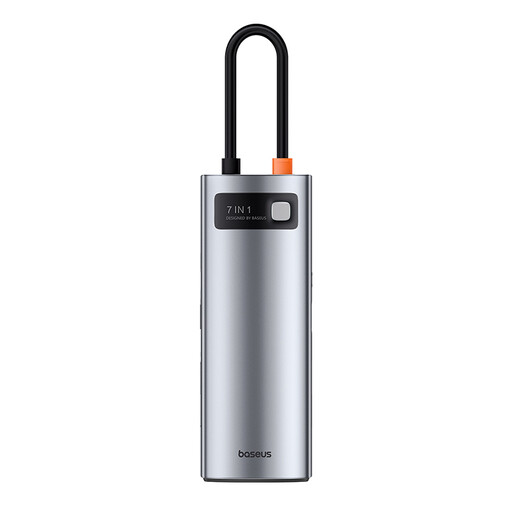
For a USB-C laptop and an existing card reader, confirm that one of this hub’s seven ports provides a data connection matching the reader’s plug. Check laptop compatibility before relying on optional charging or display functions.
 No image available
For a USB-C laptop with a USB-A card reader, this variant lists one USB-A 10Gbps data port and two USB-A 480Mbps ports. It also lists USB-C 10Gbps data, two HDMI outputs, RJ45, SD/TF slots and a USB-C PD port; check laptop compatibility before relying on display or charging functions.
 No image available
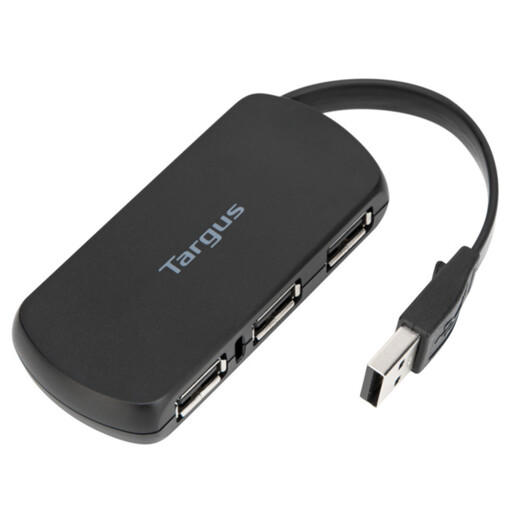
For a desk setup centred on an existing reader, check that your laptop connection and the reader’s plug match this four-port hub. Confirm the data rate you need if you regularly transfer large files.
Yes, if the connectors and devices are otherwise compatible. USB Implementers Forum says USB 3.2 is backward compatible with existing USB products, but the connection operates at its lowest common speed capability; a USB 2.0 reader does not become faster simply because the hub has a higher rating.
No, provided the hub has a data port that matches your existing reader’s plug. An integrated SD/microSD slot is worth considering if it accepts the card formats you use and you would rather connect the card directly.
It can only do so when the particular hub, laptop, charger and cable support the required arrangement. Anker states that its 553 USB-C Hub supports up to 100W pass-through charging with 15W reserved for hub operation; its specified setup requires a 100W wall charger and USB-C-to-C cable, and the wall charger is not included.
No. A marking does not establish whether a hub has the ports or functions your laptop and reader need. GOV.UK guidance published in March 2026 says Great Britain continues to recognise CE marking alongside or in place of UKCA marking for products covered by relevant rules where their aims and requirements are met; that guidance does not establish the requirements for a particular hub or provide a conclusion for Northern Ireland.
Use undamaged equipment and avoid overloading an extension lead. Electrical Safety First advises students to check for damaged cables, loose parts and signs of overheating, while University of Leeds accommodation guidance advises using only one extension lead per socket.