People moving files between mixed ports
You carry documents or media between USB-A computers and USB-C devices and want one drive that connects to both without an adapter.


Choose a single-connector USB flash drive if every device you use has the matching port, or a dual Type-A and Type-C drive if you regularly move files between both. For repeated large transfers, consider a portable SSD, but check its write speed and the ports and cables you will use. Before buying for work or study, confirm that removable storage is permitted and whether approved security controls are required.
You carry documents or media between USB-A computers and USB-C devices and want one drive that connects to both without an adapter.
You move sizeable collections of photos, video or project files and need to assess capacity, write speed and the limits of each computer port and cable.
You need to establish whether removable storage is allowed and which encryption or device-management requirements apply before carrying controlled files.
Match the drive to every port in the transfer route before weighing capacity and speed. A connector that fits does not establish that a device will permit removable storage or deliver a drive’s rated performance.
Choose when: Every device you need to connect directly has a Type-A port.
Trade-off: It will not plug directly into a USB-C-only device.
Choose when: Your required devices all have USB-C ports and you want a compact drive.
Trade-off: It will not plug directly into a Type-A-only computer.
Choose when: You regularly cross between Type-A and USB-C devices without carrying an adapter.
Trade-off: Having both connectors does not establish the drive’s write speed or approval for managed devices.
Consider when: You repeatedly carry large project batches or need more capacity.
Trade-off: It is larger than a flash drive, and rated speeds depend on the drive, host port and cable.
| Concern | What to check | Who this matters to |
|---|---|---|
| Connector coverage | List the ports on every sending and receiving device. If a phone or tablet is involved, check that it accepts external USB storage. | I move files between older USB-A computers and newer USB-C devices and want one drive to connect directly to both; around 33% of consumers put connector coverage first. |
| Large transfers and capacity | Allow room for your largest regular batch, then compare the exact model’s read and write ratings with the ports and cables you will use. | Repeatedly moving sizeable projects makes transfer time and space for the next batch important to me; around 27% of consumers prioritise large-file performance and capacity. |
| Work or study security | Ask whether removable media is allowed and whether an approved encrypted or managed device is required. | Before carrying controlled files, I need a drive my organisation permits me to use; around 20% of consumers place policy and data protection first. |
| Durability in transit | Inspect connector protection and any model-specific environmental test conditions and warranty exclusions. | If the drive travels with me often, I care about protecting it from knocks and exposure; around 20% of consumers make carrying durability their primary concern. |
USB-C describes the connector, not the speed of the entire connection. The drive, computer port, cable or hub can limit the transfer.
Compare the exact drive’s read and write ratings, then check the USB modes supported by the computers and connection you will use.
The National Cyber Security Centre advises that organisations may restrict peripheral access. A drive that fits the port may therefore be unusable for your work or study files.
Ask the relevant IT team whether removable storage is permitted, whether an approved encrypted device is required and whether the files may leave the managed environment.
Environmental and drop claims apply under model-specific test conditions. Samsung states that liquid, dust and drop damage to its T7 Shield is not covered by its warranty.
Read the exact model’s conditions and warranty exclusions, protect its connectors in transit and keep another copy of important files.
A transfer drive needs room for the whole batch you normally carry and for files you may add before clearing it.
Estimate your largest realistic batch and leave headroom when selecting capacity.
Kingston lists Type-A, USB-C and dual-connector models in its DataTraveler range, including the microDuo 3C Gen3 for devices with either connector.
Samsung has Type-A and USB-C flash-drive models as well as the T7 Shield portable SSD.
SanDisk’s Ultra Dual Drive Go USB Type-C line includes model SDDDC3-128G-G46 for moving files between USB-C and USB-A devices.
These choices cover portable SSDs for carrying larger batches and flash drives for dual-connector or compact Type-A use. Match each product’s connection and capacity to your devices and files before considering its other features.
 No image available
Consider this portable SSD if your regular transfer batches call for 4 TB of storage. The named connection is USB Type-C 3.2 Gen 2; check how you will connect it to every computer, particularly one with only Type-A ports.
 No image available
For transfers between USB-A and USB-C devices, this drive names both connectors and 512GB capacity. Its title specifies USB 3.2 Gen 1 and up to 570 MB/s read speed; check the receiving device’s connection and the drive’s write performance for your workload.
 No image available
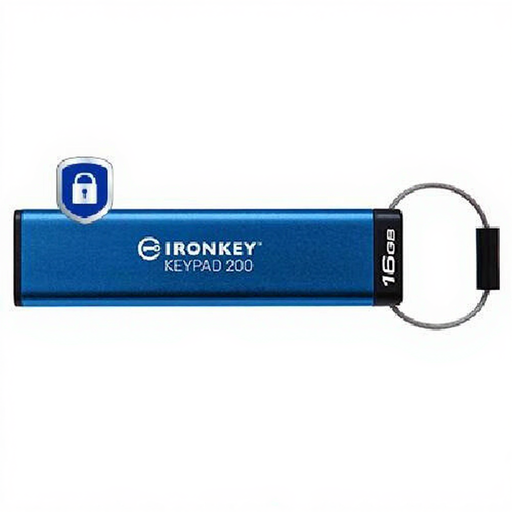
This compact-capacity option names a keypad and AES-256 encryption for files that need access control. Its title says FIPS 140-3 Level 3 certification is pending, not achieved; confirm that your organisation accepts the device and that its connection fits your computer.
 No image available
Consider this USB-C SSD for sizeable batches if your devices support its USB 3.2 Gen 2x2 connection. Its title specifies up to 2,000 MB/s read and write and an IP65 rating; check host-interface support before relying on the rated speed and confirm any mobile-device features against the named compatible models.
 No image available
This 1TB portable SSD suits transfers between devices you can connect by USB-C. Its title specifies USB Type-C 3.2 Gen 2; if a computer has only Type-A, check the connection and cable you would need. Confirm any required security controls before using it for managed work or study files.
Yes. The National Cyber Security Centre says organisations may restrict or disable peripheral access. Ask the relevant IT team whether removable storage is permitted on its managed devices before buying a drive for that use.
Check the applicable organisation’s requirements before choosing a drive for those files. The Information Commissioner’s Office explains that encryption can protect personal information stored on USB media if the device is lost or stolen; a password feature alone does not establish that a drive meets your organisation’s rules.
The computer port, cable, hub or system configuration can limit a drive’s performance. Kingston, for example, says its DataTraveler Max needs a USB 3.2 Gen 2 host port for optimal performance, so check the complete connection rather than the drive rating alone.
Use the operating system’s eject function before unplugging it. Which? advises safe ejection after copying to help prevent data corruption.