Who this is for

USB-A toothbrush owners sharing one socket

If your toothbrush cable or charging travel case ends in USB-A, you need a USB-A port to connect it directly while another device uses the same wall socket. Philips identifies USB-A charging arrangements for some Sonicare products; check the instructions for your particular model.

Households charging devices with different ports

If the toothbrush uses USB-A and a phone or tablet uses USB-C, a wall charger with one of each port can accommodate both cables without occupying a second socket. Check the output available when both ports are in use.

People replacing a toothbrush wall adapter

When an adapter is missing or unsuitable, the toothbrush maker’s input instructions and the plug’s suitability for the intended socket matter as much as the number of ports. Electrical Safety First advises buying USB chargers from reputable retailers.

What to check before buying

Two USB-A ports

Choose when: Both the toothbrush cable and the second device’s cable end in USB-A.

Trade-off: Neither port accepts a USB-C plug directly.

USB-A and USB-C

Choose when: The toothbrush needs USB-A and the other device uses USB-C.

Trade-off: Check each port’s output and any shared-output limits before charging both devices together.

USB-C-only ports

Choose when: The toothbrush has a compatible USB-C charging arrangement specified by its maker.

Trade-off: A USB-A toothbrush plug cannot connect directly.

Concern What to check Who this matters to
Toothbrush compatibility Identify the cable connector and follow the adapter requirements for the exact toothbrush or travel case. Philips specifies a 5 V IPX-4 USB wall adapter in some Sonicare charging instructions; that is not a requirement for every toothbrush. If my charging case uses a particular connector or adapter, I want to match it before choosing extra ports. Around 42% of consumers put toothbrush compatibility first.
Sharing one socket Match both cables to the actual ports, then check per-port output and any limits when the ports are used together. With the toothbrush and another device to charge at the same time, I need both cables to work from one wall outlet. For around 33% of consumers, sharing the socket is the primary concern.
Plug and placement Check compatibility with the intended UK socket and choose a position away from splashes, with the charger uncovered. Electrical Safety First advises buying from a reputable retailer. If the available socket is near a bathroom, I want a suitable plug and a place to charge away from water. Electrical safety and placement come first for around 25% of consumers.

Buying pitfalls

  • Buying USB-C-only ports for a USB-A cable

    Some toothbrush cables and charging travel cases end in USB-A, which cannot plug directly into USB-C. Philips documents USB-A arrangements for some Sonicare products.

    Look at the connector on your own cable or case before deciding which ports the wall charger needs.

    The wrong port mix can leave you needing a different charger or cable arrangement.

  • Choosing by wattage instead of the toothbrush instructions

    A high advertised output does not replace the adapter requirement for a particular toothbrush. Philips specifies a 5 V IPX-4 USB wall adapter in the cited Sonicare charging instructions, rather than setting a rule for all models.

    Check your toothbrush or travel-case instructions and use the supplied charger where the maker directs you to do so.

  • Overlooking the condition of a replacement charger

    Connector compatibility does not address damage or electrical-safety risks. Electrical Safety First has identified a serious electric-shock risk in a recall notice for a specific USB mains charger.

    Buy from a reputable retailer, inspect the charger and cable, and stop using a damaged or recalled unit.

  • Assuming two ports will suit two devices

    Two ports may still have the wrong connector mix, and available output may be shared. UGREEN advises checking port configuration and power distribution when several devices are connected.

    Match each cable to a port and read the individual charger’s per-port and shared-output information.

Brands to consider for this charger setup

Belkin

Belkin lists both dual-USB-A and mixed USB-A/USB-C wall chargers, giving shoppers two port arrangements to compare for a shared socket.

  • Belkin’s product pages identify a 24 W charger with two USB-A ports and a 42 W charger with a 30 W USB-C port and a 12 W USB-A port.
  • Check the chosen model’s current availability and its suitability for your toothbrush’s specified input.

Anker

Anker lists multi-port chargers for using one outlet with several devices, alongside smaller single-port designs.

  • Anker’s UK range includes chargers with USB-A and USB-C port arrangements.
  • Check the exact model rather than assuming a multi-port charger includes USB-A for a toothbrush cable.

UGREEN

UGREEN’s wall-charger range includes USB-A and USB-C options for comparing port layouts.

  • UGREEN advises considering required wattage, port configuration, size and power distribution when choosing a charger.
  • Confirm the ports and toothbrush-adapter requirements for the particular combination you intend to use.

Joybuy products for a shared socket

This mixed-port wall charger is worth considering if your toothbrush cable uses USB-A and another device uses USB-C. Confirm the toothbrush maker’s adapter requirements before connecting it.
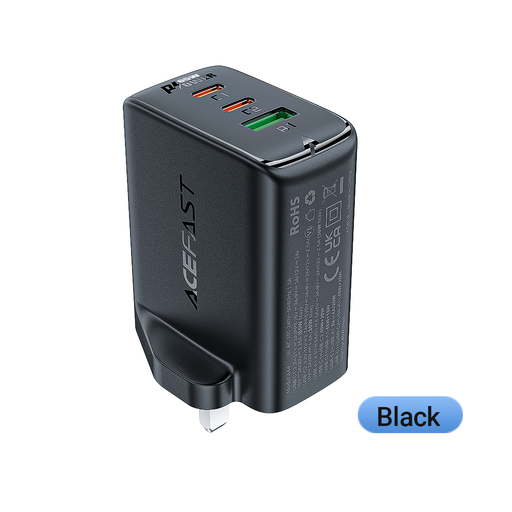
ACEFAST 65 W charger with two USB-C ports and one USB-A port, UK plug

ACEFAST 65 W Charger, 2 USB-C + 1 USB-A (UK Plug)

The port mix suits a USB-A toothbrush cable alongside a USB-C device, provided the charger meets the toothbrush maker’s input requirements.

The product title specifies two USB-C ports, one USB-A port, a UK plug and 65 W output. Check per-port and shared-output details if you plan to connect devices at the same time.

View on Joybuy

Common questions

Will a USB-C-only wall charger work with my toothbrush?

It can work if your toothbrush has a compatible USB-C charging arrangement specified by its maker, but a USB-A plug will not connect directly. Philips documents USB-A charging for some Sonicare products, so inspect your own cable or travel case first.

Do I need a high-wattage charger for a USB toothbrush?

Choose according to your toothbrush maker’s adapter requirements, not a charger’s maximum wattage alone. Philips specifies a 5 V IPX-4 USB wall adapter in some Sonicare charging instructions; check whether those instructions apply to your model.

Can I put the wall charger beside a bathroom sink?

Keep the wall charger away from splashes and do not immerse or cover it. Follow the charger and toothbrush makers’ placement instructions, and use a socket where the charger can remain dry during charging.

What matters about the mains plug in the UK?

A charger intended to plug directly into a UK public electricity supply socket conforming to BS 1363 must be compatible with that socket type under regulation 35 of the Electrical Equipment (Safety) Regulations 2016, published by legislation.gov.uk. Check the plug against the socket you intend to use; for product market documentation in Northern Ireland, check the applicable requirements separately from Great Britain guidance.