In an age where video calls, online classes and live streaming are part of daily life, relying on a grainy, built-in laptop camera is no longer sufficient. A dedicated USB webcam can dramatically improve how you appear online, making you look clearer and more professional. However, the market is filled with technical jargon and competing claims, making it difficult to choose.
As a Joybuy Product Recommendation Officer, my role is to help you navigate these options. This guide cuts through the clutter, focusing on the practical features that matter for your specific needs, whether you're working from home, attending virtual lectures or creating content.
How to Choose the Right USB Webcam for Your Needs
Before looking at specific models, understanding a few key features will help you make an informed decision.
Resolution Matters: 4K, 2K or 1080p?
The resolution of a webcam determines the clarity and detail of the image.
- 1080p (Full HD): This is the current standard for high-quality video. A 1080p webcam is an excellent choice for most users, providing a sharp, clear picture for Zoom meetings, Microsoft Teams and other video conferencing platforms.
- 2K (QHD): Offering a noticeable step up in detail from 1080p, 2K webcams provide a crisper, more refined image. They are a great middle-ground for professionals who want to present a more polished appearance without investing in a top-tier setup.
- 4K (Ultra HD): A 4K webcam delivers exceptional detail and image quality. While most video call software compresses video, the benefit of 4K is most apparent when recording video directly to your computer or for high-production webcam for streaming setups.
Focus and Field of View
How the camera focuses and how much it sees are crucial for a smooth experience.
- Focus Type: An autofocus webcam automatically adjusts to keep you sharp, even if you move around. This is ideal for dynamic presentations or active streaming. Fixed-focus cameras are simpler, designed to keep everything within a certain range clear, which is reliable for users who typically sit still.
- Field of View (FoV): This is the angle the camera can capture. A standard FoV (65°-78°) is perfect for a single person at a desk. A wide angle webcam (90° or more) is better for capturing a group of people or showing more of your background, like a whiteboard.
Essential Features for Modern Use
Beyond the core specifications, look for these practical additions:
- Built-in Microphone: A webcam with a microphone simplifies your setup. Many models now include dual microphones with noise-reduction technology to ensure your voice is heard clearly over background sounds.
- Privacy Cover: For peace of mind, a webcam with a privacy cover is a simple but vital feature. It allows you to physically block the lens when not in use, ensuring your privacy is protected.
- Compatibility: Ensure the webcam for PC you choose is compatible with your operating system (Windows, macOS and Linux) and the software you use daily. Most modern USB webcams are plug-and-play, requiring no complex driver installation.
Our Top USB Webcam Recommendations for 2026
Based on these criteria, we have selected a few standout models that cater to different requirements and budgets.
For the Professional: DELL WB7022 - 4K Webcam
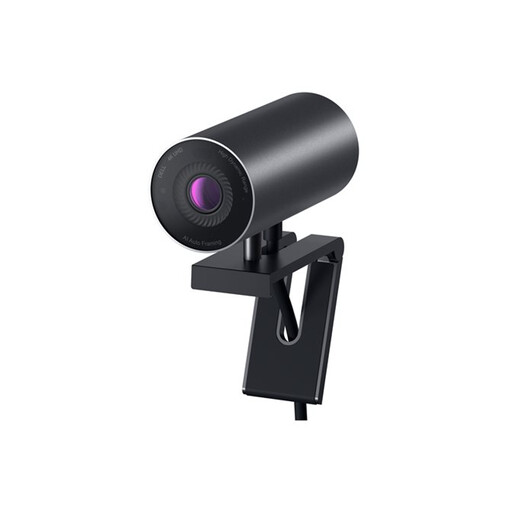
Why It Stands Out: The Dell WB7022 is engineered for superior performance. Its large 4K Sony STARVIS CMOS sensor excels in various lighting conditions, from bright offices to dimmer home setups. The AI-powered auto-framing intelligently keeps you centred in the shot, allowing you to move naturally without adjusting the camera.
- Pros:
- 4K Ultra HD resolution for outstanding clarity.
- Advanced AI auto-framing keeps you in focus.
- Digital Overlap HDR delivers true-to-life colour, even in high-contrast lighting.
- Adjustable Field of View (65°, 78° and 90°).
- Includes a magnetic privacy cap for security.
- Who is it for?: Professionals, executives and content creators who require first-class image quality for client-facing presentations and high-quality video recording. It's an excellent choice for anyone seeking a premium webcam for remote work.
View Details for the DELL WB7022 4K Webcam
The All-Rounder: EMEET 1080p USB Webcam E3104 + tripods
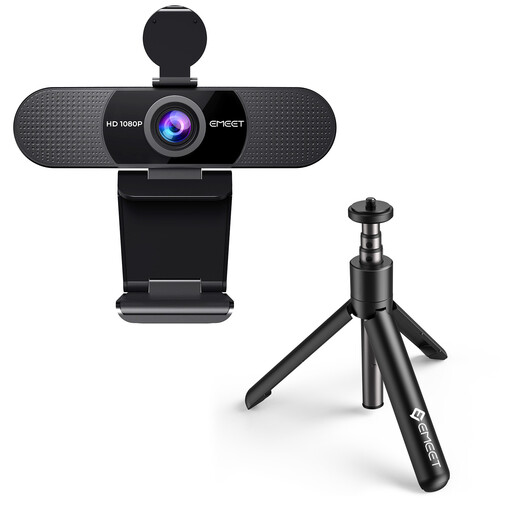
Why It Stands Out: This EMEET model offers fantastic value and straightforward functionality. It delivers reliable 1080p quality, is incredibly easy to set up (just plug it in) and comes with a tripod for flexible positioning. Its wide-angle lens makes it suitable for both individual and group calls.
- Pros:
- Sharp and smooth Full HD 1080p video at 30FPS.
- 90° wide-angle view is great for group meetings or presentations.
- Dual built-in microphones with noise reduction.
- Plug-and-play USB connection with broad software compatibility.
- Includes a tripod for versatile mounting options.
- Who is it for?: Students, teachers and remote workers looking for a dependable and affordable upgrade for daily video calls. Its simplicity and included accessories make it a practical choice for anyone.
View Details for the EMEET 1080p Webcam
The Balanced Performer: EMEET 2K Webcam with Autofocus E3115
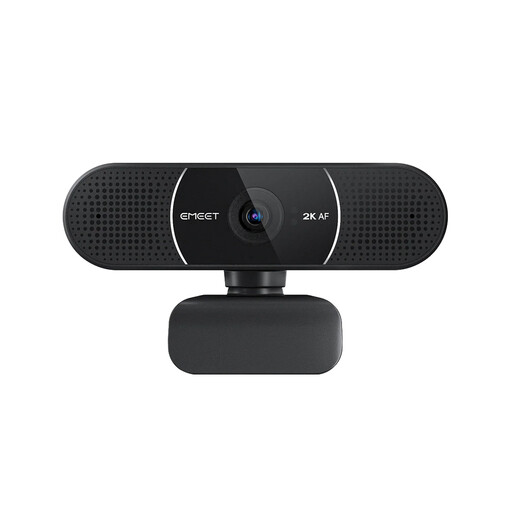
Why It Stands Out: The EMEET E3115 strikes an excellent balance between advanced features and affordability. It provides crisp 2K resolution and a fast, accurate autofocus system that keeps you looking sharp. The inclusion of a detachable privacy cover and customisable settings via the EMEETLINK software makes it a versatile and secure option.
- Pros:
- Clear and detailed 2K resolution for a professional image.
- Fast and precise autofocus keeps you sharp during calls.
- Detachable privacy cover for enhanced security.
- Plug-and-play setup with optional software for advanced adjustments.
- Wide compatibility with popular operating systems and meeting apps.
- Who is it for?: Professionals and educators who want a visible quality upgrade from 1080p without the expense of a 4K model. The autofocus makes it ideal for those who are more animated during presentations.
View Details for the EMEET 2K Webcam
Looking for Something Else?
While these three models cover a wide range of uses, your perfect camera might have different specifications. For a wider selection, including specialised options for different environments, feel free to explore our full range of cameras suitable for any room.
Frequently Asked Questions about USB Webcams
Do I need to install software for a USB webcam?
Most modern USB webcams are "plug and play," meaning they work automatically as soon as you connect them to your computer. No driver installation is needed. However, models like the Dell and EMEET webcams offer optional software that allows you to customise settings like brightness, contrast and special features like AI framing.
Is a 4K webcam worth it for Zoom meetings?
While a 4K webcam offers the best possible image quality, most video conferencing platforms like Zoom or Microsoft Teams compress video to save bandwidth. For this reason, a high-quality 1080p webcam is generally more than sufficient for clear and professional-looking calls. The main benefit of 4K is for recording high-resolution video directly to your computer or for professional streaming.
How important is a webcam with a microphone?
A webcam with a microphone is extremely convenient as it combines two essential peripherals into one device. The built-in microphones on most current webcams, especially those with noise-reduction technology, are perfectly adequate for everyday video calls and meetings. For professional-grade audio, such as in podcasting or music streaming, a dedicated external microphone is often recommended.


