
24/7 Customer Support

Free returns

Same-day & Next-day Delivery

Quality Guaranteed

Unlock Your Welcome Offers: FREE Delivery | Up to 80% OFF | Free 30-day JoyPlus trial
Download the APP
Choosing a USB XLR microphone can give you a straightforward computer setup today while leaving room to upgrade to an audio interface or mixer later. However, the wording used in microphone listings can make it difficult to compare products fairly. A microphone may include RGB lighting, a boom arm or wireless connectivity, yet still be poorly suited to your room, device or recording style.
This guide from the Joybuy Product Recommendation Officer focuses on practical specifications, common buying traps and suitable options for UK creators, gamers, musicians and party hosts.
A dual USB/XLR microphone offers two connection methods, but they are not identical. USB normally provides plug-and-play connection to a PC, laptop or compatible console, with controls such as mute, gain and headphone monitoring available on the microphone.
XLR requires a separate cable and usually an audio interface, mixer or sound card. In many models, built-in USB controls and RGB lighting become inactive when using XLR. Check this before buying if you expect to switch between a computer and an analogue recording setup.
A desktop stand may be adequate for occasional voice calls, but podcasters and streamers often prefer a microphone with boom arm to keep the desk clear and position the microphone close to the speaker. Not every listing includes one.
Also check whether the package contains an XLR cable, shock mount, pop filter, windscreen, clamp and the correct USB cable. A low initial price can become less attractive if essential accessories are missing.
A dynamic microphone with a cardioid or unidirectional pattern can reduce sound arriving from the sides and rear. It does not remove every noise source. Keyboard clicks, nearby speakers, hard floors and an untreated room can still affect recordings.
Correct positioning matters. For the reference USB XLR microphones featured here, a recording distance of approximately 2 to 6 inches is suggested. Speaking towards the correct end of an end-address microphone is also important.
For a XLR microphone for PC, USB is the simpler route because the microphone can connect directly to a computer, generally without driver installation. Confirm whether the supplied cable terminates in USB-A, USB-C or both, and check the ports on your computer or console.
XLR is useful if you already own an audio interface or plan to control gain and monitoring externally. Remember that an XLR cable may not be included.
For mobile content, a wireless USB-C microphone can be more convenient than a desktop model. Check whether your phone, tablet or camera supports audio input through USB-C and whether the receiver includes monitoring.
A dynamic podcast microphone is often practical for speech, gaming and streaming in ordinary home environments because it generally focuses on sound close to the capsule. A cardioid or unidirectional pattern can help reduce some off-axis room noise.
Condenser microphones can capture more detail but may also pick up more room ambience. Neither design automatically produces a suitable recording; placement, distance and room conditions remain important.
A listed frequency range such as 50Hz–16kHz indicates the frequencies the microphone is designed to capture. For spoken content, clear mid-range vocal reproduction is usually more relevant than a very broad numerical range.
A microphone with headphone jack allows direct monitoring, helping you hear your voice and detect cable, software or background-noise problems. A physical mute button is also useful during live broadcasts, especially when the status light clearly indicates whether the microphone is muted.

Why This Fits Their Persona: A desktop option for new podcasters, gamers and YouTubers who want direct USB connection without immediately buying an interface.
The listing clearly separates USB and XLR functions. RGB and the function key are available through USB, while an XLR cable is not included.
USB-C connection, tap-to-mute control, headphone jack, gain control and built-in 3/8-inch and 5/8-inch threads.

Why This Fits Their Persona: Suitable for creators who want a coordinated desk setup with a supplied boom arm and the option to move to mixer-based recording.
The kit includes a boom arm, C-clamp, shock mount and USB cable, reducing the need to source several compatible accessories separately.
Metal microphone construction, USB-C/XLR ports, headphone monitoring, mute and gain controls; XLR cable is separate.
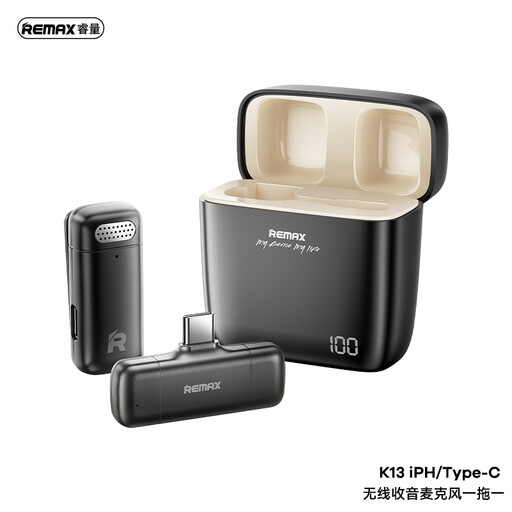
Why This Fits Their Persona: A portable choice for vloggers, journalists and social media creators recording with USB-C phones, tablets or cameras.
It uses a dedicated USB-C receiver rather than relying on a desktop stand, and includes a furry wind muff for outdoor recording conditions.
2.4G wireless transmission, built-in rechargeable batteries, one-touch muting and a 3.5mm headphone jack on the receiver.
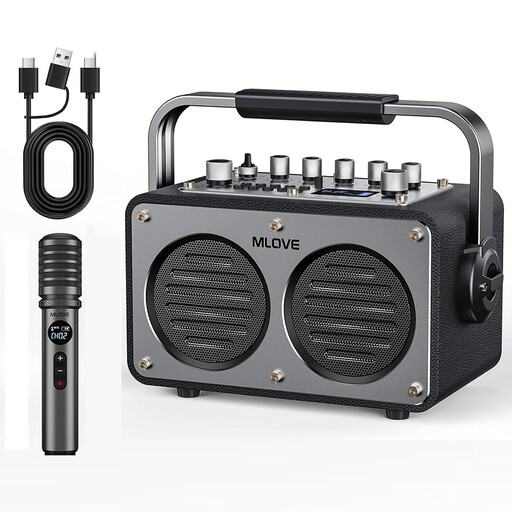
Why This Fits Their Persona: Designed for home gatherings, garden parties and portable entertainment rather than close-mic podcast production.
It is a complete speaker-and-microphone system, so buyers do not need to build a separate party audio chain. It is not described as fully waterproof, so protect it from rain.
Bluetooth 5.4, wireless karaoke microphone, USB and AUX playback, instrument input, USB-C charging and stated 10–13-hour play time at medium volume.
For a desktop USB XLR microphone:
For outdoor interviews, a wireless USB-C microphone is easier to carry, but wind protection and receiver compatibility should be checked before filming.
We have compiled a complete, real-time list of products that fully satisfy these strict selection criteria and UK safety regulations.
Yes, when it includes USB connectivity and your PC has a compatible port. USB is generally the simpler connection for gaming, streaming and voice chat. An XLR connection is more suitable when you already use an audio interface or mixer.
An XLR dynamic microphone normally connects to an audio interface or mixer, which handles the connection to your computer and may provide controls such as gain and monitoring. Check the equipment requirements for the specific model. The USB connection on the listed microphones is corded and powered through the computer.
Service life depends on handling, cable strain, dust, moisture and the strength of the stand or boom arm. Keep the microphone dry, avoid shocks and extreme temperatures, clean it with a soft dry cloth and do not disassemble it. A removable USB cable can also make storage and cable replacement more convenient, but replacement compatibility should be checked first.