For an online tutorial in a small meeting room, start with a wired USB headset whose boom microphone can sit close to your mouth and whose mute control is easy to reach. If other people or equipment make noise nearby, assess the microphone's noise-handling features separately from features that make listening quieter. Check the computer's USB port and any Teams-specific variant before choosing a model, then make a test recording in your teaching app.
Who needs which features?
Tutors in shared or interruption-prone rooms
If nearby speech or keyboard noise could reach your class, prioritise boom-microphone placement and the exact model's microphone features. Logitech and Jabra describe noise-handling features for particular headsets, but those claims do not replace a recording in your usual room.
Tutors running long or frequent sessions
Check how the headset sits, where its mute and volume controls fall, and whether its cable reaches your teaching position. HP and Logitech describe cushioning and accessible controls on particular wired models; fit still needs to work for your sessions.
Tutors with specific ports or teaching platforms
Match the connector to your computer and check whether you need a Microsoft Teams or UC variant. Jabra distinguishes these versions within the Evolve2 40 SE family, while HP describes connection options for the Poly Blackwire 5200 Series; the exact model matters.
What matters when choosing?
For tutorials in a small meeting room, decide whether transmitted speech, comfort through repeated sessions or setup compatibility is your primary concern. Listening isolation may help you concentrate, but it does not by itself establish what learners hear through the microphone.
| Concern | What to check | Who this matters to |
|---|
| Speech heard by learners |
Look for a positionable boom microphone and check the exact model's microphone noise-handling features. Make a recording with typical room noise. |
If nearby conversation or keyboard noise could interrupt my explanation, I need learners to hear my words clearly. Around 42% of consumers put transmitted speech first. |
| Long-session usability |
Check fit, access to mute and volume controls, and whether the cable reaches your teaching position. |
When I teach for extended blocks, an awkward fit or hard-to-reach mute control can distract me. Roughly 33% of consumers make session comfort and control their main concern. |
| Computer and platform fit |
Match USB-A or USB-C to your computer; check the exact variant and any supplied adapter or Teams-specific controls. |
I need the headset to connect to my teaching computer and work conveniently with my main call platform. About 25% of consumers prioritise connector and platform fit. |
Mistakes to avoid
-
Assuming quieter listening means clearer speech
Active noise cancellation (ANC) or isolating ear cups can address what you hear without establishing how clearly remote learners hear your voice. Microphone noise handling is a separate feature.
Check the exact headset's microphone claims separately, then record a short passage with the usual background noise before your first live tutorial.
-
Choosing the right family but the wrong variant
Connector and platform versions can differ within a named headset family. Jabra distinguishes Teams and UC versions of the Evolve2 40 SE, and HP describes connection options for the Poly Blackwire 5200 Series.
Compare the exact model and supplied connector or adapter with your computer and primary teaching platform before ordering.
-
Skipping a microphone and mute check
Even a headset marketed for calls needs its boom positioned for your voice. An unfamiliar mute control can also interrupt a lesson.
Position the microphone close to your mouth, as Jabra advises for the Evolve2 40 SE, and test the controls and audio in the app and room you will use.
Brands to consider for these headset types
Logitech
Logitech lists wired USB headsets ranging from the USB-A H390 to the Zone Wired family. Compare individual models rather than applying a Zone feature to an H390.
- Logitech describes plug-and-play USB-A connection for the H390 and model-specific microphone noise handling for Zone Wired headsets.
- Zone Wired 2's claimed adaptive hybrid ANC concerns listening concentration; it does not by itself establish clearer outgoing speech.
Jabra
The corded Evolve2 40 SE family offers connector and Teams or UC variants that warrant checking against your teaching setup.
- Jabra describes a boom microphone and three-microphone call technology for the Evolve2 40 SE, and Teams-oriented plug-and-play features for its Microsoft variants.
- Jabra recommends a UC variant for people not using Teams as their softphone; confirm the model number and connector rather than relying on the family name.
Poly
HP describes the Poly Blackwire 5200 Series as a wired option with PC and 3.5 mm mobile or tablet connection choices.
- HP lists a USB-C lead with a tethered USB-A adapter, inline controls and mono or stereo styles for the Blackwire 5200 Series.
- Check the exact variant, wearing style and supplied accessories; series-level options should not be assumed for every Blackwire headset.
Joybuy headset choices for online tutorials
These wired headset choices address different parts of the tutorial setup: the Dell model is labelled for ANC, the Poly model names a USB-C connection and adapter, and the Logitech model offers a wired option. Check microphone capture, controls and connection details for the exact item before relying on it for a live class.
 No image available
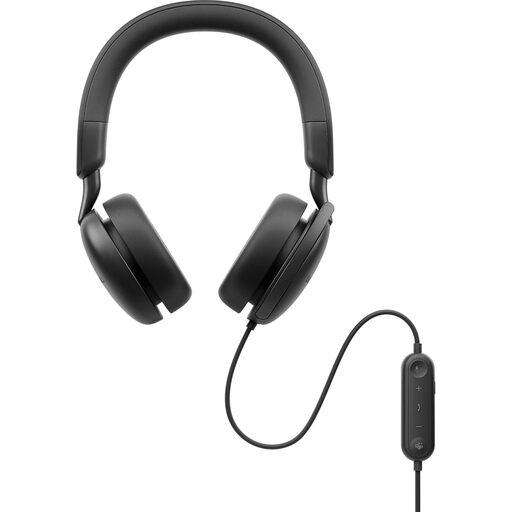
DELL Pro Plus Wired ANC Headset WH5024
Consider this wired model if listening concentration is important during tutorials, while checking microphone capture separately. ANC in the model name does not establish how much nearby speech reaches your learners; make a sample call and confirm the controls work as needed in your teaching app.
View on Joybuy
 No image available
Poly Blackwire 3220 Stereo USB-C Headset with USB-C/A adapter
This wired stereo option is relevant if your teaching computer has USB-C or you intend to use the adapter named with this variant. Confirm the delivered connector and adapter arrangement, and test voice capture and muting in your tutorial app.
View on Joybuy
 No image available
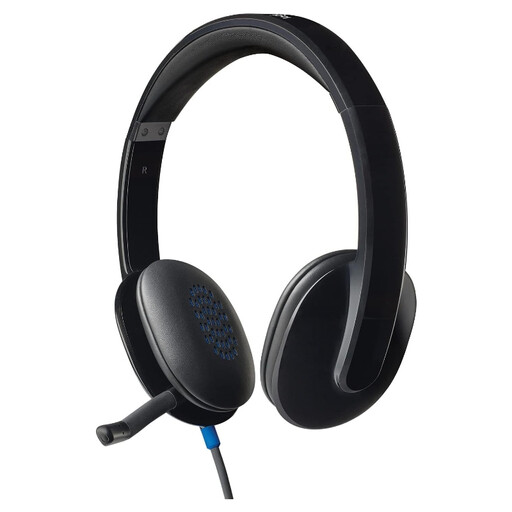
Logitech H540 Wired Headset
Consider this wired headset if a straightforward computer setup suits your tutorials. Check its connector against your computer, and test microphone placement, mute access and voice capture before teaching; H390 specifications should not be assumed to apply to the H540.
View on Joybuy
Common questions
Do I need a USB-A or USB-C headset?
Choose a connector that fits your teaching computer, or confirm that the exact headset variant comes with a suitable adapter. Logitech describes the H390 as USB-A; Jabra lists several connector versions of the Evolve2 40 SE; and HP describes a USB-C lead with a tethered USB-A adapter for the Poly Blackwire 5200 Series. Check the version you are actually buying.
Is a Microsoft Teams variant worth choosing?
A Teams variant is worth considering if Teams is your main tutorial platform and you want its model-specific controls. Jabra says its Microsoft variants offer Teams-oriented plug-and-play features and recommends a UC variant for users who do not use Teams as their softphone. Confirm the exact version and test audio input and output before a lesson.
Where should the boom microphone sit?
Place it close to your mouth, then check the result with a short recording in your tutorial app. Jabra gives this placement advice for the Evolve2 40 SE; a noise-reducing microphone claim does not remove the need to test your own setup.
How should I dispose of an old USB headset?
Check your local council's electrical-equipment collection instructions rather than putting the headset in general rubbish. Oxfordshire County Council advises that items with electrical parts or a plug are waste electrical and electronic equipment and should not go in general waste; collection arrangements can vary by area.


