What to check before buying
Identify the microphone connection before comparing hubs. Then count the devices that must stay connected and decide whether an external monitor is part of the setup.
Compact USB-C hub
Choose when: A USB-C computer needs a connection for a USB microphone and perhaps a few other devices.
Bear in mind: Display output depends on the host’s video capability; charging pass-through does not mean a mains charger is supplied.
Self-powered USB hub
Choose when: Several USB peripherals will remain connected at a fixed desk. StarTech.com’s 5G7AIBS-USB-HUB-EU, for example, has seven USB-A ports and a supplied power adapter.
Bear in mind: That model does not add an HDMI output or an XLR microphone input.
Direct connection or audio interface
Choose when: Plug a lone USB microphone directly into the computer to test a connection problem; use an audio interface instead for an XLR microphone.
Bear in mind: A direct connection occupies a computer port, while an audio interface is a different purchase from a USB hub.
| Concern |
What to check |
Who this matters to |
| Microphone and port compatibility |
Match the microphone’s USB-A or USB-C plug to a downstream data port and the hub’s host connector to the computer. An XLR microphone needs an audio interface. |
If I cannot connect my existing microphone to the computer, extra hub features will not help. Around 44% of consumers would put this connector match first. |
| Ports and shared power |
Count devices used simultaneously and distinguish data ports from charging connections. Check whether the chosen hub has its own power adapter. |
With a microphone, webcam and other peripherals sharing a desk, I want enough suitable connections without repeatedly swapping devices. For about 33% of consumers, capacity and shared power are the primary concern. |
| External display |
Check the monitor connection and the computer’s USB-C video support, including DisplayPort Alt Mode where the hub requires it. Address glare through screen placement or shading. |
If I need another screen at my window-side desk, I want to know it will connect; HDMI alone does not settle that. Display connectivity comes first for roughly 23% of consumers. |
Joybuy USB-C hub and dock options
These USB-C adapters and docks offer connection options for a USB microphone and other peripherals; several also list display outputs. Match the microphone plug and computer capabilities before choosing, particularly if you intend to attach a monitor.
 No image available
USB-C multiport hub with 2 HDMI, DP and 4 USB ports
Consider this for a USB microphone alongside other peripherals if its data ports match their plugs. The title lists two USB 3.0 ports, two USB 2.0 ports, two HDMI outputs, DisplayPort, RJ45, PD, SD/TF and audio connections. Check the computer’s USB-C video capabilities before relying on the display outputs.
View on Joybuy
 No image available
Mokin 2USBC to TB hub with USB-A, USB-C and HDMI
This is an option if your USB microphone needs a matching USB-A or USB-C data connection and you also want a display output. The title lists two USB-A 3.0 ports, one USB-C 3.0 port, SD/TF and HDMI 4K 60Hz. Confirm the computer supports the docking and video functions you plan to use.
View on Joybuy
 No image available
Targus USB-C Universal Dual HDMI 4K Docking Station, 100W PD Pass-Thru (Retail Packaging)
Consider this dock if you need to connect a USB microphone and are also planning a display setup; confirm that the microphone has a matching data port on this variant. Its title specifies dual HDMI 4K and 100W Power Delivery pass-through. Check the computer’s USB-C Alt Mode support and whether the required external 100W+ adapter is included.
View on Joybuy
 No image available
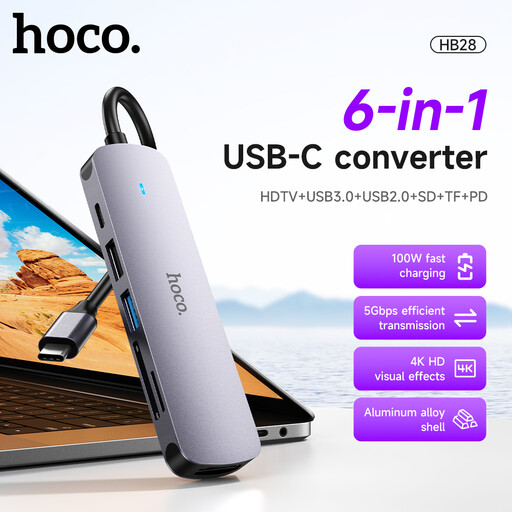
HOCO HB28 USB-C Multi-Function Converter, Metal Grey
Consider this for a USB microphone if one of its USB connections matches the microphone plug. The stated connections include USB 3.0, USB 2.0, HDTV, SD/TF and PD. If you also need a screen, check the display connector and the computer’s video support.
View on Joybuy
 No image available
V7 V7UC-U3CRJ45HDVG-BLK USB-C Adapter
Its two listed USB 3.0 ports make this an option to check for a USB microphone with a matching plug. The title also specifies 4K HDMI, VGA, Gigabit Ethernet and 100W Power Delivery. Confirm the computer supports USB-C Alt Mode if you intend to connect a display.
View on Joybuy
Common questions
Can an ordinary USB hub connect any microphone?
No. A USB hub can connect a USB microphone through a compatible data port, but it cannot directly connect an XLR microphone. For an XLR microphone, look for an audio interface with an appropriate input; if a USB microphone is not detected, Microsoft Support advises checking its connection and selected input device.
Do I need a self-powered hub for one USB microphone?
Not necessarily: first check that a hub has the right data connection for the microphone. A self-powered model is worth considering when several peripherals will share the hub. StarTech.com’s 5G7AIBS-USB-HUB-EU, for instance, specifies seven USB-A ports and a supplied 65W adapter.
Will an HDMI hub solve glare beside a bright window?
No. An HDMI-capable hub may let you attach an external monitor, but it will not reduce light falling on the screen. Check the computer’s video support before buying for display output: Anker specifies DisplayPort Alt Mode support for the A83C3.
How should I dispose of a broken USB hub?
Check local electrical-equipment recycling arrangements rather than assuming the hub belongs in ordinary household waste. Recycle Now notes that collection options vary by area and include some home schemes and recycling points.


