
24/7 Customer Support

Free returns

Same-day & Next-day Delivery

Quality Guaranteed

Unlock Your Welcome Offers: FREE Delivery | Up to 80% OFF | Free 30-day JoyPlus trial
Download the APP
Choosing a wired headset for work or study can seem straightforward until small design compromises become daily frustrations. The V7 HA212-2EP headset is designed for office calls, online meetings, virtual learning and general audio, but it is still worth checking whether its specifications match your equipment and routine.
Many UK buyers waste money on headsets because of three common traps:
A 3.5mm headset is generally convenient because it does not require charging, Bluetooth pairing or software installation. The V7 HA212-2EP uses one standard 3.5mm connection and is listed as compatible with Windows, macOS, iOS, Android and ChromeOS devices.
Before ordering, check the socket on your equipment. A laptop with a combined headset port should generally suit a single-plug design. A desktop computer with separate audio and microphone ports may require a compatible splitter. Phones and tablets without a 3.5mm socket will need a suitable adapter, if supported by the device.
A plug-and-play headset can be useful for shared offices, classrooms and home working because there are no drivers to install. However, the connected device may still need its microphone and speaker settings selected manually in an online meeting platform.
For calls, the microphone is often more important than music specifications. Look for:
The V7 HA212-2EP has a bi-directional noise-cancelling microphone with 270° rotation, allowing it to be worn on either side. This can suit call-handling staff, teachers and remote workers who regularly switch between notebooks, monitors or shared desks. “Noise-cancelling” should still be understood as a microphone feature rather than a promise that all surrounding noise will disappear.
A lightweight headset is easier to wear throughout a working session, but comfort also depends on headband pressure and ear cushion shape. The V7 HA212-2EP weighs approximately 72.5g, uses soft foam on-ear cushions and has an adjustable headband. Its 1.8m cable provides useful reach for a desk or classroom without requiring a wireless battery.
On-ear headphones rest against the ears rather than surrounding them. This can feel less enclosing than an over-ear design, although individual comfort varies. Buyers who need stronger passive isolation or have larger ears may prefer an over-ear model instead.
For technical context, the V7 HA212-2EP includes 30mm drivers, a listed 20Hz–20kHz frequency range and 32-ohm impedance. These figures describe the hardware; they do not independently guarantee a particular listening preference or call quality.
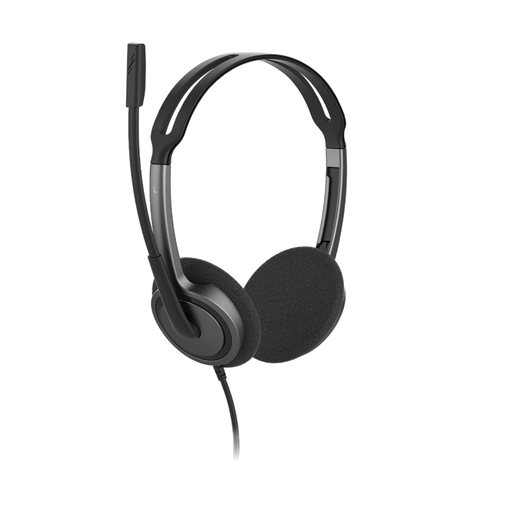
Why This Fits Their Persona: A sensible option for students, home users and office starters who want one lightweight wired headset for calls, lessons and everyday audio without managing a battery.
Its single 3.5mm plug-and-play connection avoids charging and driver installation, while the rotating boom helps keep the microphone positioned consistently.
Approximately 72.5g; adjustable headband; soft foam ear cushions; 1.8m cable; 2-year warranty.
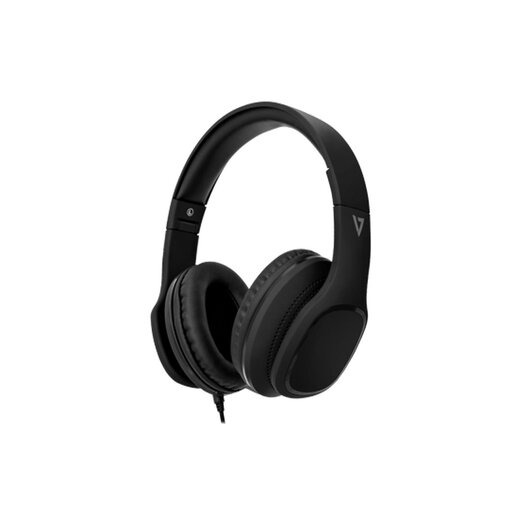
Why This Fits Their Persona: Suitable for users who place greater value on over-ear coverage, foldable storage and a detachable cable for commuting, office use and general listening.
The product information specifies passive noise isolation rather than implying complete active noise cancellation, making the limitation clearer before purchase.
40mm drivers; memory foam ear pads; foldable earcups; detachable 1.8m braided 3.5mm cable; in-line controls.

Why This Fits Their Persona: Designed for business users who spend substantial time on calls, webinars or softphone conversations at a Windows or Mac desk.
Its USB-A connection removes uncertainty around analogue headset sockets, while the adjustable microphone and in-line mute reduce the need to reach for system controls.
USB-A plug-and-play setup; noise-cancelling microphone; in-line volume and mute controls; approximately 2.4m cable.
We have compiled a complete, real-time list of products that fully satisfy these strict selection criteria and UK safety regulations.
It is designed for communication and includes a rotating noise-cancelling microphone, on-ear stereo speakers and a 3.5mm plug. Check that your computer or tablet has a compatible headset socket, or use an appropriate adapter if necessary.
No. It is a wired, plug-and-play headset, so it does not require a battery or driver installation. Audio performance still depends on the connected device and meeting application.
Lifespan depends on handling, cable strain, storage and cleaning. Avoid pulling the headset by its cable, route the lead away from moving furniture and store it where the ear cushions will not be crushed. The V7 HA212-2EP is supplied with a 2-year warranty, providing a defined period of product support.