
24/7 Customer Support

Free returns

Same-day & Next-day Delivery

Quality Guaranteed

Unlock Your Welcome Offers: FREE Delivery | Up to 80% OFF | Free 30-day JoyPlus trial
Download the APP
That familiar ache in your wrist after a long day at the computer is a common complaint for many office professionals and remote workers across the UK. The traditional computer mouse, while functional, can force your hand and wrist into an unnatural, twisted posture. Over time, this can lead to strain and discomfort. A vertical ergonomic mouse is designed to address this very issue, but with so many options available, how do you choose the right one?
As the Joybuy Product Recommendation Officer, my role is to help you navigate the market and find products that genuinely improve your daily life. This guide will walk you through what to look for in a vertical mouse and provide some practical recommendations to help you find a more comfortable way to work.
Choosing a new mouse is about more than just aesthetics. To find a device that offers long-term comfort, consider these key factors.
A mouse that is too large or too small can cause as much strain as a non-ergonomic one. Many vertical mice are designed for specific hand sizes. The goal is to find a mouse that allows your hand to rest on it comfortably, without having to stretch your fingers or clench your palm. For those with smaller hands, looking for a model specifically marketed as an ergonomic mouse for small hands is a crucial first step to ensure a proper fit and maximum benefit.
A wireless vertical mouse offers a clean, clutter-free desk and the freedom to position it exactly where you need it. Most connect via Bluetooth or a dedicated USB receiver and offer long battery life. A wired mouse, on the other hand, eliminates any concerns about battery levels or signal interference, offering a reliable plug-and-play experience. The choice depends on your personal preference for convenience versus steadfast connection.
The core principle of a vertical mouse is its "handshake" orientation. These mice are tilted at an angle, typically between 50 and 90 degrees, which keeps your forearm bones (the ulna and radius) in a parallel, untwisted position. This natural handshake mouse posture can help reduce muscle strain and pressure on the wrist. When searching for a mouse for wrist pain in the UK, paying close attention to the angle and overall shape is essential for finding relief.
We have selected a few options that cater to different needs and preferences, from dedicated ergonomic designs to reliable, performance-focused alternatives.
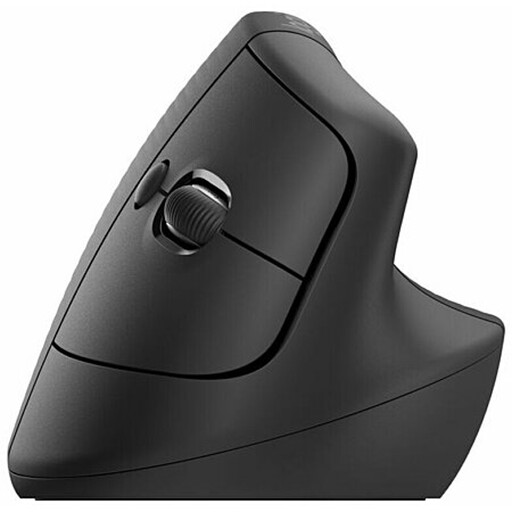
Why It Stands Out: The Logitech Lift is a standout choice specifically designed for small to medium-sized hands. Its 57-degree vertical angle is engineered to promote a natural handshake posture, immediately taking pressure off the wrist. This model is a frequent topic of discussion in any Logitech Lift review, and for good reason. It combines a thoughtful ergonomic shape with premium features, including dual connectivity via Bluetooth or the Logi Bolt USB receiver.
Pros:
Who is it for? This mouse is ideal for office professionals, creatives and anyone with small to medium-sized hands who spends hours at their desk and is looking to proactively improve their workspace ergonomics or alleviate existing wrist discomfort.
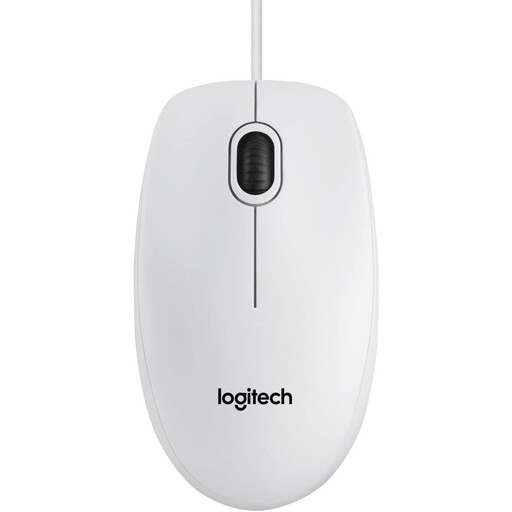
Why It Stands Out: While not a vertical mouse, the Logitech B100 represents a benchmark for reliability and simplicity. For those not yet ready to switch to a vertical design or who need a dependable, affordable option, the B100 is a solid choice. Its full-size, ambidextrous design is comfortable for a wide range of users, and its plug-and-play functionality makes it incredibly easy to set up.
Pros:
Who is it for? The B100 is perfect for users in home, office or educational settings who prioritise reliability, simplicity and value. It is an excellent choice for a secondary workstation or for those who prefer a traditional mouse shape from a trusted brand.
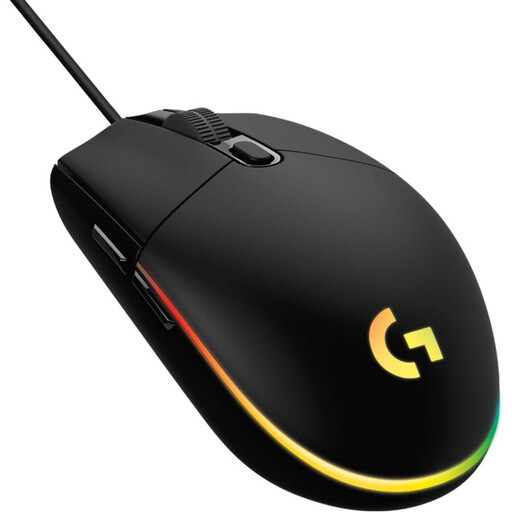
Why It Stands Out: Ergonomics are not just about vertical alignment; they are also about shape, responsiveness and customisation. The G102 brings a classic, gamer-tested ergonomic shape to the table, combined with high-performance features. While it maintains a traditional orientation, its comfortable design, high-precision 8,000 DPI sensor, and customisable buttons make it a compelling option for users who need speed and accuracy for both work and play.
Pros:
Who is it for? This mouse is for the user who balances productivity with a passion for gaming. If you want a single mouse that delivers high performance, customisation and a comfortable, familiar shape for all your activities, the G102 is an excellent contender.
Our recommendations cover a range of needs, but the world of computer peripherals is vast. If you are looking for a different style or feature set, particularly a reliable wired connection, there are many more choices to explore.
Discover a wider selection in our wired computer mouse category to find the perfect fit for your desk.
1. Does a vertical mouse really help with wrist pain? A vertical mouse is designed to place your hand and wrist in a more neutral, "handshake" position. This can reduce the twisting of your forearm muscles and may help alleviate the strain associated with using a traditional mouse for long periods. While many users report increased comfort, it is not a medical treatment. If you are experiencing persistent pain, it is always advisable to consult a healthcare professional.
2. How long does it take to get used to a vertical mouse? There is typically a short adjustment period, which can last from a few hours to a few days. Initially, the movement may feel less precise as your arm and shoulder learn to make the fine movements your wrist used to handle. Most users find that after a few days of consistent use, the new posture feels natural and more comfortable.
3. Are vertical mice good for gaming? While some gamers do use vertical mice, they are generally not designed for the rapid, precise "flick" movements common in competitive gaming. Performance-focused gamers often prefer traditional ergonomic gaming mice, like the Logitech G102, which prioritise sensor accuracy, low latency and button placement for fast-paced action. For slower-paced strategy or simulation games, a vertical mouse can be perfectly suitable.