Teachers planning for long periods while standing
If you navigate documents, presentations and school platforms at a standing desk, you need space to keep the mouse close rather than reaching across the work surface.


For lesson planning at a standing desk, choose a vertical mouse that fits your hand and handedness, then check that its connection works with your computer. A different grip does not replace good mouse placement: the Health and Safety Executive advises keeping the mouse within easy reach and using it with a straight wrist, while a 2013 study published in Ergonomics indicates that adapting to vertical-mouse pointing can take time.
If you navigate documents, presentations and school platforms at a standing desk, you need space to keep the mouse close rather than reaching across the work surface.
Hand orientation and grip size can rule out an otherwise appealing shape. Check the sizing guidance and handedness of the exact model, not just its vertical design.
If you move between a school laptop and another computer, check the connection method, available ports and operating-system support for any button software you intend to use.
Start with hand fit and mouse position at your standing desk; then check connectivity and whether you can work comfortably with the pointing controls.
| Concern | What to check | Who this matters to |
|---|---|---|
| Reach and wrist position | Whether the mouse can sit close to you, in line with your elbow, while you use it with a straight wrist, as the Health and Safety Executive advises. | During long planning sessions, I want the mouse within easy reach rather than stretching my arm across the desk. Around 29% of consumers put reach and wrist position first. |
| Hand fit and handedness | Manufacturer sizing guidance and the orientation of the exact variant; Logitech specifies Lift for small to medium hands, while Evoluent gives a hand-size threshold for its regular VerticalMouse 4 models. | If a grip feels too large or is shaped for the wrong hand, its other controls matter less to me. Hand fit is the primary concern for around 29% of consumers. |
| Computer connection | Bluetooth, receiver or wired connection; the ports on your computer or dock; and operating-system support for any button software. | Moving between a school laptop and another setup, I need a connection that works with the equipment I use. Around 21% of consumers prioritise device compatibility. |
| Pointing control | Button placement and adjustable pointer sensitivity, if relevant to your work; allow time to get used to the grip. | Detailed selecting and dragging make me wary of changing how the pointer feels. Maintaining pointing control comes first for around 21% of consumers. |
A vertical mouse can still be the wrong size or orientation. Logitech describes Lift as suited to small to medium hands, and Evoluent distinguishes its regular VerticalMouse 4 sizing from a smaller alternative.
Check the exact model’s hand-size guidance and left- or right-handed variant before buying.
A different grip does not address a mouse placed too far away. The Health and Safety Executive advises keeping it within easy reach and using it with a straight wrist.
Adjust the standing-desk arrangement so you can use the mouse without stretching your arm.
The cited Kensington Pro Fit Ergo model uses a 2.4 GHz USB receiver, while Evoluent’s VM4L has a wired USB-A connection. The connection that suits one computer may need extra equipment on another.
Check your computer or dock ports and verify software compatibility if you plan to customise buttons.
For a USB-C-only computer, a USB-A connection may require an adapter or hub.
A 2013 study published in Ergonomics found slower time-to-target with a vertical mouse in its studied task, alongside reduced forearm pronation.
Allow time to get used to the grip before judging how it handles selecting, dragging and navigation in your lesson-planning work.
The Lift line is worth considering if you need a compact vertical mouse, particularly for a small to medium hand or a left-handed setup.
The Pro Fit Ergo Vertical Wireless Mouse K75501EU is a right-handed, receiver-based option for people considering a larger grip and adjustable pointer sensitivity.
The VerticalMouse range is relevant when choosing by hand measurement or when a left-handed, wired mouse suits your setup.
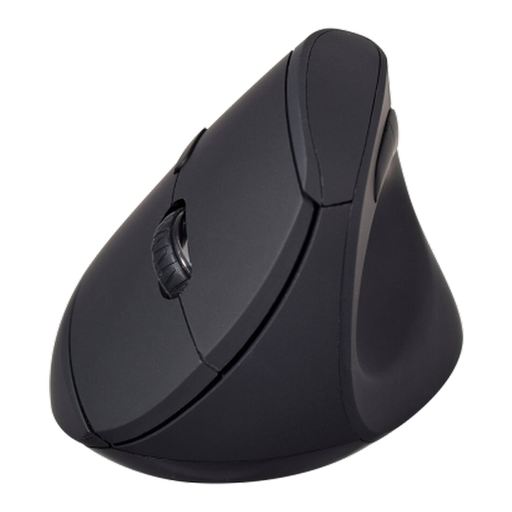
This vertical mouse is a connection-flexible option to consider for lesson planning at a standing desk; check its fit for your hand and computer before choosing it.
 No image available
Consider its two stated wireless connection methods if you need to match the mouse to your lesson-planning computer.
The product name specifies six buttons and an adjustable sensor up to 1600 DPI. Check the exact variant’s hand fit and orientation, whether a 2.4 GHz receiver is included, and whether it can switch between paired devices if you need that feature.
No: a vertical mouse is not a guaranteed remedy. A 2013 study published in Ergonomics found reduced forearm pronation in its test but longer pointing time; mouse placement and the rest of your workstation still matter.
Place it within easy reach, in line with your elbow, and aim to use it with a straight wrist. These positioning points follow the Health and Safety Executive’s display-screen-equipment guidance and apply regardless of mouse shape.
Choose a connection that works with the computers and ports you actually use. A receiver-based mouse needs a suitable USB connection, while the wired Evoluent VM4L uses USB-A and needs an adapter or hub for a USB-C-only computer; check button-software support separately if you need it.