If your computer supports Bluetooth, start with a Bluetooth-capable vertical mouse: it can connect without occupying a USB port. An AA-powered model avoids routine charging but eventually needs a replacement battery; a rechargeable model needs a charging plan. Check hand fit and mouse placement as well as the connection method before choosing one for long editing sessions.
Who needs which features?
Editors short of ports and sockets
If your laptop has few free USB ports, Bluetooth connectivity can let you use a mouse without a receiver. Power still needs attention: an AA-powered mouse needs occasional battery replacement, while a rechargeable one needs access to charging.
Long-session document reviewers
Repeated scrolling and navigation make accessible buttons, cursor-speed controls and quiet clicks worth checking. These features matter alongside a mouse position that does not require you to reach across the desk.
Editors switching to a vertical mouse
Hand size and handedness are useful starting points. Logitech positions Lift for small to medium hands and offers a left-handed version; Kensington positions MY630 for small to average hands and K75501EU for average to larger hands. A vertical angle alone cannot establish whether a mouse will fit you.
What matters when choosing?
Check your computer’s connection options first, then choose a power routine you can accommodate. After that, compare controls and hand fit for the way you edit.
| Concern |
What to check |
Who this matters to |
| Ports and power |
Confirm computer Bluetooth support if you want to avoid a USB receiver. Check whether power comes from a replaceable battery or USB charging. |
If my ports are already occupied, I want the mouse to connect without another receiver and avoid interrupting an editing session for charging. Around 40% of consumers put port and power demands first. |
| Document controls |
Check the location of navigation buttons, cursor-speed settings and quiet-click features; confirm software compatibility if you want to customise buttons. |
When I move repeatedly through lengthy minutes, I want controls I can reach without breaking my flow. Around 30% of consumers prioritise document navigation and quiet operation. |
| Hand fit and desk setup |
Check the maker’s hand-size and handedness guidance, then make sure the mouse can sit within easy reach. |
If the shell does not suit my hand or makes me reach across the desk, its vertical shape alone will not settle the fit question. Around 30% of consumers put hand fit and workstation position first. |
Buying pitfalls
-
Assuming wireless means no USB port is needed
A receiver-based mouse still occupies a compatible port, which can be awkward on a laptop already sharing ports with other equipment.
If preserving a port matters, choose a Bluetooth-capable model and confirm that your computer supports Bluetooth.
-
Treating rechargeable as maintenance-free
A rechargeable mouse still needs access to USB charging. Manufacturer battery-life figures also depend on the model and how it is used.
Choose between planned charging and eventual battery replacement according to which interruption is easier to manage at your desk.
-
Choosing by vertical angle alone
Manufacturer hand-size guidance differs between models, and a right-handed shell will not answer a left-handed user’s fit needs.
Check hand size and handedness before ordering, rather than treating the stated angle as a comfort guarantee.
-
Expecting a mouse to fix the whole workstation
The Health and Safety Executive advises keeping the mouse within easy reach so it can be used with a straight wrist; work routine matters during extended screen use too.
Position the mouse close to you and change activity regularly during lengthy editing sessions.
Brands to consider
Logitech
Relevant if you want Bluetooth and a receiver alternative, particularly when comparing hand-size or handedness options.
- Logitech lists Bluetooth Low Energy and Logi Bolt connectivity for Lift, with right- and left-handed versions and an included AA battery rated for up to 24 months.
- Lift is positioned for small to medium hands. Check fit rather than assuming its vertical shape will suit every user.
Kensington
Relevant when comparing a rechargeable Bluetooth mouse with a receiver-based model for larger hands.
- Kensington lists Bluetooth Low Energy and an included USB-A receiver for MY630, with connections for up to three active devices and up to four months of battery life over Bluetooth.
- MY630 is positioned for small to average hands and still needs charging. Kensington positions the receiver-based K75501EU for average to larger hands.
Trust
Relevant if a rechargeable, receiver-connected mouse suits a desk with a free USB port.
- Trust lists a 2.4 GHz USB micro receiver, silent buttons and two thumb buttons for Bayo II.
- Its stated connection uses a receiver rather than Bluetooth, and its rechargeable battery needs periodic charging.
Joybuy product choices
These wireless mouse choices address the port-limited editing scenario in different ways: compare their stated connection options and controls, then check fit and power needs for your desk.
 No image available
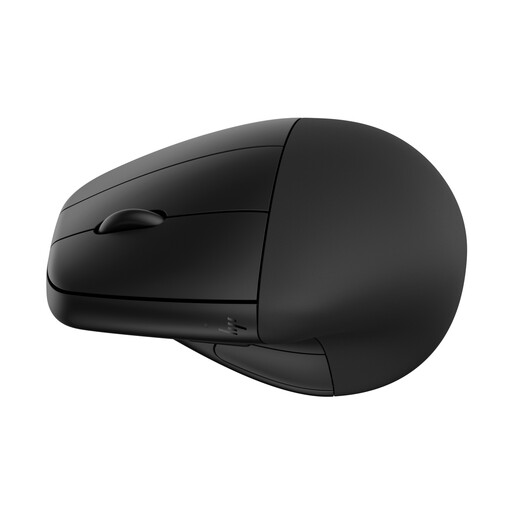
HP 920 Ergonomic Wireless Mouse (Black) with Detachable Wrist Rest
Consider this model if you want a wireless mouse for document editing and can plan for recharging. The detachable wrist rest is part of this variant; confirm that its fit and the mouse’s connection options suit your computer and desk.
View on Joybuy
 No image available
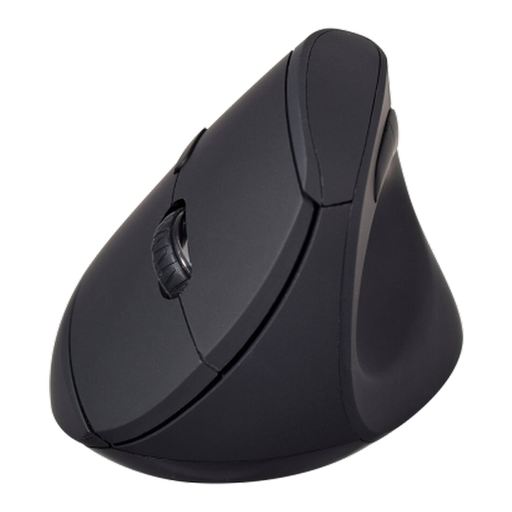
V7 MW500BT Bluetooth Vertical Mouse, 2.4 GHz, 6 Buttons, 1600 DPI
Consider this model if Bluetooth connectivity is important for keeping a USB port free. Its title also specifies a 2.4 GHz mode and six buttons; check hand fit and the battery replacement interval before ordering.
View on Joybuy
Frequently asked questions
Will a Bluetooth vertical mouse save a USB port?
Yes, if your computer supports Bluetooth and you use that connection rather than a receiver. Logitech describes a direct Bluetooth connection for Lift; a receiver-based connection instead needs a compatible USB port.
Is an AA-powered or rechargeable mouse easier with limited sockets?
An AA-powered mouse avoids routine USB charging, while a rechargeable mouse avoids replacing AA batteries but needs a charging source. Logitech rates Lift for up to 24 months with its included AA battery; Kensington rates MY630 for up to four months over Bluetooth. Those are manufacturer figures, not guaranteed intervals.
Will a vertical mouse make a long editing session comfortable on its own?
No mouse shape can replace checking hand fit and desk position. The Health and Safety Executive advises placing the mouse within easy reach for a straight wrist and taking short breaks or changing activity during prolonged screen work.
What should I do with an old mouse or battery?
Keep unwanted electrical products and batteries out of household rubbish, in line with UK government guidance. Check the collection options available locally for each item.


