Choose a vertical mouse that fits your hand and pointing side before prioritising extra controls. Two screens connected to one computer do not require multi-device switching; that feature matters when you move between separate devices. Keep the mouse within easy reach and consider the wider workstation setup, as advised by the Health and Safety Executive and University Hospitals Sussex NHS Foundation Trust.
Who this suits
Teachers planning for long desk sessions
If you spend extended periods selecting resources and editing lesson documents, start with hand fit and a mouse position you can reach comfortably. University Hospitals Sussex NHS Foundation Trust advises keeping the mouse within easy reach.
People switching between planning devices
If you move between a work laptop, home computer or tablet, device switching may be useful. Check the operating systems and connection methods for the particular mouse; Logitech states that Lift for Business can connect to up to three devices.
Buyers with specific fit or connection needs
A left-handed version, the right hand-size range or a connection for a USB-C-only laptop may decide the choice. Logitech offers left- and right-handed Lift variants; Evoluent specifies an adapter or hub for the USB-A receiver on its VM4RW when used with USB-C ports.
What to prioritise
| Concern |
What to check |
Who this matters to |
| Hand fit and placement |
Check the handed version, stated hand-size range and whether the mouse can sit within easy reach. |
For long planning sessions, I want the grip and controls to suit my hand without reaching across the desk; around 43% of consumers put hand fit and comfortable use first. |
| Switching devices |
Establish whether both screens use one computer or you switch computers; check the model’s device-switching and connection options. |
If I prepare materials on separate devices, I want to move the mouse between them without changing my desk setup; roughly 29% of consumers prioritise device switching. |
| Ports and software |
Match the connection to your available ports and check customisation support for your operating system. |
With limited laptop ports or a need to configure buttons, I want the chosen model to work with my computer; about 28% of consumers put connection and software compatibility first. |
Common buying mistakes
-
Expecting the mouse to fix the whole workstation
A vertical shape does not address a mouse placed too far away or other workstation factors. The Health and Safety Executive identifies workstation design and use as relevant to display-screen-equipment discomfort.
Keep the mouse within easy reach, adjust screen positions for comfortable viewing and change activity or take breaks regularly.
-
Choosing by vertical angle alone
Hand size and pointing side still matter. Logitech positions Lift for small-to-medium hands in left- and right-handed versions, while Evoluent gives a hand-size threshold of about 178 mm for regular VerticalMouse 4 models.
Compare your hand with the maker’s sizing guidance and choose the correct handed version before weighing extra controls.
-
Overlooking ports and software compatibility
Evoluent’s VM4RW has a USB-A receiver that needs an adapter or hub for USB-C ports. Evoluent states that its Mouse Manager customisation software is for Windows.
Check your laptop ports, operating system and required button functions against the exact mouse model.
Relevant brands to consider
Logitech
Logitech positions Lift for small-to-medium hands, with left- and right-handed versions, and MX Vertical for medium-to-large right hands.
- Logitech specifies a 57-degree vertical angle for Lift and MX Vertical. It states that Lift for Business can connect to up to three devices.
- MX Vertical is right-handed. Check the exact variant and its controls rather than assuming the two models suit the same hand or workflow.
Evoluent
Evoluent’s VerticalMouse range includes regular, small and left-hand variants, with wired and USB-receiver models.
- Evoluent publishes hand-sizing guidance, including a threshold of about 178 mm from middle fingertip to wrist crease for regular VerticalMouse 4 models.
- The VM4RW USB-A receiver needs an adapter or hub for USB-C ports. Check operating-system support if button customisation matters.
Joybuy vertical mice for lesson planning
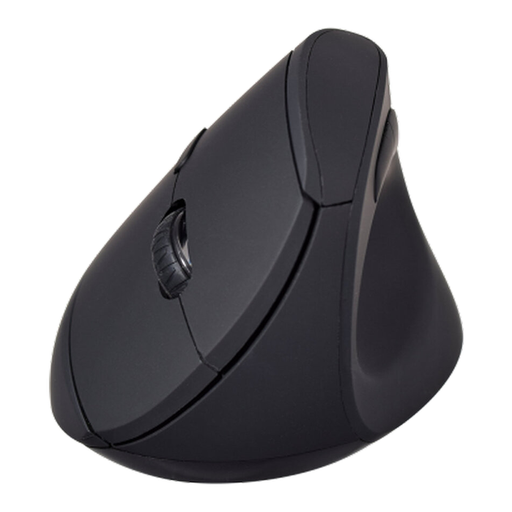
For lesson planning at a two-screen desk, assess this vertical mouse against your hand fit, computer connection and any need to switch between separate devices.
 No image available
V7 MW500BT Bluetooth vertical mouse
Its vertical form is relevant to repeated pointing during lesson planning; check that its shape and handedness suit you.
The listed connection modes are Bluetooth and 2.4GHz. It has six buttons and an adjustable sensor specified at 1600 DPI.
If you use separate computers, confirm whether this model can pair with and switch between them.
Joybuy
Questions about vertical mice
Do two screens mean I need a multi-device vertical mouse?
No, not if both screens connect to one computer. Prioritise hand fit and a mouse position within easy reach; consider device switching when you actually move between computers or compatible devices. Logitech states that Lift for Business can connect to up to three devices.
Bluetooth or a USB receiver for a USB-C-only laptop?
Bluetooth avoids using a USB port when the chosen mouse and laptop support it. For a USB-A receiver, check whether you need an adapter or hub: Evoluent explicitly requires one for its VM4RW on USB-C ports. Connection options vary by model.
Will a vertical mouse resolve wrist or arm discomfort on its own?
A vertical mouse cannot be relied on to resolve discomfort by itself. The Health and Safety Executive identifies display-screen use and workstation design among the relevant factors. Set up the wider desk, keep the mouse within easy reach and seek appropriate professional advice for persistent symptoms.


