Consider a vertical mouse if long sessions of selecting text, sorting documents and scrolling through notes leave a conventional mouse feeling awkward, but choose one that fits your hand and study device. A 2013 study published in Ergonomics found less wrist pronation with a vertical mouse, alongside slower target acquisition; its shape may take getting used to and should not be treated as a medical treatment.
Who might consider one?
Long-session digital note organisers
If you spend extended sessions reading PDFs, selecting passages and rearranging notes, you may want to try a different mouse shape alongside improvements to your desk setup. The Health and Safety Executive advises keeping the mouse in line with your elbow.
Fit-sensitive or left-handed students
If your current mouse feels too large or too small, check the size and handed version rather than assuming every vertical shape will fit. Logitech offers a left-handed Lift option, while Evoluent separates some models by hand size.
Laptop and multi-device note workers
If you move between study devices, check whether each one can use the mouse’s connection method and whether its buttons suit the way you navigate documents. Compatibility depends on the exact model.
What matters when choosing?
Start with hand fit and handedness, then check your device connection and controls. Allow time to try the grip during your usual note-organising tasks.
| Concern |
What to check |
Who this matters to |
| Hand fit and handedness |
Check the stated hand-size guidance, left- or right-handed version and reach to the buttons. |
If my hand has to stretch for the buttons, sorting notes may feel awkward despite the vertical grip. Around 37% of consumers put hand fit and handedness first. |
| Long-session posture |
Check whether the grip feels comfortable during selection and dragging; keep the mouse in line with your elbow. |
When I spend a long session highlighting and moving passages, I want to avoid an awkward reach or wrist position. For around 36% of consumers, sustained-session posture is the primary concern. |
| Study-device workflow |
Check Bluetooth or receiver requirements, device compatibility and the controls you will use. |
If I switch devices or move repeatedly between research pages, the connection and button layout need to suit that routine. Workflow compatibility comes first for around 27% of consumers. |
Mistakes to avoid
-
Choosing an “ergonomic” label instead of checking fit
Vertical mice come in different sizes and handed versions. Logitech positions Lift for small-to-medium hands, while Kensington positions its Pro Fit Ergo Vertical Wireless Mouse for average-to-larger right hands.
Check the exact model’s hand-size guidance and whether you can reach its buttons without stretching.
-
Expecting a mouse to treat wrist symptoms
Changing mouse shape does not replace attention to the whole workstation. University of Oxford research involving people with carpal tunnel syndrome found that the ergonomic devices studied did not reduce carpal-tunnel pressure.
Keep the mouse within comfortable reach, vary your activity and seek appropriate clinical advice for persistent or worsening symptoms.
-
Judging precision after one short session
A 2013 study published in Ergonomics found slower target acquisition with a vertical mouse than with a standard mouse, despite differences in measured wrist posture and muscle activity.
Try your usual highlighting, dragging and document navigation before deciding whether the grip suits you.
-
Overlooking connection and computer compatibility
A receiver needs a suitable USB port, and operating-system support varies by model. Kensington states that its Pro Fit Ergo Vertical Wireless Mouse does not support Windows ARM-based computers.
Check your computer, available ports and preferred connection against the exact mouse version before buying.
Brands to consider
Logitech
Logitech positions Lift as a vertical mouse for small-to-medium hands and offers right- and left-handed versions.
- Published fit guidance and a left-handed Lift option make it easier to narrow down the version to consider.
- Hand comfort remains personal; the brand’s comfort claims are not a substitute for checking your grip and button reach.
Kensington
Kensington positions its Pro Fit Ergo Vertical Wireless Mouse for average-to-larger right hands and specifies a receiver, cursor-sensitivity settings and forward/back controls.
- Its published fit and control details give Windows users specific features to check against a note-navigation routine.
- Kensington states that this model does not support Windows ARM-based computers; check the exact computer before choosing it.
Evoluent
Evoluent offers distinct VerticalMouse sizes and some left-handed models within the VerticalMouse 4 range.
- Separate size options help shoppers compare shapes rather than relying on one general fit description.
- Connection and compatibility vary by model; the brand’s comfort and pain-relief statements should not be treated as evidence of treatment effectiveness.
Joybuy product choices
These mice offer options for study-note navigation. Check the exact shape, hand fit and device compatibility before choosing either one.
 No image available
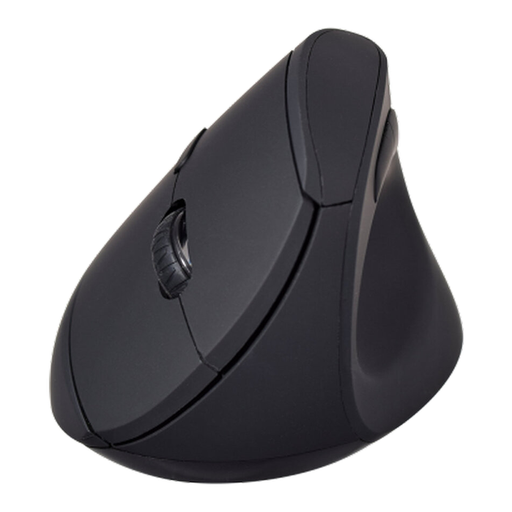
V7 MW500BT Bluetooth Vertical Mouse
Consider this model if you want a vertical shape and forward/back controls for moving through study material; check that its grip suits your hand and dominant side.
The product name specifies Bluetooth and 2.4 GHz wireless connectivity, six buttons and an adjustable sensor listed at 1600 DPI.
View on Joybuy
 No image available
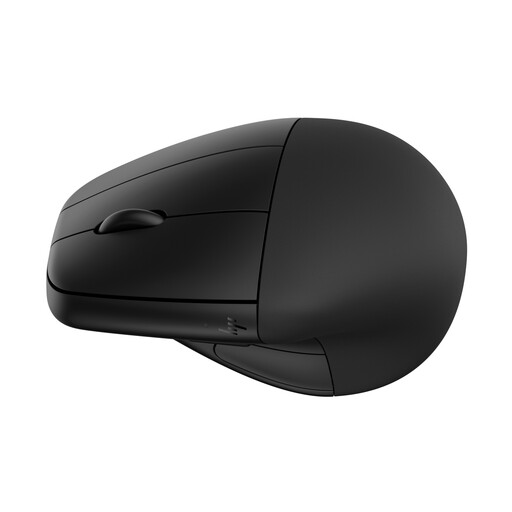
HP 920 Ergonomic Wireless Mouse (Black) with Detachable Wrist Rest
Consider this wireless option for desk-based note work if you want a detachable wrist rest. If a vertical grip is essential, confirm the exact shape, hand fit and button reach before buying.
The product name specifies a detachable wrist rest.
View on Joybuy
Frequently asked questions
Will a vertical mouse feel comfortable for organising notes straight away?
Not necessarily: fit and familiarisation both matter. In a 2013 controlled study of 16 participants published in Ergonomics, a vertical mouse reduced measured wrist pronation and wrist-extensor activity, but target acquisition took longer than with a standard mouse. Try the grip during your usual selection and dragging tasks before judging it.
Where should a vertical mouse sit on my study desk?
Keep it close enough to use without reaching, in line with your elbow. That follows Health and Safety Executive posture guidance and remains relevant whatever mouse shape you choose.
Can a vertical mouse treat carpal tunnel syndrome?
Do not rely on a vertical mouse as treatment. University of Oxford research involving 21 people with carpal tunnel syndrome found a change in wrist position but no reduction in carpal-tunnel pressure from the devices studied. Seek appropriate clinical advice for persistent or worsening symptoms.
Do I still need breaks if I switch mouse?
Yes. The Health and Safety Executive advises breaks or changes of activity during display-screen work and generally favours shorter, more frequent breaks over longer, less frequent ones; choose a pattern that suits the work you are doing.


