Choose a vertical mouse for proposal writing by checking hand fit, connection options and click noise, not just its upright shape. Quiet controls matter when colleagues work nearby, while the Health and Safety Executive advises keeping the mouse in line with your elbow as part of a properly arranged workstation.
Who should consider one?
Long-session proposal writers
If you spend sustained periods drafting and revising documents, an upright mouse shape may be worth considering alongside your wider workstation setup. The Health and Safety Executive advises positioning the mouse in line with your elbow.
Shared-office distraction minimisers
If you write near colleagues, click noise may influence your choice. Logitech describes quiet clicks on its Lift mouse; check scrolling noise separately and make sure the shape fits your hand.
Fit- and compatibility-sensitive buyers
Hand size, handedness, available USB ports and operating system can determine whether a particular model suits your desk. Check those details for the exact version you plan to buy.
What matters when choosing?
Start with a shape and handed version you can use comfortably, then check how the mouse connects and whether its controls suit a shared workspace.
| Concern |
What to check |
Who this matters to |
| Position during long sessions |
Try the grip and check whether the mouse can sit close to you, in line with your elbow. |
If I spend a long session revising a proposal, I want a grip I can use without reaching awkwardly. Around 40% of consumers put positioning and comfort first. |
| Noise near colleagues |
Check the stated click behaviour and assess scrolling noise where possible. |
Repeated clicks can distract people working beside me, so quieter controls are my priority. Around 30% of consumers put low-distraction operation first. |
| Fit and connection |
Check hand-size and handedness guidance, then confirm ports, connection method and software support for your computer. |
If the shape is hard to grip or the connection does not suit my desk, extra buttons will not resolve the mismatch. For around 30% of consumers, fit and compatibility come first. |
What should you avoid?
-
Treating a vertical mouse as a fix for the whole workstation
Mouse shape does not correct a screen, keyboard or pointing device placed awkwardly. The Health and Safety Executive advises keeping the keyboard central and the mouse in line with your elbow.
Arrange the desk as a whole and use your workplace’s display screen equipment assessment process where applicable. Seek appropriate professional advice for persistent symptoms rather than relying on a product claim.
-
Choosing by vertical angle alone
A stated angle does not establish that a mouse fits your hand. Logitech positions Lift for small to medium hands, while Evoluent gives a hand-length guide of about 178 mm or more for its regular VerticalMouse 4 models.
Check the maker’s sizing guidance, select the correct handed version and try the grip where possible. Check the retailer’s applicable return terms before purchase.
-
Assuming every connection and shortcut works on every computer
Evoluent specifies a USB Type-A connection for its wired VM4R and says its Mouse Manager customisation is not compatible with macOS. Connection and software features therefore need checking model by model.
List your available ports, operating system and required shortcuts before choosing a wired or wireless mouse.
A computer with only USB-C ports needs a suitable adapter or hub for the wired VM4R; Evoluent says neither is included.
-
Assuming a product page guarantees availability
A product listing is not a commitment that the mouse can be supplied when you need it.
Check current availability, delivery eligibility and the exact model details before checkout.
Brands to consider
These ranges illustrate different fit and control options; a brand’s inclusion does not establish that every model suits a shared office.
Logitech
Lift is aimed at small to medium hands, including a left-handed option; MX Vertical offers a different, control-focused choice.
- Logitech specifies a 57° shape, quiet clicks and Bluetooth or Logi Bolt connectivity for Lift.
- Check fit for either model. Logitech’s claims about reduced hand movement for MX Vertical should not be treated as a guaranteed outcome for your work.
Razer
The Pro Click V2 Vertical Edition is a right-handed option for people who want additional controls.
- Razer specifies six buttons and base support for this model.
- Those features do not establish its click noise or whether its shape will fit your hand.
Evoluent
The VerticalMouse range includes size and handedness variants, with wired and wireless choices.
- Evoluent gives a hand-length guide of about 178 mm or more for regular VerticalMouse 4 models.
- The wired VM4R uses USB Type-A, and Evoluent says its Mouse Manager customisation is Windows-only.
Vertical mice on Joybuy
These two vertical mice offer different features to check against a proposal-writing desk setup. For either one, assess hand fit and control noise before relying on it in a shared office.
 No image available
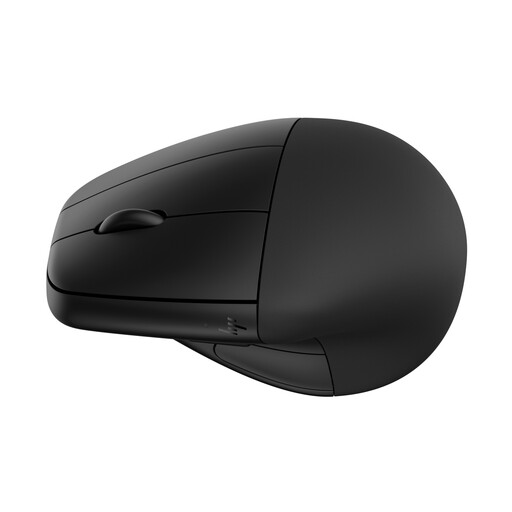
HP 920 Ergonomic Wireless Mouse, Black, with Detachable Wrist Rest
Consider this wireless model if a detachable wrist rest is useful at your document-writing desk. Check the grip, connection method and click noise against your own setup before choosing it for shared-office work.
View on Joybuy
 No image available
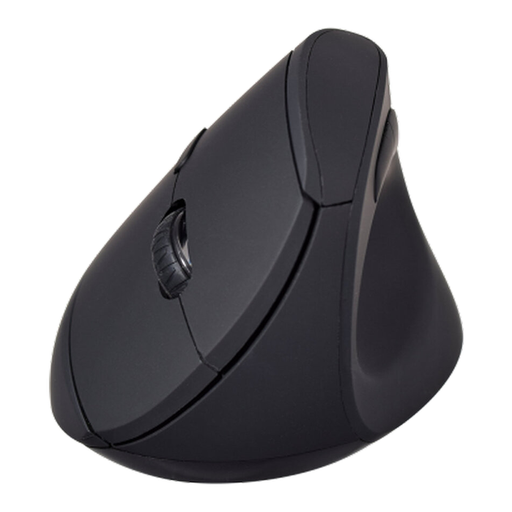
V7 MW500BT Bluetooth Vertical Ergonomic Mouse
Consider this model if you want a vertical mouse with Bluetooth and 2.4 GHz wireless options for document work. Its named specifications include six buttons and an adjustable 1600 DPI sensor; check hand fit, computer compatibility and control noise separately.
View on Joybuy
Common questions
Does a vertical mouse remove the need to adjust my workstation?
No. The Health and Safety Executive advises keeping the mouse in line with your elbow and the keyboard central; an upright mouse shape does not replace those positioning checks.
When should I ask about a workstation assessment?
If you use display screen equipment daily for continuous periods of an hour or more, ask your employer how its assessment process applies to your workstation. The Health and Safety Executive identifies this usage pattern in its display screen equipment guidance.
How can I check whether a vertical mouse will fit?
Use the exact model’s hand-size and handedness guidance, then try its grip where possible. Logitech positions Lift for small to medium hands; Evoluent gives a guide of about 178 mm from middle fingertip to wrist crease for regular VerticalMouse 4 models.
Will programmable buttons work the same way on every computer?
Not necessarily. Evoluent says its Mouse Manager customisation works on Windows but is not compatible with macOS, where VerticalMouse button functions are fixed. Check the exact model and operating system if shortcuts matter to your proposal workflow.


