Choose a vertical mouse by hand fit and laptop connection before paying attention to extra controls. Logitech Lift is aimed at small-to-medium hands and has a left-handed version; Kensington Pro Fit Ergo Vertical is aimed at average-to-larger hands and uses a USB receiver. In a shared room, check the exact model’s click noise, and keep the mouse within easy reach rather than treating its shape as a substitute for a workable desk setup.
Who needs a vertical mouse for timetable planning?
Comfort-focused timetable planners
If editing grids and moving events means long stretches at the desk, hand fit matters alongside mouse placement. The Health and Safety Executive advises keeping the mouse in line with the elbow; a vertical shape does not remove the need to arrange the workstation.
Shared-room late-night organisers
When timetable work happens near a roommate, button noise may affect which mouse is practical. Logitech describes Lift’s clicks as quiet, while Trust specifies silent buttons for Yuno; check the claim for the exact model you are considering.
Laptop-first club coordinators
A laptop with limited ports makes the connection choice important. Logitech Lift offers Bluetooth and Logi Bolt, whereas Trust Yuno connects through a 2.4G USB receiver; check which option works with your laptop before ordering.
What matters when choosing one?
For club timetable work, establish hand fit and a usable laptop connection first, then decide how much quiet clicking and navigation controls matter in your room.
| Concern |
What to check |
Who this matters to |
| Hand fit and posture |
Check the maker’s hand-size and handedness guidance, then whether you can reach the controls without stretching. |
If the mouse feels awkward while I move events around a timetable, fit matters more than extra buttons; roughly 36% of consumers would put hand fit first. |
| Quiet use |
Look for a quiet-button claim for the exact model; consider whether its wheel and side buttons will also suit your room. |
When I edit a timetable beside someone who is studying or sleeping, I want less distracting clicking; around 29% of consumers would prioritise quiet use. |
| Laptop connection and desk space |
Confirm Bluetooth support or a suitable port for the specified USB receiver, and check how the mouse is powered. |
With few spare laptop ports and little desk space, I need a connection that does not displace another device; about 28% of consumers would make connection and space their main concern. |
| Timetable navigation |
Check side-button placement and whether any programmable controls work with your operating system and timetable software. |
If I repeatedly switch between event details and calendar views, reachable shortcuts could be useful; roughly 7% of consumers would put navigation controls first. |
Buying mistakes to avoid
-
Choosing by the word ergonomic rather than hand size
Logitech positions Lift for small-to-medium hands, while Kensington specifies Pro Fit Ergo Vertical for average-to-larger hands. Either shape can be awkward if its controls are difficult for you to reach.
Use the maker’s sizing guidance as a starting point, then check the applicable retailer’s return terms before relying on an at-home fit test.
-
Leaving the desk setup unchanged
A vertical mouse can still be uncomfortable to use if it sits beyond easy reach. The Health and Safety Executive advises placing the mouse in line with the elbow and, for prolonged laptop use, using a separate keyboard and mouse so the screen can be raised.
Make room beside the keyboard for the mouse and check that you can use it without reaching or twisting.
-
Expecting a change of mouse shape to treat pain
A 2013 laboratory study published in Ergonomics found lower wrist pronation and wrist-extensor activity with a vertical mouse than with a standard mouse, but also found that familiarisation might be needed. Those findings do not establish a treatment for a medical condition.
Allow time to get used to the shape during ordinary timetable tasks; seek appropriate professional advice rather than relying on a mouse to address persistent pain.
-
Buying a receiver-only mouse without checking ports
Trust Yuno uses a 2.4G USB receiver, while Logitech Lift offers Bluetooth as well as Logi Bolt. A receiver is less convenient if the laptop has no suitable free port.
Check the laptop’s ports and Bluetooth capability against the exact mouse and receiver before ordering.
A laptop without a compatible port may need a USB adapter for a receiver-only mouse.
Vertical-mouse brands to consider
Logitech
Lift is a compact office-oriented option for small-to-medium hands, with right- and left-handed versions.
- Logitech specifies a 57° angle, a thumb rest, quiet clicks, Bluetooth and Logi Bolt connectivity for Lift.
- Its stated sizing is not a reason to assume that Lift will fit extra-large hands; check the handed version as well as the size.
Kensington
Pro Fit Ergo Vertical is a receiver-based option specified for average-to-larger hands.
- Kensington specifies a 46.7° slope, a little-finger support lip, forward/back controls and four DPI settings.
- It uses a nano receiver rather than Bluetooth, and Kensington states that Windows ARM-based computers are not currently supported.
Trust
Yuno addresses quiet, rechargeable receiver-based use; Voxx is a separate option with more programmable controls.
- Trust specifies silent buttons and a rechargeable battery for Yuno. It specifies Bluetooth and five programmable buttons for Voxx.
- Yuno’s stated connection uses a 2.4G USB receiver, so check for a suitable laptop port; do not assume Voxx’s controls or connectivity also apply to Yuno.
Joybuy vertical mice for timetable planning
These vertical-mouse listings offer wireless choices for a laptop-based timetable setup. Check hand fit and button noise for the particular model, especially if you will work for long periods or share your room.
 No image available
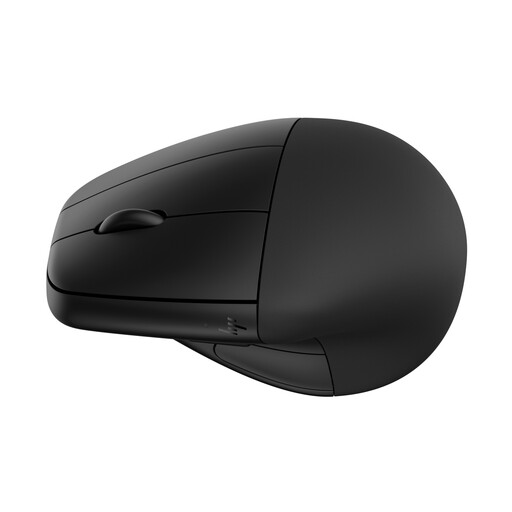
HP 920 Ergonomic Wireless Mouse, Black, with Detachable Wrist Rest
Consider this wireless model if a detachable wrist rest appeals for your desk setup. Check how the rest fits alongside your keyboard, and confirm hand fit and click noise if either is important to your choice.
View on Joybuy
 No image available
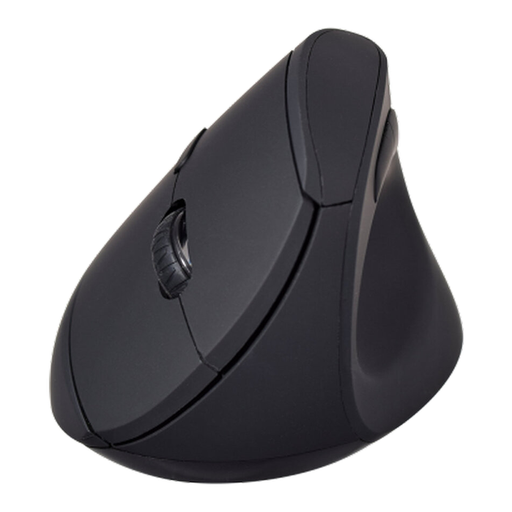
V7 MW500BT Bluetooth Vertical Ergonomic Mouse
Consider this model if you want a stated choice between Bluetooth and 2.4 GHz wireless for timetable work. Its title specifies six buttons and an adjustable sensor up to 1600 DPI; check hand fit and click noise separately before choosing it for a shared room.
View on Joybuy
Common questions about vertical mice
Can a vertical mouse replace a better desk setup?
No. The Health and Safety Executive advises keeping the mouse in line with the elbow and using a separate keyboard and mouse when raising a laptop screen for prolonged work. Check mouse reach and screen position as well as the mouse’s shape.
Will a vertical mouse cure wrist pain?
Do not choose one as a treatment. A 2013 laboratory study published in Ergonomics found differences in wrist posture and muscle activity compared with a standard mouse, but did not establish a cure; it also noted that users may need time to adapt.
Is Bluetooth or a USB receiver more practical for a timetable-planning laptop?
Bluetooth avoids occupying a USB port when the laptop and mouse support it; a receiver is workable when a compatible port is available. Logitech Lift offers Bluetooth and Logi Bolt, while Trust specifies a stored 2.4G USB receiver for Yuno, so check the connection for the exact model.


