For proposal writing on two screens connected to one computer, choose a vertical mouse by hand fit, connection method and how easily you can control pointer speed. Multi-device switching matters when you need to control separate computers, not simply because you have two displays; keep the mouse and wider desk layout in mind as well.
Who is this for?
Long-session proposal writers
If you spend extended periods drafting and editing, consider how the mouse fits your hand and where it sits on the desk. The Health and Safety Executive advises looking at the whole display-screen workstation, not just one input device.
Two-screen, single-computer users
If both displays run from one computer, focus on controllable pointer movement and a suitable connection. Switching the mouse between devices becomes relevant only if you also use a separate computer or device.
Fit-sensitive or left-handed users
Hand size and handedness may narrow the choice before extra buttons or connection features do. Look for a stated fit range, the correct handed version or an adjustable grip.
What matters when choosing?
Establish whether your two screens share one computer, then assess hand fit and pointer control before paying attention to extra device-switching features.
| Concern | What to check | Who this matters to |
|---|
| Hand fit |
Check the maker’s hand-size guidance, handed version and thumb-rest shape; consider how the mouse sits beside your keyboard. |
For a long drafting session, I need a grip that suits my hand without stretching to reach the controls. Around 36% of consumers put physical fit first. |
| Two-screen navigation |
Look for adjustable pointer speed and controls you can use in your editing workflow; confirm software support for any intended shortcuts. |
Moving between a draft and reference material makes precise selection as important to me as crossing the desktop. Around 29% of consumers prioritise pointer control and navigation. |
| Connection and devices |
Check Bluetooth or receiver requirements, available ports and whether the exact model switches between separate devices. |
If my screens belong to different computers, I want to know whether one mouse can control both; with one computer, I only need a suitable connection. Roughly 21% of consumers place that connection decision first. |
| Desk setup |
Check that the mouse can sit in line with your elbow and that the screen and keyboard arrangement lets you work without twisting. |
A new mouse will not resolve a desk layout that makes me reach or turn throughout a proposal. Around 14% of consumers make the wider setup their primary concern. |
Common buying mistakes
-
Assuming two monitors require multi-device switching
Two displays connected to one computer still use one mouse connection. A switchable mouse serves a different purpose: controlling separate devices.
Check how your displays are connected before comparing multi-device features. For a single computer, give hand fit and pointer-speed control priority.
-
Expecting the mouse to fix the whole workstation
The Health and Safety Executive’s posture guidance also addresses screen, keyboard and mouse placement; changing the mouse alone does not correct an awkward layout.
Keep the screen and keyboard central and the mouse in line with your elbow. If you are a worker using display-screen equipment daily for continuous periods of an hour or more, use your employer’s workstation assessment process when discomfort occurs.
-
Choosing by vertical shape without checking fit
Logitech positions Lift for small-to-medium hands, Kensington positions its Pro Fit Ergo Vertical Wireless Mouse for average-to-larger hands, and Contour offers adjustable thumb support on UniMouse. The word “vertical” does not make their grips interchangeable.
Check the stated hand fit and handed version before ordering. If you are unsure about the grip, check the retailer’s applicable return terms before purchase.
Relevant brands to consider
Logitech
Lift and MX Vertical offer different ways to approach hand fit and pointer control for desk work.
- Logitech states that Lift suits small-to-medium hands and offers a left-handed version. MX Vertical has a dedicated cursor-speed switch; Lift for Business can switch between up to three devices.
- Check the exact Lift variant: the stated hand fit may not suit a larger hand, and the documented multi-device capability applies to Lift for Business.
Kensington
The Pro Fit Ergo Vertical Wireless Mouse is positioned for average-to-larger hands and receiver-based use.
- Kensington lists forward and back controls and selectable 800, 1000, 1200 and 1600 DPI settings.
- Check that you have a suitable port for its nano receiver. Do not assume that this model switches between computers.
Contour
UniMouse is worth considering when you want to adjust the grip rather than choose a fixed vertical angle.
- Contour describes adjustable angle and thumb support, with left- and right-handed variants.
- Confirm the exact handed and connection variant before buying, and allow time to find a comfortable setting.
Trust
Verto Wireless offers a fixed-shape, USB-receiver vertical-mouse option.
- Trust describes a 60° shape, thumb rest and storable USB micro-receiver.
- Check that the fixed grip suits your hand and that the receiver connection fits your computer setup.
Joybuy product choices for a two-screen desk
These vertical mice offer different wireless and pointer-control options for proposal writing at a two-screen workstation. Check physical fit and the exact features you need before choosing.
 No image available
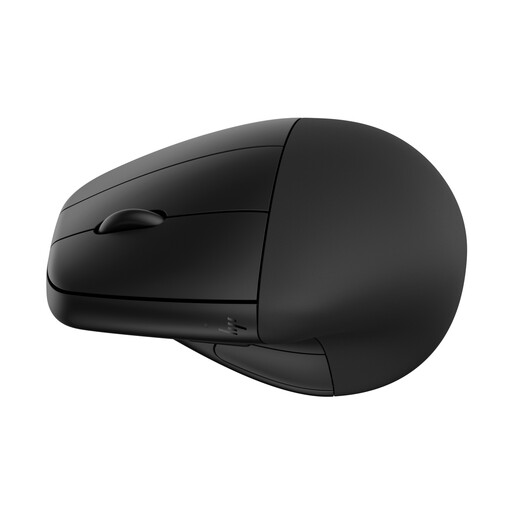
HP 920 Ergonomic Wireless Mouse, black, with detachable wrist rest
Consider the HP 920 if a detachable wrist rest appeals to you during desk-based writing. Check how its grip fits your hand and whether its button software supports the shortcuts you want.
View on Joybuy
 No image available
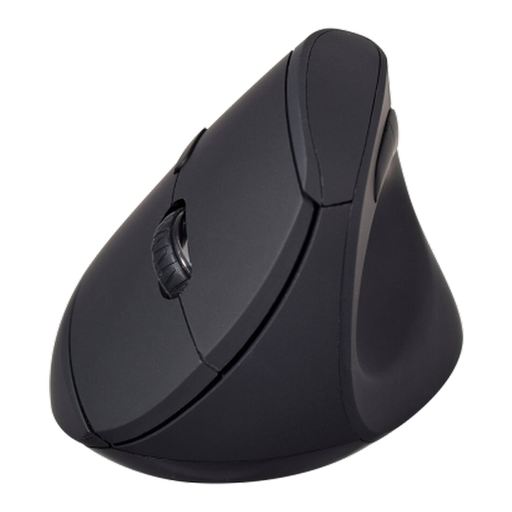
V7 MW500BT Bluetooth Vertical Ergonomic Mouse
Consider the V7 MW500BT if you want a vertical mouse with a choice of Bluetooth or 2.4 GHz connection for your desk setup. Its title specifies six buttons and an adjustable sensor up to 1600 DPI; check hand fit and compatibility with your operating-system version.
View on Joybuy
Frequently asked questions
Do two screens mean I need a multi-device vertical mouse?
No, if both screens are attached to one computer, ordinary mouse connectivity is enough. Multi-device switching is useful when you control separate computers or devices; Logitech states that Lift for Business can switch between up to three.
How should I position a vertical mouse at a two-screen desk?
Place the mouse in line with your elbow and arrange the screen and keyboard so you do not have to twist your back. This follows Health and Safety Executive posture guidance; consider which screen you work from most when arranging the displays.
How do Lift, Kensington Pro Fit Ergo Vertical and UniMouse differ?
Start with fit: Logitech positions Lift for small-to-medium hands and offers a left-handed version, while Kensington positions Pro Fit Ergo Vertical Wireless Mouse for average-to-larger hands. Contour UniMouse offers adjustable angle and thumb support if you would rather tune the grip than choose a fixed shape; check the exact connection and handed variant before buying.
Does a UK employer have to provide a vertical mouse for display-screen work?
The Health and Safety Executive’s guidance does not make a vertical mouse a universal requirement. Its display-screen equipment guidance applies to workers who use it daily as part of normal work for continuous periods of an hour or more, and calls for workstation assessment when users report pain or discomfort; raise a fit or setup concern through that process.


