Choose a vertical mouse by hand fit, handedness and connection method before weighing up extra controls. A compact model may suit smaller hands, while pointer-speed controls may matter more if you frequently navigate long drafts. The Health and Safety Executive advises addressing screen reflections and mouse placement as part of the workstation setup: changing the mouse will not remove glare from a bright window.
Who this choice affects
People reviewing long drafts
If you spend extended periods selecting text, annotating and scrolling, check whether a vertical mouse fits your hand and lets you work without reaching across the desk. The Health and Safety Executive advises keeping the mouse in line with your elbow.
People working beside a bright window
If reflections make draft text difficult to read, address the display and lighting as well as the mouse. The Health and Safety Executive advises arranging screens and lighting to avoid glare.
People switching between devices
If you move between a laptop and another device, compare connection methods with your available ports. Logitech lists Bluetooth and Logi Bolt options for Lift, while Evoluent says its listed wireless receiver needs a full-size USB port.
What matters when choosing
Set up the screen and mouse position for readable, comfortable review, then narrow the mouse choice by hand fit and the connections and controls you need.
| Concern | What to check | Who this matters to |
|---|
| Hand fit and handedness |
Check the maker’s hand-size guidance, handed version and button reach; consider the retailer’s return terms if fit is uncertain. |
I need a shape I can hold through a long review session without stretching for the buttons; around 42% of consumers put hand fit and grip comfort first. |
| Screen and desk setup |
Check whether you can reduce window reflections and keep the mouse within easy reach, in line with your elbow. |
When daylight obscures draft text, I need a clearer screen before changing how I navigate it; roughly 33% of consumers prioritise a readable review setup. |
| Connection and navigation |
Check Bluetooth or receiver compatibility, available ports and whether the controls you need are within reach. |
If I switch devices or move repeatedly through pages, the connection and button layout need to fit my workflow; about 25% of consumers make this their primary concern. |
Buying pitfalls
-
Expecting a mouse to remove window glare
A different grip will not make reflected light disappear from the display.
Adjust the screen position or angle, or manage the window light, before judging whether the mouse helps you navigate the draft. The Health and Safety Executive treats glare as a screen-and-lighting issue.
-
Choosing by vertical angle alone
An angle does not tell you whether the body size, thumb rest and buttons suit your hand or whether the model is made for your dominant hand.
Compare the manufacturer’s sizing and handedness guidance, then check the retailer’s return terms if you cannot assess fit before buying.
-
Overlooking the wireless connection
A receiver needs a suitable port, while Bluetooth use depends on the device and workplace setup.
Confirm the exact connection method and your laptop’s available ports before ordering.
Evoluent says its listed wireless receiver requires a full-size USB port; a USB-C-only laptop would need a compatible adapter or dock.
-
Treating comfort claims as a promise of pain relief
A mouse is only one part of the workstation, and a manufacturer’s comfort claim cannot establish how it will feel in your hand.
Assess mouse placement and the wider setup. If symptoms persist or worsen, seek appropriate clinical advice rather than relying on a product change.
Brands to consider
Logitech
Logitech offers the smaller-hand Lift alongside the MX Vertical, which has a dedicated cursor-speed switch.
- Logitech lists a left-handed Lift option and Bluetooth or Logi Bolt connection for Lift.
- Check hand fit and workstation layout independently; Logitech’s ergonomic positioning is not a guarantee of comfort or pain relief.
Kensington
Kensington describes its Pro Fit Ergo Vertical Wireless Mouse as a right-handed, receiver-based model for average to larger hands.
- Kensington lists six controls and adjustable 800, 1000, 1200 and 1600 DPI settings for this model.
- It is not a left-handed option; check the required receiver port and current availability before choosing it.
Evoluent
Evoluent lists small, medium and large VerticalMouse D variants, with wired and wireless versions.
- The size-specific range gives you separate variants to compare against your hand.
- Evoluent says its listed wireless receiver needs a full-size USB port; check the variant’s connection and availability before ordering.
Joybuy products for document review
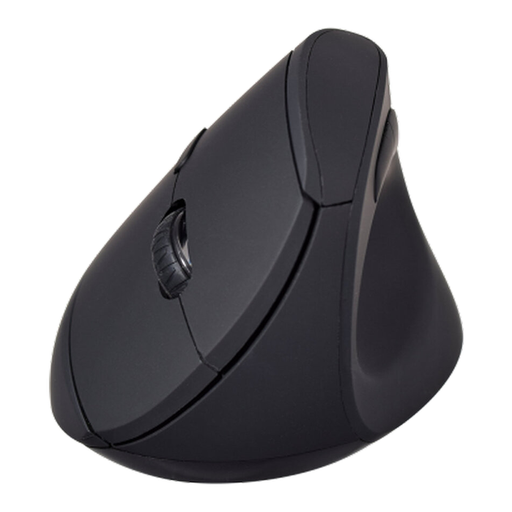
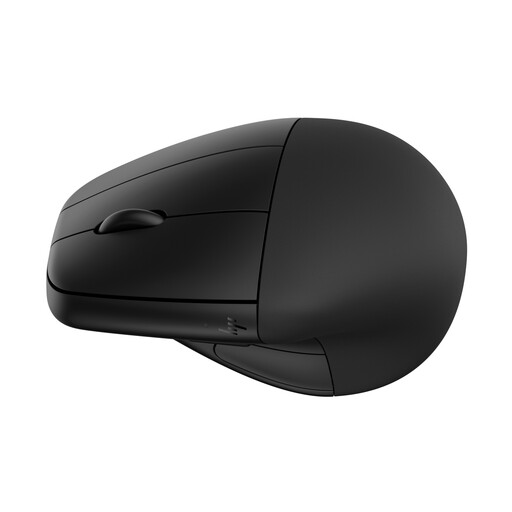
These wireless mice offer different starting points for reviewing drafts: the V7 model explicitly has a vertical shape and navigation buttons, while the HP option includes a detachable wrist rest. Check hand fit and the controls you need before choosing either.
 No image available
V7 MW500BT Bluetooth Vertical Mouse
Consider this model if you want a vertical shape and Forward and Back buttons for moving through a draft.
The product name specifies Bluetooth and 2.4 GHz connections, six buttons and an adjustable sensor rated up to 1600 DPI. Check the fit for your hand and whether the click sound suits your workspace.
View on Joybuy
 No image available
HP 920 Ergonomic Wireless Mouse, Black, with Detachable Wrist Rest
Consider this option if a detachable wrist rest matters to your document-review setup.
Check its shape against your hand and confirm the connection method and button functions you need for moving through drafts.
View on Joybuy
Common questions
Will a vertical mouse help with glare beside a bright window?
No, changing the mouse will not remove screen reflections. The Health and Safety Executive advises arranging screens and lighting to avoid glare, so adjust the display position, angle or window light separately.
Where should I place a vertical mouse on the desk?
Keep it within easy reach and in line with your elbow. The Health and Safety Executive’s display-screen guidance makes mouse position part of the wider workstation setup.
Should I buy a vertical mouse to treat wrist pain?
Do not treat a mouse purchase as medical treatment. NHS guidance identifies repeated movement and posture among factors associated with repetitive strain injury; seek appropriate clinical advice if symptoms persist or worsen, and discuss workplace adjustments where relevant.
Should I choose Bluetooth or a USB receiver for my laptop?
Choose according to the connections your laptop and workplace permit. Bluetooth can leave a USB port free; if you choose a receiver-based mouse, confirm that its receiver fits an available port. Logitech lists Bluetooth and Logi Bolt options for Lift, while Evoluent says its listed wireless receiver requires a full-size USB port.


