People taking appointments in a shared home
A headset can keep the clinician’s voice off room speakers. You still need a private place to speak: someone nearby may hear your side of the conversation even when you wear headphones.


For a video appointment at home, start with the device you already have and run the appointment provider’s test: one person with a working camera, microphone and connection may not need extra equipment. A headset or microphone-equipped earbuds are worth considering when room speakers could be overheard or background sound disrupts the call, but they cannot stop others hearing you speak. Consider a webcam if the existing camera is unusable or several people need to fit in the picture; investigate a wired connection if Wi-Fi appears to be the problem.
The useful addition depends on who is joining, what the room is like and whether the existing device passes the appointment test.
A headset can keep the clinician’s voice off room speakers. You still need a private place to speak: someone nearby may hear your side of the conversation even when you wear headphones.
Earbuds or a headset with a microphone may be useful for call audio. Check that the device routes both sound and microphone input through them, and charge wireless equipment before the appointment.
According to NHS Scotland’s virtual consultation guidance, a built-in camera suits an individual call, while a wider-angle USB webcam may help when more than one person needs to appear. Check the view with everyone seated where they will join.
Test the appointment service on your existing device first. Then address the part of the setup that does not meet your needs, rather than replacing the camera, audio and connection together.
| Priority | What to check | Your needs |
|---|---|---|
| Private listening | Check whether speaker audio could be overheard and whether a headset or earbuds have a microphone recognised by the call service. Headphones do not prevent others hearing you speak. | I need to hear the clinician without playing the conversation through room speakers, and I can find somewhere private to speak. |
| Call compatibility | Follow the provider’s current device and browser instructions. Run its camera, microphone, speaker and connection test using the equipment you intend to use. | I want to know that my chosen browser and audio device work before the appointment starts. |
| Camera view | Test the built-in camera’s position and framing. NHS Scotland says it suits individual use; check the field of view if several people must be visible. | For a call on my own, a working built-in camera may be enough. If we are joining together, everyone needs to fit in the picture. |
| Wireless audio | For Bluetooth earbuds or a headset, check charging, pairing and which microphone the call service selects. Test the intended phone, tablet or computer. | I would rather avoid a cable, provided my earbuds carry both sides of the call on the device I will use. |
| Connection | Use the provider’s connection test before blaming Wi-Fi. If considering Ethernet, check the computer’s port, adapter compatibility and access to a wired connection; an adapter cannot resolve broadband or provider-side problems. | I need the call to stay connected and want to identify whether my local Wi-Fi is the part I can change. |
NHS Scotland considers a built-in camera suitable for an individual call. An external camera is more relevant when the existing one cannot be used, is badly positioned or cannot frame everyone joining.
Run the provider’s test with your current camera first, then check framing from your intended seat.
Headphones keep the clinician’s voice off room speakers, but someone nearby may still hear you respond. NHS guidance calls for a quiet, private space for a video consultation.
Use headphones for private listening and choose the most private room available. Tell the clinician if you cannot speak privately.
Noise cancellation for the wearer does not establish what the clinician will hear. Sony notes that its listening noise cancellation does not transfer during telephone calls.
Check that the product has a call microphone and test it from the room you will actually use; do not rely on active noise cancellation alone.
A wired local connection cannot fix every cause of a failed call. TP-Link notes that actual adapter performance depends on factors including the internet provider, network and client device.
Run the appointment service’s connection test and check the computer’s port and operating-system compatibility before choosing an adapter.
These ranges illustrate different equipment types; a brand name alone does not establish compatibility with your appointment service.
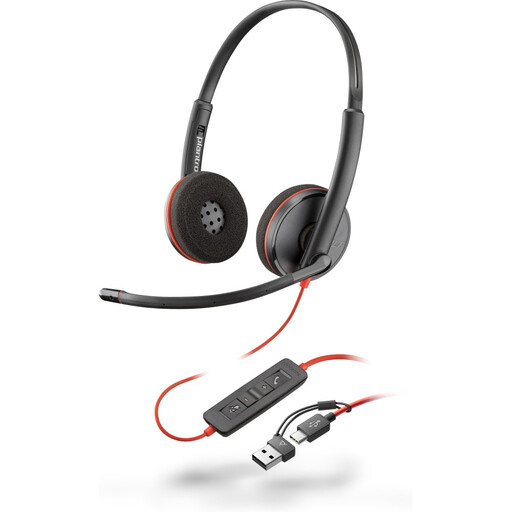
HP Poly offers USB headsets in wired designs and different wearing styles for calls.
Logitech’s webcam range is relevant when a computer has no usable camera or needs a different camera position.
TP-Link makes USB-to-Ethernet adapters for devices that need a compatible wired-network connection.
Shokz describes OpenMeet as an open-ear headset for calls.
These headsets, earbuds and webcams address call audio or camera needs. Choose the type only after testing your existing device, and check the intended appointment service before relying on any accessory.
 No image available
A wired headset is an option when you want appointment audio off room speakers. The named USB-C headset comes with a USB-C/A adapter; check which connection your device uses and test call audio before the appointment. People nearby may still hear you speak.
 No image available
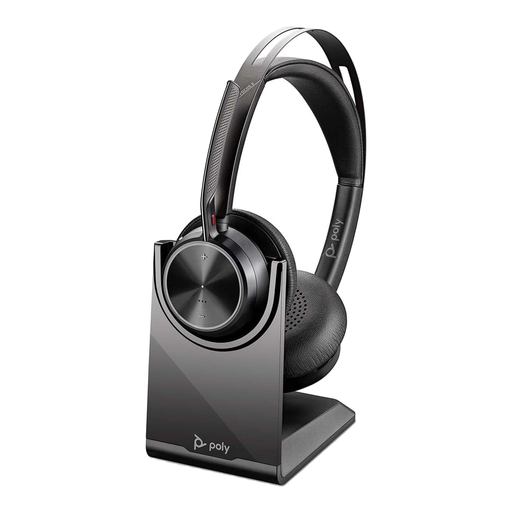
This wireless headset is an option for listening without room speakers when you do not want a cable during the call. The named bundle includes a USB-C/A adapter and charging stand. Charge it beforehand and test the connection and selected microphone on the device you will use.
 No image available
Consider an external webcam if your built-in camera is unusable or cannot be positioned for the call. Confirm the resolution before buying: this model’s 2K name conflicts with the stated 1080p technical detail. Check framing and run the appointment provider’s camera test.
 No image available
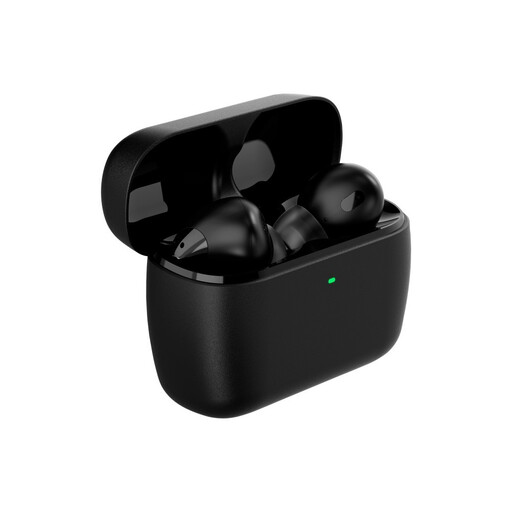
These wireless earbuds offer an in-ear option for keeping appointment audio off room speakers. Check that the intended phone or tablet selects their microphone for calls, and charge the earbuds before the provider’s test. They will not stop others hearing you speak.
 No image available
This webcam is an option for a computer without a usable camera. Check that its connection suits your device and test it with the appointment service. If several people need to appear, confirm that its field of view fits everyone before choosing it.
Usually not if your existing camera works and frames you adequately. NHS Scotland says a built-in camera is suitable for individual use; consider a USB webcam if the camera cannot be used or more than one person needs to appear.
Use your provider’s test with the device, browser and accessories you intend to use. Check the camera, selected microphone, speaker or headset audio, and connection. Bradford Teaching Hospitals NHS Foundation Trust recommends testing its service at least 30 minutes before an appointment; follow your own provider’s instructions.
Do not assume it will. Sony explains that listening noise cancellation does not transfer during telephone calls, so check the call microphone and test from your intended room. A quiet, private space still matters.
No. A wired connection may address a local Wi-Fi problem, but an adapter cannot fix slow broadband, an outage or an incompatible call setup. Run the provider’s connection test and confirm the adapter fits your computer before buying.