
24/7 Customer Support

Free returns

Same-day & Next-day Delivery

Quality Guaranteed

Unlock Your Welcome Offers: FREE Delivery | Up to 80% OFF | Free 30-day JoyPlus trial
Download the APP
As a new or expectant parent, choosing a video baby monitor can feel like navigating a minefield of technical jargon and marketing promises. The goal is simple: peace of mind. Yet, the path to finding a reliable device is often cluttered with pitfalls that can lead to frustration and wasted money.
As the Joybuy Product Recommendation Officer, my role is to help you sidestep these issues. We'll focus on the practical features that matter for UK families, cutting through the clutter to help you make a confident choice.
Before looking at features, it's crucial to recognise the common traps that many parents fall into. Being aware of these can save you significant hassle down the line.
smart baby monitor options lure you in with a sleek design and a long list of features. The catch? Key functions, such as video clip storage, advanced sleep analytics or even multiple-user access, are often locked behind a monthly subscription. What seems like a one-off purchase can quickly become an ongoing expense.Wi-Fi baby monitor that frequently disconnects from your home network is a major source of anxiety. Signal dropouts, app crashes and lagging video feeds defeat the entire purpose of the monitor, leaving you to wonder if it's working when you need it most.baby monitor with night vision makes it impossible to see important details, like whether your baby is breathing comfortably or has simply lost their dummy.To avoid these pitfalls, focus your attention on a few non-negotiable technical specifications. These are the foundations of a reliable and useful video baby monitor.
This is the most critical decision you'll make. Your choice determines how and where you can view the feed.
baby monitor with camera and app. This is ideal for parents who want to check in while at work or away from home. The main drawback is that their performance is entirely dependent on the stability of your Wi-Fi network.secure baby monitor option, free from the risk of Wi-Fi dropouts. Many offer a very long range baby monitor connection, suitable for larger UK homes and gardens. The limitation is that you can only view the feed on the parent unit within its range.A clear picture is essential. Don't settle for anything less than an HD baby monitor, which typically means a resolution of 720p (1280x720 pixels) or 1080p (1920x1080 pixels). This ensures you can see details clearly, both day and night.
Equally important is the camera's field of view. While a fixed camera is fine for a newborn, a pan and tilt baby monitor becomes invaluable as your child grows. This feature allows you to remotely move the camera lens left, right, up and down, so you can keep an eye on them as they start to move around the cot and, eventually, their room.
When you place a camera in your home, security is paramount. For a Wi-Fi baby monitor, look for models that explicitly state they use AES 256-bit encryption. This is a banking-grade security standard that protects your video feed from unauthorised access. Also, check that the company's app and cloud services are GDPR compliant, which ensures your data is handled according to strict privacy regulations.
Based on these core principles, here are a few options from our catalogue, matched to different parenting needs and priorities.
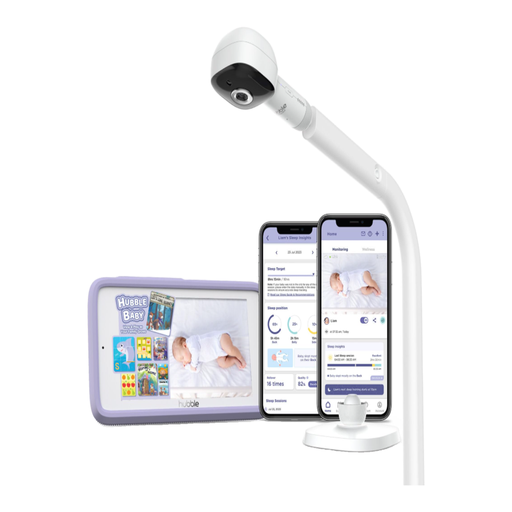
Why This Fits Their Persona: This parent wants more than just a video feed; they want insights. This monitor offers advanced sleep analytics and AI-powered alerts for events like the baby rolling over or their face being covered, providing an extra layer of information.
It directly counters the "unreliable connection" pitfall with its patented dual-mode technology. You get a dedicated 5-inch parent unit for a stable, non-Wi-Fi connection, plus secure app access for when you need it.
Features AI-driven alerts for covered face and roll-over, plus advanced sleep analytics. The dual-mode offers unmatched flexibility and reliability.
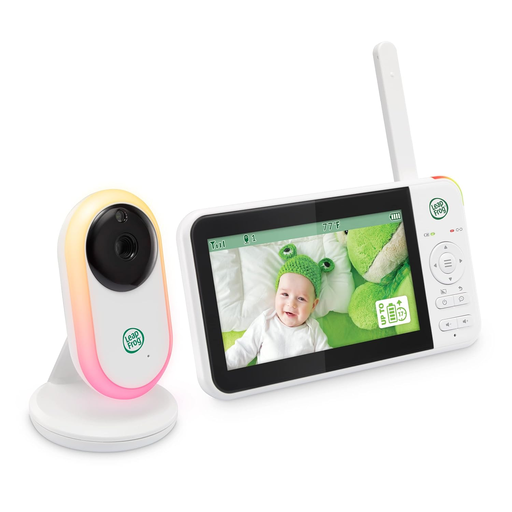
Why This Fits Their Persona: This parent prioritises reliability and simplicity over complex features. They want a secure, private connection that works straight out of the box without connecting to the internet or downloading an app.
As a non-Wi-Fi FHSS monitor, it completely bypasses the pitfalls of unreliable internet connections and hidden subscription fees. All features are included and work on a closed-loop system.
Offers a secure 2.4GHz FHSS connection with a long range of up to 1000ft (300m). The large 5000mAh battery provides up to 17 hours of continuous video streaming.

Why This Fits Their Persona: This parent wants the best of both worlds: a dedicated parent unit for use at home and app-based remote viewing for when they are away. They also need full room coverage for an active baby.
This model explicitly offers all its features, including remote viewing and smart alerts, with no subscription fees. This directly addresses the "hidden costs" pitfall, making it a transparent, long-term investment.
Its key strengths are the hybrid connectivity (parent unit + app) and a full 360-degree horizontal pan-and-tilt camera, providing complete nursery visibility without any ongoing fees.
We have compiled a complete, real-time list of products that fully satisfy these strict selection criteria and UK safety regulations.
Do I need a Wi-Fi or non-Wi-Fi baby monitor? This depends entirely on your lifestyle. If you want the ability to check in on your baby from your office or while you're out, a Wi-Fi baby monitor is necessary. If you primarily need a secure and simple monitor for use within your home, a non-Wi-Fi (FHSS) model offers excellent reliability and privacy. Hybrid models provide a great compromise.
How can I make my Wi-Fi baby monitor more secure? To secure your smart baby monitor, always start by setting a strong, unique password for both your home Wi-Fi network and the monitor's app account. If the app offers two-factor authentication (2FA), enable it. Finally, make sure to regularly check for and install firmware updates for the camera, as these often contain important security patches.
What does 'pan and tilt' mean and do I need it? 'Pan' refers to the camera's ability to turn horizontally (left and right), while 'tilt' refers to its ability to move vertically (up and down). You control this remotely from the parent unit or app. While not essential for a stationary newborn, a pan and tilt baby monitor is extremely useful once your child becomes more mobile and starts moving around their cot, saving you from having to go in and physically readjust the camera.