
24/7 Customer Support

Free returns

Same-day & Next-day Delivery

Quality Guaranteed

Unlock Your Welcome Offers: FREE Delivery | Up to 80% OFF | Free 30-day JoyPlus trial
Download the APP
As a new or expectant parent, ensuring your baby's safety and comfort is paramount. A video baby monitor often sits at the top of the nursery essentials list, promising peace of mind when you can't be in the room. However, the market is flooded with options and it's easy to fall into common purchasing traps that lead to frustration and wasted money.
My role as a Joybuy Product Recommendation Officer is to help you navigate this landscape. We'll look past the marketing jargon and focus on what truly matters. Before you add any monitor to your basket, let's uncover the pitfalls that many parents wish they had known about sooner.
To make a confident choice, focus on the technical foundations of the monitor. These three parameters will determine its reliability, security and long-term usefulness.
This is the most critical decision you'll make.
A grainy, pixelated image is of little use. Look for an HD baby monitor with a resolution of at least 720p. This provides a clear enough picture to see your baby's breathing and facial expressions.
Equally important is the baby monitor with night vision. Most use infrared (IR) LEDs to provide a black-and-white image in total darkness. More advanced models now offer colour night vision, which uses highly sensitive sensors to render a coloured image in very low light, making it easier to see details.
For long-term value, a pan and tilt baby monitor is a wise investment. This feature allows you to remotely move the camera lens left, right, up and down, giving you a full view of the cot and the surrounding room. As your child grows and becomes more active, this functionality ensures they are always in frame. Digital zoom is a common feature, but check the degree of magnification to ensure it remains clear and not just a pixelated close-up.
Instead of a one-size-fits-all approach, we've matched some reliable options to different parenting needs, helping you find a monitor that genuinely fits your lifestyle.
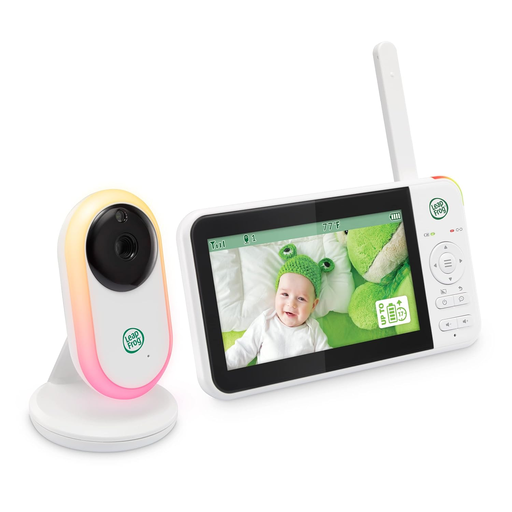
Why This Fits Their Persona: This user prioritises reliability and security above all else. They want a straightforward, plug-and-play device that works flawlessly straight out of the box without needing Wi-Fi or a smartphone app. It's perfect for ensuring a stable connection anywhere in a typical UK home.
It uses a secure 2.4GHz FHSS connection, completely bypassing the Wi-Fi reliability and subscription fee traps. All features are self-contained within the parent and baby units.
Excellent battery life (up to 17 hours of video) and a long range of up to 300m (approx. 1000ft). Includes a baby monitor with temperature sensor and two-way talk.

Why This Fits Their Persona: This parent wants the flexibility to check in from work or while out, but also needs a reliable connection for the babysitter at home. They value smart features but are wary of hidden costs. This hybrid model is the ideal compromise.
It explicitly offers remote viewing and smart alerts with no subscription fees. The hybrid design also provides a dedicated parent unit, mitigating the Wi-Fi reliability trap for at-home use.
A full 360-degree pan and tilt baby monitor camera and advanced colour night vision provide a complete, clear view of the entire nursery, day or night.
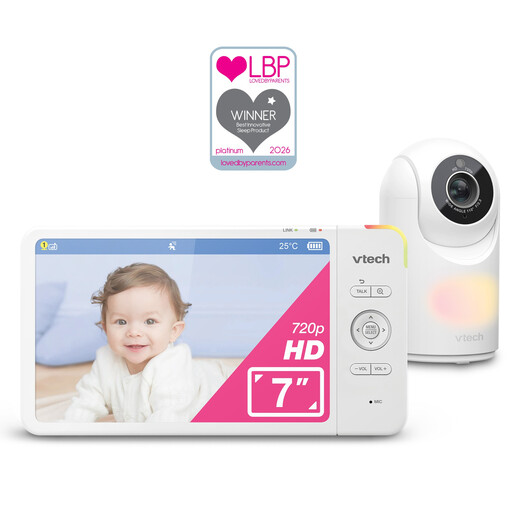
Why This Fits Their Persona: This parent wants a central hub for the nursery that does more than just monitor. They are looking for a device that helps create a soothing sleep environment with integrated lights and sounds, all controlled from one high-quality parent unit.
As a dedicated, non-Wi-Fi system, it avoids all connectivity and subscription issues. Its comprehensive feature set, including the pan-and-tilt camera, means you won't need to upgrade as your baby becomes more mobile.
The large 7-inch HD baby monitor screen provides an excellent view, and the touch-controlled, seven-colour night light and built-in lullabies are premium soothing features.
We have compiled a complete, real-time list of products that fully satisfy these strict selection criteria and UK safety regulations.
For safety, all manufacturers strongly advise placing the camera and any cords at least 1 metre (approximately 3 feet) away from the cot. This is crucial to prevent any risk of the baby pulling on the cords, which can be a strangulation hazard. Always ensure cords are secured and well out of reach.
This is a valid concern, particularly for Wi-Fi enabled models. Monitors that use a dedicated FHSS connection are not connected to the internet and are therefore not vulnerable to remote hacking. For a smart baby monitor that uses Wi-Fi, you can significantly improve security by:
Generally, no. Baby monitors are low-power devices. A camera unit that is always plugged in will draw a small, constant amount of power, similar to other small home electronics. The parent unit's consumption depends on how often the screen is on. Many models feature a power-saving or "VOX" mode, where the screen only activates when it detects sound, which helps to conserve battery and reduce electricity usage.