
24/7 Customer Support

Free returns

Same-day & Next-day Delivery

Quality Guaranteed

Unlock Your Welcome Offers: FREE Delivery | Up to 80% OFF | Free 30-day JoyPlus trial
Download the APP
Choosing a video baby monitor is not simply a matter of selecting the highest resolution or the largest screen. UK parents also need to consider connection reliability, privacy, battery life, room coverage and the ongoing cost of using the device.
Marketing can make some features sound more useful than they are. A camera may advertise “smart” alerts but require a subscription for cloud recordings. A wide viewing angle may not cover a moving toddler if the camera cannot pan or tilt. A Wi-Fi baby monitor may offer remote access, but it will depend on your broadband connection and account security.
This guide explains the main buying pitfalls and highlights practical options for different households.
Some indoor monitoring cameras offer free live viewing but charge for cloud storage, advanced alerts or longer video history. Before buying, check exactly which functions work without a monthly payment. Local microSD recording can reduce recurring costs, although the card is often sold separately.
A high-resolution image is helpful, but it cannot compensate for a fixed camera pointed at the wrong part of the nursery. For babies who move around the cot or toddlers who explore, a pan and tilt baby monitor can be more practical. Check the horizontal and vertical movement range, as well as whether zoom is digital or optical.
A dedicated parent unit may quote a range of up to 300 metres in open conditions. Thick walls, several floors and nearby wireless devices can reduce the usable distance. Wi-Fi models may work remotely, but they rely on a stable home internet connection and suitable router placement.
A non-Wi-Fi monitor with a dedicated screen can be suitable for parents who want simple, local viewing without an app account. Models using secure digital or FHSS-style wireless transmission are designed for direct communication between the camera and parent unit.
A smart baby monitor or Wi-Fi baby monitor is more suitable if you need to view the nursery from work, while travelling or when another carer is at home. Use a unique password, enable available two-step verification and keep the camera firmware updated. Check whether remote access, alerts and recordings are included or subscription-dependent.
Infrared night vision is a practical feature for a newborn baby monitor, particularly when the nursery is dark. Colour night vision can show more visual detail in suitable low-light conditions, but performance depends on ambient light and the camera’s sensor.
For everyday monitoring, consider:
A portable parent unit is useful when moving between the kitchen, bedroom and garden. Look for stated video-streaming battery life rather than audio-only figures. Two-way audio allows you to speak through the camera, although it should not replace checking on your child personally.
A baby monitor with temperature sensor can display or alert you to changes in the nursery. Treat this as a general room indication rather than a medical measurement. Temperature readings can vary depending on where the camera is placed.
For safety, position the camera and cables at least 1 metre away from the cot, keep cords out of reach and never place the camera inside the cot or playpen. Follow the supplied instructions and inspect mounts and cables regularly.
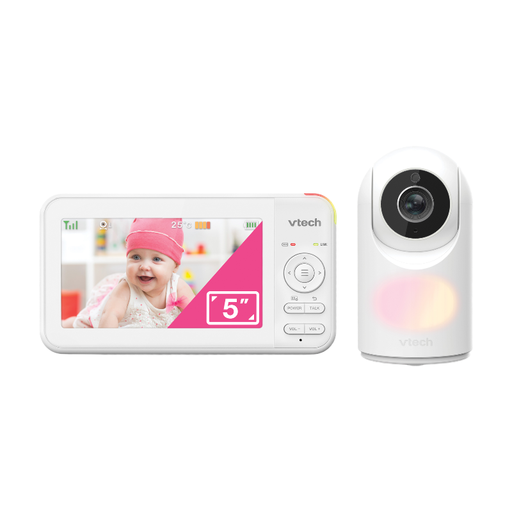
Why This Fits Their Persona: A straightforward option for new parents who want a dedicated screen without setting up an app or home Wi-Fi connection.
It uses a secure digital connection and does not depend on a cloud subscription for local viewing.
5-inch colour display, remote pan and tilt, 2x zoom, night vision, temperature sensor and two-way audio.

Why This Fits Their Persona: Suitable for families wanting both a large local screen and remote smartphone access when away from home.
The listed features include remote app viewing and smart alerts without mandatory subscription fees.
5.5-inch 1080p parent display, 360-degree pan, 94-degree tilt, colour night vision and temperature and humidity sensors.
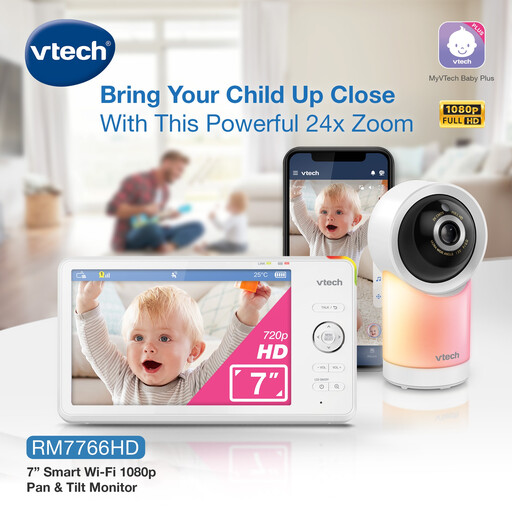
Why This Fits Their Persona: Designed for households that want broad nursery coverage, a generous display and remote viewing from a phone or tablet.
Its local viewing distance is listed separately from app-based remote viewing, making the connection options easier to compare.
7-inch screen, 360-degree pan, 135-degree ultra-wide lens, 24x zoom, infrared night vision and up to 12 hours of active video battery life.

Why This Fits Their Persona: A practical match for parents who prefer a dedicated monitor and do not need app access or remote internet viewing.
It uses a dedicated wireless connection without an app or Wi-Fi, reducing dependence on broadband and cloud services.
2.8-inch colour screen, infrared night vision, two-way audio, ECO mode and up to 12 hours of parent-unit monitoring.
We have compiled a complete, real-time list of products that fully satisfy these strict selection criteria and UK safety regulations.
No. Dedicated-screen models can use a direct wireless connection between the camera and parent unit. Wi-Fi is needed for remote viewing through a smartphone app, but it also introduces dependence on broadband, router coverage and account security.
The usable lifespan depends on battery condition, cable integrity, software support and how often the monitor is moved. Keep the camera dry, avoid damaging the power lead and check wall mounts regularly. Replace the unit if it becomes unusually hot, shows visible damage or develops unreliable connections.
The camera normally remains mains-powered, while the parent unit uses a rechargeable battery. ECO or audio-activated modes can reduce screen-on time. Wi-Fi cameras may also use extra storage or cloud services, so check subscription terms and microSD requirements before purchase.