What matters when choosing the setup
Start with a call using the family’s chosen app, then check whether the tablet can sit comfortably in the intended room and stay connected there. A screen size or mobile-data option alone cannot answer all three questions.
| Concern |
What to check |
Who this matters to |
| Repeatable calling |
Try incoming and outgoing calls in the chosen app, including unlocking, finding contacts, adjusting volume and returning to the call screen. |
If I struggle to find the right contact or recover after leaving an app, I need a call routine I can repeat without navigating dense menus. Around 40% of consumers put simpler calling first. |
| Positioning and handling |
Match the case to the exact tablet model; try a freestanding stand on an approved surface with the camera and charging connection unobstructed. |
Holding a tablet throughout a conversation is difficult for me, so its position matters as much as its screen. For around 30% of consumers, hands-free positioning is the primary concern. |
| Connection and upkeep |
Test a call on the room Wi-Fi and ask about sign-in, personal-device rules and help after restarts; check mobile coverage if a SIM is needed. |
I need family calls to work from the room without repeatedly sorting out the connection. Reliable, manageable access comes first for around 30% of consumers. |
Joybuy tablets to consider
These tablets list both Wi-Fi and cellular connectivity. For a relative calling mainly from one care-home room, check the Wi-Fi and the person’s ability to use the chosen app before deciding whether to set up mobile data. Check case fit and a suitable freestanding position separately for the exact tablet.
 No image available
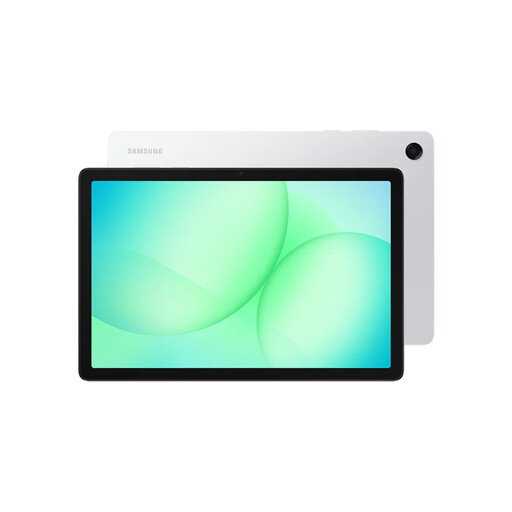
Samsung Galaxy Tab A11+ 5G X236, 6GB RAM, 128GB, Silver
Consider this Galaxy Tab if mobile connectivity is needed as well as the family’s calling app. The named variant is the 5G X236 with 6GB RAM and 128GB storage; test the calling controls with the relative and check case fit for X236.
View on Joybuy
 No image available
TECLAST T70, 14-inch, 256GB, dual-SIM 4G LTE
The 14-inch display is relevant if the tablet will stay on a room surface rather than be held throughout calls. The title specifies a 1920 × 1200 display, 8GB physical RAM plus 12GB virtual RAM, 256GB storage and dual-SIM 4G LTE. Confirm the exact software version and battery specification, and try the chosen app from the intended stand position.
View on Joybuy
 No image available
TABWEE W90, 11-inch, 256GB, dual-SIM 4G LTE
This 11-inch model is another option to assess where both a tabletop position and mobile connectivity matter. Its title specifies 8GB physical RAM plus 16GB virtual RAM and 256GB storage. Confirm the exact Android version and battery specification before choosing it, then test the calling app and a compatible stand with the relative.
Purchase link unavailable
 No image available
TECLAST ArtPad Pro, 12.7-inch 2K, dual-SIM 4G LTE
The 12.7-inch display makes the viewing position an important part of assessing this tablet for room-based calls. Its title specifies a 2K display, 8GB physical RAM plus 12GB virtual RAM, 256GB storage and dual-SIM 4G LTE. It also names a stylus; check case and stand compatibility separately and test the intended call routine.
View on Joybuy
 No image available
TECLAST T65, 13.4-inch 120Hz, 128GB, dual-SIM 4G
If calls will take place from a fixed surface, assess whether this 13.4-inch tablet fits the space and can be positioned at a usable angle. Its title specifies a 120Hz display, 6GB physical RAM plus 20GB virtual RAM, 128GB storage, dual-SIM 4G and Wi-Fi. Confirm the front camera, audio and software details needed for the chosen calling app before buying.
View on Joybuy
Questions before buying
Does a tablet used mainly in a care-home room need mobile data?
Not unless room Wi-Fi proves unsuitable or the tablet will regularly be used away from it. Test a call in the intended room and ask about sign-in, device rules and support after a restart. Department of Health and Social Care guidance describes suitable fixed-line broadband as generally preferable for residential care, with mobile broadband an alternative or backup where appropriate.
Can I attach a tablet stand to a bed rail?
Do not attach a consumer stand to a bed rail without the care home’s approval and assessment. Medicines and Healthcare products Regulatory Agency guidance says bed-rail assessments should consider interactions with other equipment and accessories. A freestanding stand on an approved stable surface avoids assuming the rail is a suitable mounting point.
Which accessibility features should we try before choosing a tablet?
Try the entire call routine with the relative, from waking the screen to answering, adjusting volume, ending the call and finding the app again. Apple Support describes Assistive Access and favourite calling contacts on iPad; Google Meet Help and Samsung document Android accessibility options. Check the chosen app and controls on the exact model, as the available setup can differ.
Who should manage the calling account and recovery details?
Agree on a trusted supporter who can help maintain contacts and recovery details with the relative’s consent. Apple Support notes that Assistive Access setup may require a supporter to access account information, while WhatsApp describes two-step verification as an account-protection measure. Make sure the agreed supporter can restore the calling setup after a password problem or device reset.


